Cloudflare for WordPress can filter requests before they reach your host, but that does not answer every question about the code, accounts and backups inside the site. Deciding whether you also need a security plugin starts with a responsibility map: which layer handles which job, and who checks that it is working?
This guide compares those jobs without claiming that either product makes a site immune to attack. Cloudflare documentation and PowerSEC plans were checked on 14 November 2026. The aim is a practical configuration and verification process, not a generic recommendation to install more tools.

Edge controls and site-level controls should have clearly assigned responsibilities.
The short version
Responsibility | Where to look |
|---|---|
Filter proxied web requests | Cloudflare rules and security events |
Restrict direct origin access | Hosting and network configuration |
Review installed code and known vulnerabilities | WordPress inventory and site-level security tooling |
Review users and integrations | WordPress and service account controls |
Recover files and business data | Tested backup and restoration process |
Handle an incident | A named response owner with evidence from the relevant layers |
This is a responsibility model, not a claim that every Cloudflare plan or every WordPress security plugin provides the same features.
What does Cloudflare for WordPress actually cover?
Start with the traffic path. Cloudflare's proxy-status documentation distinguishes proxied DNS records from DNS-only records. The distinction determines whether eligible web traffic passes through Cloudflare's proxy. Having the domain in a Cloudflare account is not sufficient evidence that every hostname is using that path.
Then identify the rules available to the account. Cloudflare documents a Free Managed Ruleset and separate availability for its broader managed rulesets. Avoid describing the Free plan as though it contains the full paid ruleset catalog, or describing it as though it has no managed protection at all.
For a WordPress operator, the useful question is which traffic and controls are active on this specific site. Record the relevant hostname, proxy status, ruleset and any exceptions. Keep this inventory alongside the site's hosting details so a future maintainer can understand the intended design.
Do not infer comprehensive protection from a large blocked-request counter. A counter shows recorded rule actions, not the condition of every file, account or database record behind the proxy.
What remains inside the WordPress installation?
A request filter, an installed-component inventory and a backup answer different questions. WordPress's hardening guidance treats software maintenance, access and backups as parts of site security. Buying an edge service does not remove the need to assign those responsibilities.
Ask who checks installed plugins and themes, reviews privileged accounts, follows up on malware findings and verifies recoverability. If the answer is your managed host, examine the actual service scope. If the answer is a plugin, examine its enabled features and reporting. If nobody owns the job, another dashboard alone will not solve the gap.
An application-side scanner may provide information about files that is unavailable from a public request. A backup preserves a recoverable state subject to its scope and retention. Neither should be described as a guarantee that an edge rule has blocked a particular exploit.
For agencies, turn this into a client-specific responsibility sheet. Separate tasks performed by the host, Cloudflare, the agency and the customer. That makes exclusions visible before an incident exposes them.
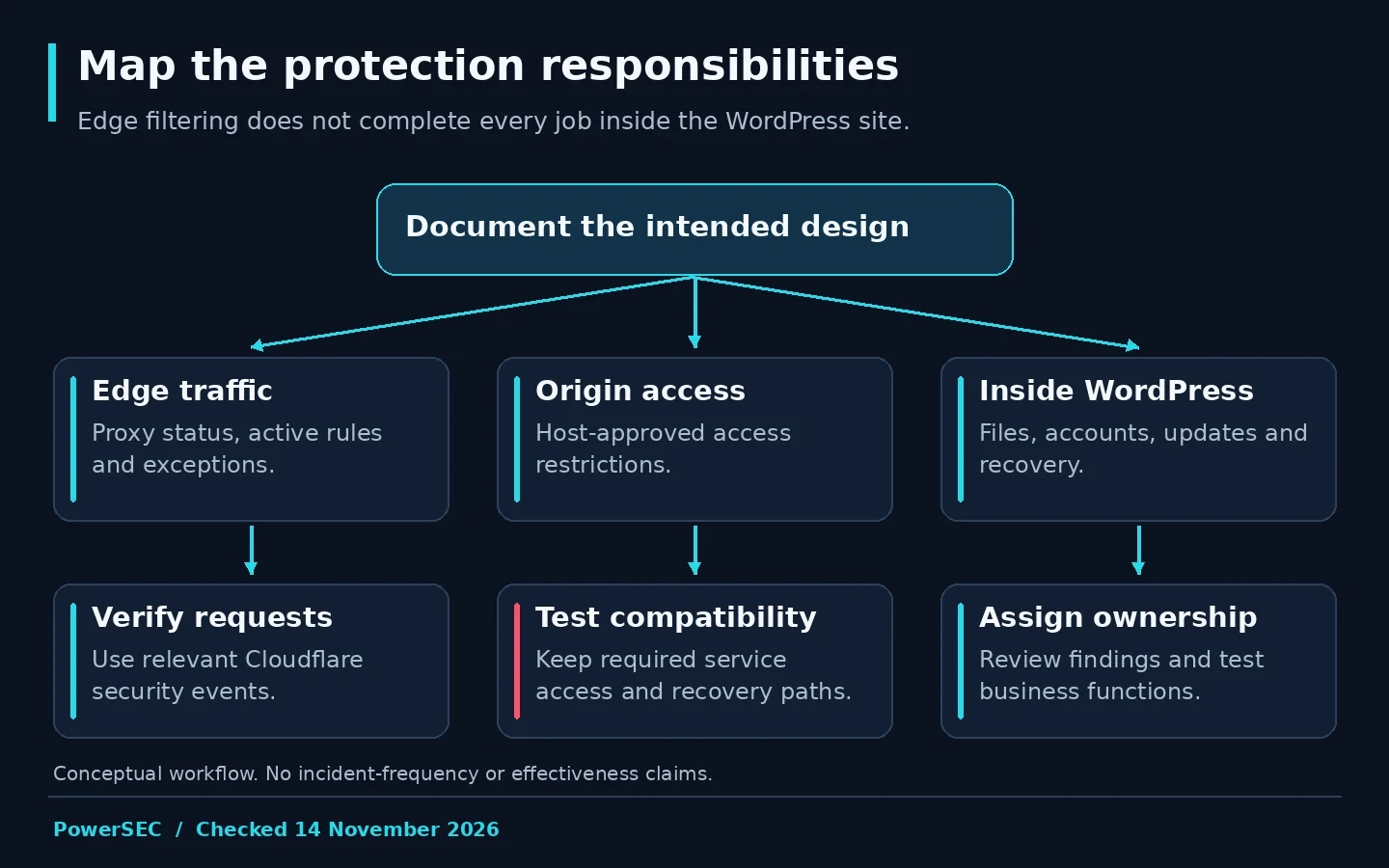
Document the intended request path and the controls that remain inside the site.
Can requests bypass the intended edge controls?
Review the origin configuration with your host. Cloudflare's origin-protection guidance describes approaches such as restricting allowed sources, Cloudflare Tunnel and authenticated origin connections. The appropriate method depends on the hosting environment and legitimate services that need access.
Do not copy a blanket firewall rule into production without accounting for monitoring, administration, certificate renewal and other required traffic. Ask the host to implement the chosen design and demonstrate that expected requests still work. Preserve a recovery path if the change blocks legitimate operations.
Cloudflare's Authenticated Origin Pulls documentation explains the role of client-certificate authentication between Cloudflare and the origin. That is a transport control, not a substitute for updating vulnerable WordPress code. Describe its scope accurately when presenting the design to a client.
Record which hostnames and services were reviewed. An origin review that covers only the main website should not be reported as a review of every application on the server. A useful completion note names the boundary and any exceptions.
Will the controls interfere with legitimate requests?
Cloudflare's WordPress and CMS guidance recognizes that security rules can affect legitimate application activity. Use the observed failure and the relevant security event to identify the responsible control before changing a rule.
Prepare a functional checklist for the site's real workflows: administrator sign-in, content editing, form submission, payment callbacks where relevant and authorized remote maintenance. Test with the roles and integrations actually used by the business. A successful homepage request does not verify these workflows.
When an exception is justified, make it as narrow as the evidence and platform allow. Cloudflare's Skip documentation explains how selected security features can be skipped for matching requests. Keep an exception record with a reason, owner and review condition. Avoid broad bypasses introduced merely to silence an unexplained error.
PowerSEC's Cloudflare and firewall connectivity guide is relevant when legitimate PowerSEC communication is blocked. Apply the documented connectivity requirement to the affected flow and verify the result; do not disable site protection as a permanent troubleshooting shortcut.
Which logs should you compare?
Use a shared timestamp and request description when checking events across layers. Cloudflare's Security Events documentation explains its view of actions taken by security products. Ask the host or application owner for the corresponding evidence within their scope rather than assuming the edge view describes the complete transaction.
Visitor IP handling is another configuration question. Cloudflare provides guidance for restoring original visitor IP information for supported server environments. Have the host apply the appropriate configuration and trust boundaries. Do not let an arbitrary client-supplied header become the unquestioned identity used by access controls.
Our suggested investigation record includes the reported URL, time, expected action, edge observation, application observation and the person responsible for the next check. This is more useful than sending unrelated screenshots from separate dashboards.
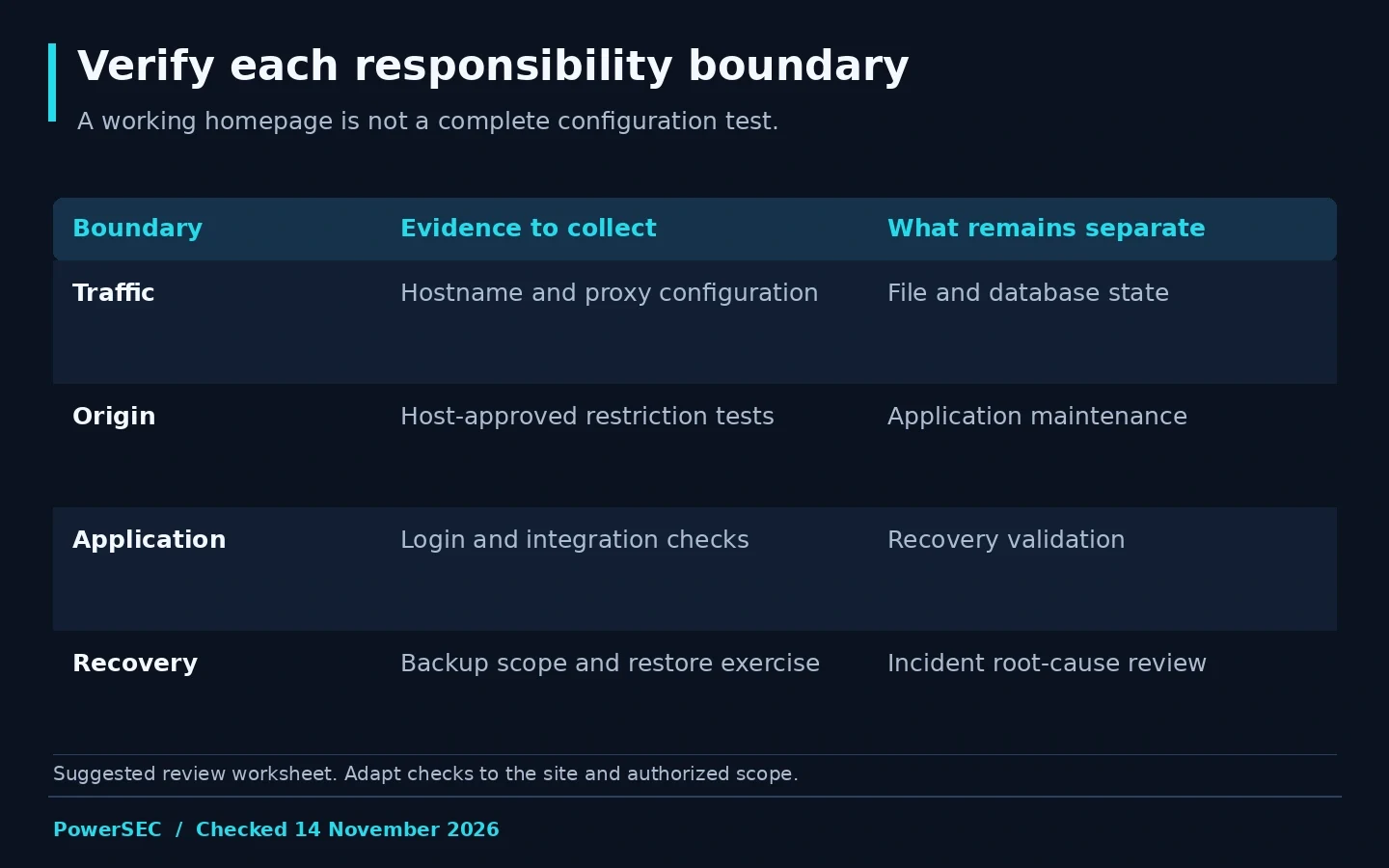
A layered setup needs checks at each responsibility boundary, not just a working homepage.
How should you decide whether to add a plugin?
List the jobs already covered and the evidence available for each. If the host supplies file scanning, vulnerability review and tested recovery, evaluate that scope before duplicating it. If those jobs are missing, choose tooling that fills the specific gap and assign someone to act on its findings.
Assess operational fit as well as features. Who receives alerts? Can the site owner understand them? Does a maintenance team have access during an incident? How are false positives reviewed? The product with the longest feature list is not automatically the product your team can operate well.
Run a controlled pilot and document resource use and functional results on the actual site. We have not benchmarked performance or exploit-blocking effectiveness across these products, so this guide does not assign performance scores or claim one layer can replace every other layer.
Where PowerSEC fits
PowerSEC Pro Protection combines site-level security automation with cloud backup. Its documented features include scheduled rescans, automated WAF rule updates, bulk plugin updates and incident runbooks. PowerSEC Free already includes malware and vulnerability scanning, firewall protection and manual local backup and restore.
For a site using Cloudflare, the relevant benefit is a clearer workflow for the responsibilities inside WordPress. Review the plan against your existing host services and use the connectivity guide during setup. A vendor update remains the fix for a vulnerable component; PowerSEC does not promise to block a specific exploit.
Bottom line
Cloudflare and a WordPress security plugin can serve complementary roles. Choose the combination by mapping traffic, origin access, site maintenance and recovery, then verify the real workflows. A documented division of responsibility is more useful than assuming the presence of either product means the work is finished.
Sources
Primary sources checked on 14 November 2026: