The Ninja Forms vulnerability CVE-2026-94504 features in a campaign Patchstack reported on 6 October 2026. Attempts targeted WPC Product Bundles on 4 October and Ninja Forms the next day. The analyzed malware can hide an unauthorized administrator. [1]
For a site owner, the immediate decision is straightforward: update the affected plugin, then investigate any signs of compromise. Treat the installed version and the integrity of existing access as separate questions. This guide gives you a way to check both, including a limitation that matters when using WP-CLI.
Apply the vendor fix, then review the evidence behind your site's access.
The short version
Component | Affected releases | Minimum fix | Current release checked |
|---|---|---|---|
Ninja Forms, CVE-2026-94504 | Through 3.15.3 | 3.15.4 | 3.15.5 |
WPC Product Bundles for WooCommerce, CVE-2026-93836 | Through 8.6.6 | 8.6.7 | 8.7.3 |
Affected ranges and minimum fixes come from the vulnerability records. Current releases were checked against WordPress.org on 6 October 2026. [2-5]
Use the latest compatible vendor release. Ninja Forms 3.15.5 also addresses a separate rich-text-field XSS issue, CVE-2026-90438, disclosed on 1 October. Stopping at the minimum fix for the older flaw would miss that later correction. There is no claim here that the newer flaw was used in this campaign. [4, 6]
How the Ninja Forms vulnerability works
Stored cross-site scripting means untrusted content is saved and later displayed in a way that allows script execution. For Ninja Forms, the published CVE description identifies a non-rich-text textarea value rendered unsafely in the legacy submission editor. The important boundary is between visitor-supplied form content and a privileged administrative page. [7]
WPC Product Bundles has a separate input and rendering problem involving bundle quantity information stored with an order. Its vulnerability record describes an unauthenticated attacker supplying content that executes when someone accesses the affected page. These are plugin defects with different fixes, even though the campaign groups them together. [3]
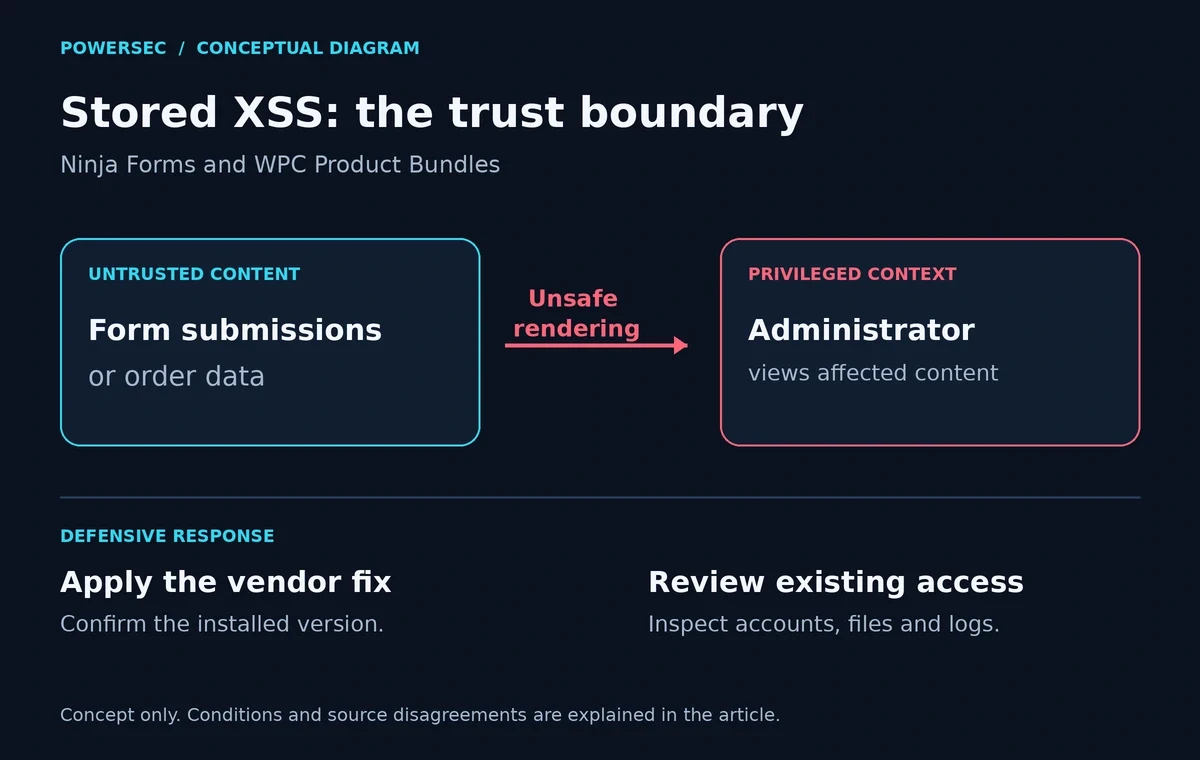
The diagram shows the trust boundary. It contains no exploit request, payload, or instructions for reproducing an attack. [3, 7]
Exploit conditions
The attacker does not need their own WordPress account for the reported injection paths. However, the administrative impact described for Ninja Forms depends on a privileged user viewing the affected submission in the relevant editor. Installing the plugin alone is not evidence that an attack succeeded. [2, 7]
Do not treat every form field or every plugin version as interchangeable. The original Ninja Forms record concerns the legacy submission editor; the later rich-text issue specifically requires the Paragraph Text field's Rich Text Editor option. Updating to the current fixed release avoids using those distinctions as a reason to postpone maintenance. [6, 7]
There is also a scoring disagreement. Patchstack lists both campaign CVEs at 7.1, while Wordfence lists 7.2. Wordfence's vector says no user interaction, but its descriptions still describe execution when a user accesses injected content. Follow the documented conditions when assessing your site. [2, 3, 8, 9]
Threat status on 6 October 2026
Attacks: Patchstack observed limited exploitation attempts in its telemetry. This is evidence of attacks, not an ecosystem-wide infection count. [1]
CISA KEV: Neither campaign CVE, nor the two additional Ninja Forms IDs discussed here, appeared in the official CISA JSON mirror fetched for this run. The retrieved catalog was version 2026.10.04, released on 4 October. Patchstack's own exploited-status label should not be confused with a CISA listing. Absence from that snapshot does not contradict the observed attacks. [2, 8, 10]
Public material: Patchstack includes attack examples; WPScan schedules its related PoC for 22 October. A PoC demonstrates a flaw under stated conditions. It is separate evidence from observed attacks. No exploit was executed for this article. [1, 11]
CVE overlap: Patchstack marks CVE-2026-92438 as a possible duplicate of CVE-2026-94504. WPScan scores that record at 8.8 and lists 3.15.4 as fixed. Keep the IDs in your inventory, but do not count them as two confirmed independent flaws. [2, 11]
Is my site affected?
In WordPress, open Plugins > Installed Plugins. Locate Ninja Forms and WPC Product Bundles for WooCommerce, record their versions, and compare them with the table. Check each site you manage, including a separate store or staging installation. WordPress documents plugin versions and updates on this screen. [12]
For a routine inventory on a site you have no reason to suspect is compromised, run these read-only commands from its WordPress directory: [13]
wp plugin get ninja-forms --field=version --skip-plugins --skip-themes
wp plugin get woo-product-bundle --field=version --skip-plugins --skip-themes
A missing-plugin message means that slug was not found in the installation you queried. Confirm the directory and site before closing the task.
WP-CLI caveat: --skip-plugins still loads must-use plugins. It therefore does not make a normal WordPress command an independent integrity check. If compromise is suspected, use a trusted host or forensic environment and inspect database records directly, as described below. [13]
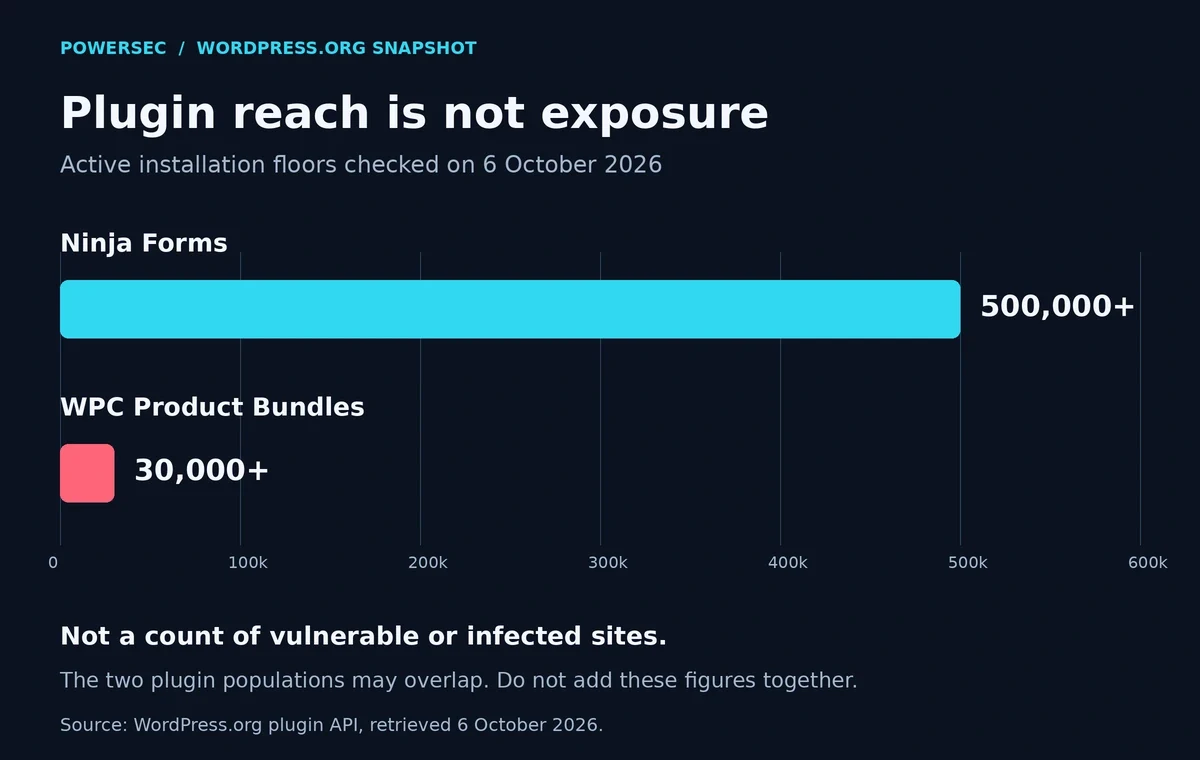
WordPress.org installation floors checked on 6 October 2026. These are plugin populations, not counts of vulnerable or infected sites; overlap between them is unknown. [4, 5]
The chart explains why this deserves attention without pretending to measure your exposure. Your installed version, configuration, and evidence of unwanted changes are the useful inputs for a decision.
What to do
Update first. Use the vendor's current compatible release and confirm the installed version afterward. The following commands change plugin files; run only the command for the plugin you use, through your normal maintenance process: [14]
wp plugin update ninja-forms
wp plugin update woo-product-bundle
Then check an ordinary form submission or test order through your normal workflow. Record the version, update time, and result. A short maintenance record is more useful during an incident than remembering that someone probably clicked Update.
If there are signs of compromise, involve your host immediately and preserve a filesystem and database snapshot before cleanup. Keep that evidence copy separate from any backup you plan to restore. WordPress's incident guidance recommends retaining a snapshot even when infected, reviewing access, and rotating credentials and authentication keys during recovery. [15]
Review all privileged access, not just the account that first raised concern. Have the responder check unauthorized files and accounts, affected stored content, and the cause of entry. Validate a recovery before reopening normal administration. Avoid treating a successful plugin update as the end of incident response.
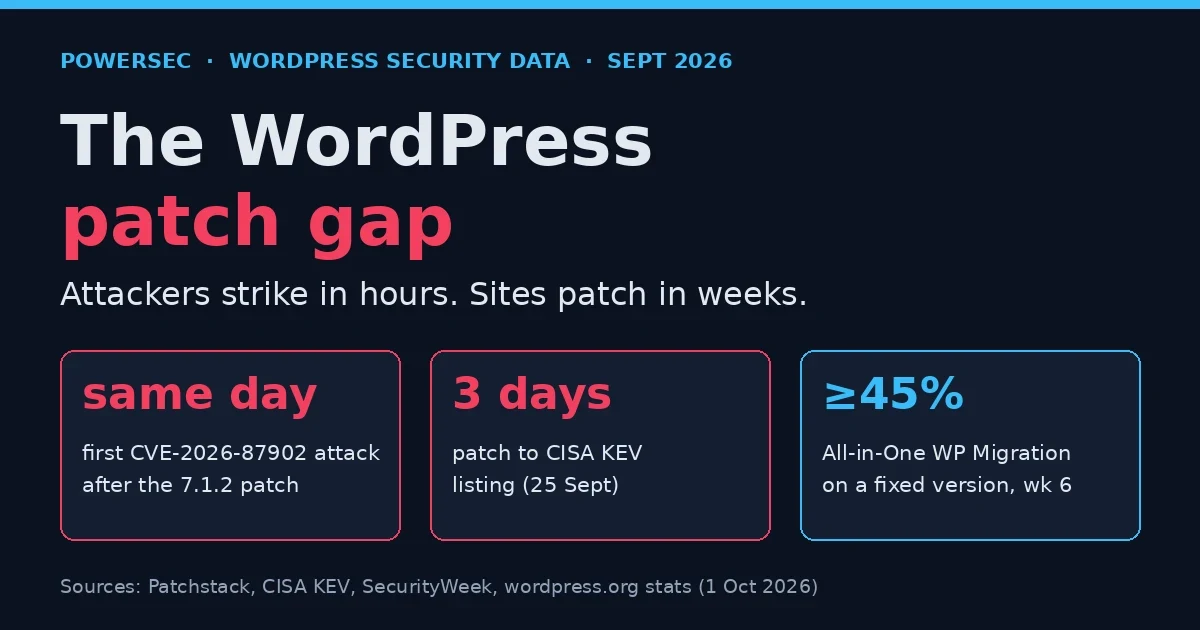
Our earlier WordPress patch-gap analysis explains why confirming deployment matters. For this incident, add an access review using the indicators and conditions specific to the campaign.
Were you targeted?
Use the following as investigation leads, attributed to Patchstack's observed campaign. A filename or request alone needs context. [1]
Evidence type | Indicator to investigate |
|---|---|
Network domain |
|
Unexpected plugin directory |
|
Must-use plugin paths |
|
Database option names |
|
Login-log marker |
|
Start with a preserved copy where possible. These commands inspect files and existing logs; they do not contact the domain or run PHP. Adjust paths to your environment. The domain is written literally inside the search so it matches log text. [16, 17]
find wp-content/plugins wp-content/mu-plugins -type f \( \
  -path '*/wp-smart-thumbnails/*' -o \
  -name 'class-wp-token-validate.php' -o \
  -name 'class-wp-query-????????.php' \
\) -print
grep -nF \
-e 'imgcdn1.com' \
-e 'wp-smart-thumbnails' \
-e '_wplogin=' \
/var/log/nginx/access.logSearch retained and rotated logs too. Normal access logs may omit form request bodies, so an empty search cannot settle whether a malicious submission arrived. Patchstack also reports backdated malware files; looking only for recent modification times can miss this evidence. [1, 18]
For account review, ask your host to run the following read-only SQL through a trusted database console. Replace wp_ with the actual table prefix. This example is for a single-site installation; Multisite requires the responder to identify the correct user tables and site capability key. It bypasses WordPress's user-list rendering rather than relying on the dashboard. [19, 20]
SELECT DISTINCT u.ID, u.user_login, u.user_registered
FROM wp_users AS u
INNER JOIN wp_usermeta AS m ON m.user_id = u.ID
WHERE m.meta_key = 'wp_capabilities'
  AND m.meta_value LIKE '%"administrator";b:1%'
ORDER BY u.ID;

SELECT option_name
FROM wp_options
WHERE option_name IN ('fz_emer_done_v1', 'fz_emer_login_tokens');
Compare the account results with your authorized administrator inventory. Investigate unexplained differences; do not automatically delete accounts based on an unfamiliar name.
The campaign report describes must-use plugins as absent from the Plugins screen. WordPress documents a separate Must-Use section outside the default list. Hosts legitimately use these plugins. Review their provenance and contents before judging them. [1, 21]
Where PowerSEC fits
PowerSEC's free plan includes local malware and vulnerability scanning. Its vulnerability scanner flags known-exploited CVEs and sorts them first on every plan. Paid capabilities include scheduled rescans, plugin updates across multiple sites, and incident runbooks. These help organize checks and remediation; the vendor update fixes the plugin vulnerability. [22, 23, 25, 26]
For suspicious files or unexplained administrator access, use PowerSEC's get-help page to request an assessment. Malware and file scanning can support the investigation, but a clean result is not a guarantee that the site was never compromised.
The free external security snapshot checks public signals. It does not log in or inspect private database accounts, so it cannot rule out a hidden administrator or establish that server-side cleanup is complete. [24]
Bottom line
Install the current vendor fix, verify the version, and investigate unexplained access with evidence from outside the ordinary user-list screen. For this campaign, the most useful distinction is between closing a vulnerable entry point and establishing that the site's existing files and accounts are trustworthy.
Sources
All sources below were fetched on 6 October 2026. Undated documentation is identified as such; current installation figures are a snapshot, not a historical estimate.
Patchstack campaign report, published 6 October 2026.
Patchstack: Ninja Forms, CVE-2026-94504, published 22 September 2026.
Wordfence: WPC Product Bundles, CVE-2026-93836, updated 22 September 2026.
Ninja Forms vendor changelog and listing, latest listed release 3.15.5 dated 28 September 2026; installation count checked against the WordPress.org plugin API.
WPC Product Bundles vendor changelog and listing, latest plugin API update 5 October 2026.
Wordfence: Ninja Forms rich-text-field XSS, CVE-2026-90438, published 1 October, updated 2 October 2026.
Published CVE record: CVE-2026-94504, published and updated 22 September 2026.
Patchstack: WPC Product Bundles, CVE-2026-93836, published 23 September 2026.
Wordfence: Ninja Forms, CVE-2026-94504, updated 24 September 2026.
CISA's official KEV JSON mirror, catalog 2026.10.04, released 4 October 2026.
WPScan: CVE-2026-92438, published 22 September, updated 5 October 2026.
WordPress: managing plugins, documentation.
WP-CLI: plugin get and global parameters, command documentation.
WP-CLI: plugin update, command documentation.
WordPress: My site was hacked, incident-response documentation.
POSIX find reference, command documentation.
POSIX grep reference, command documentation.
Apache: access-log formats, documentation illustrating what standard access logs record.
WordPress database schema source, official definitions of the user, user-metadata, and options tables.
WP-CLI: database queries and Multisite caveats, command documentation.
WordPress: must-use plugins, updated 23 September 2026.
PowerSEC plugin documentation, current feature description checked during this run.
PowerSEC plans, current plan description checked during this run.
PowerSEC external snapshot scope, current scope checked during this run.
PowerSEC: known-exploited vulnerability prioritization, updated 1 October 2026.
PowerSEC: reading vulnerability reports, updated 1 October 2026.
KEV checked on 6 October 2026 against CISA's official JSON mirror, catalog 2026.10.04: CVE-2026-94504, CVE-2026-93836, CVE-2026-92438, and CVE-2026-90438 were not listed in the retrieved snapshot.