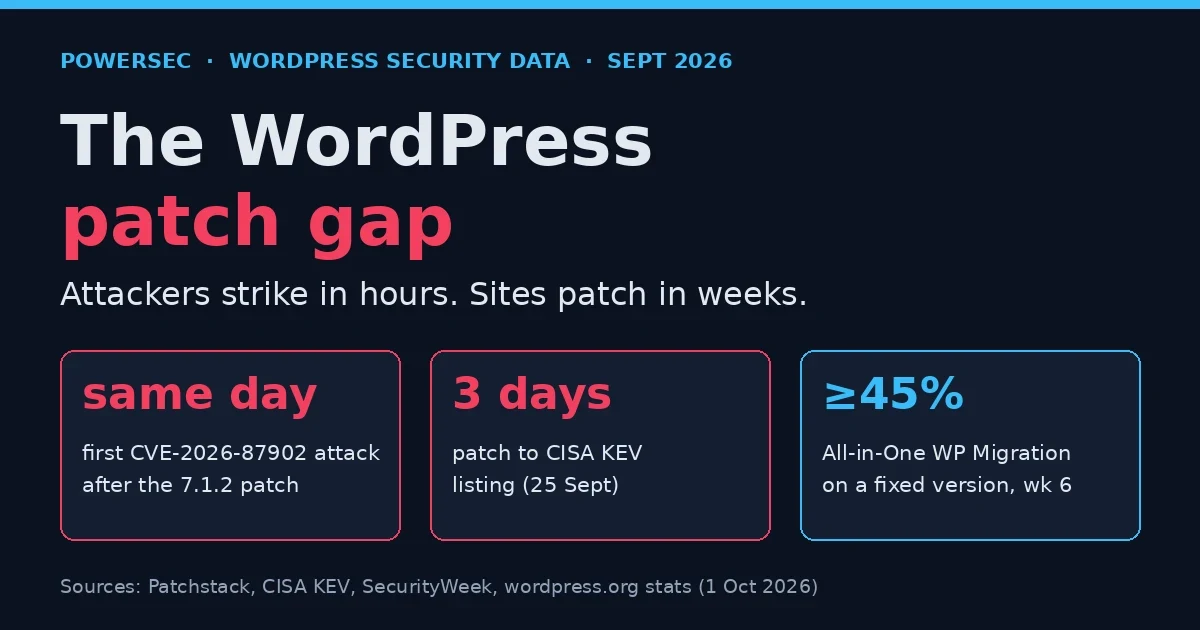
Attackers started probing WordPress sites for CVE-2026-87902 on the same day the patch shipped. Three days later, CISA added it to its Known Exploited Vulnerabilities catalogue. Meanwhile, wordpress.org's own statistics show that weeks after critical plugin fixes, large shares of sites are still running the old code. That distance between "patch released" and "patch installed" is the WordPress patch gap, and in September 2026 it decided which sites got hit. This article lays out the real numbers, explains why the gap exists, and shows how to close it on your own sites. The short answer: turn on WordPress security updates wherever you safely can, and check that they actually ran.
This is not a story about one bug. It is about a pattern that showed up again and again last month, across WordPress core and three of its most-installed plugins. Every figure below comes from a dated, linked source or from wordpress.org's public statistics, pulled on 1 October 2026.
The short version
Hook | CVE-2026-87902 (WordPress core) added to CISA KEV on 25 Sept 2026, with a 28 Sept due date |
Time to first attack | Same day as the 7.1.2 patch (22 Sept), per Patchstack telemetry |
Time to patch, core | 59.3% of WordPress sites report the 7.1 branch (wordpress.org, 1 Oct 2026) |
Time to patch, plugins | All-in-One WP Migration: 35% fixed after 2 weeks, about 45% after 6 weeks |
Sites on unpatchable core | About 1% of WordPress sites still run versions older than 4.7, which get no security fixes |
What closes the gap | Automatic security updates, plus checking that they actually ran |
Who it affects | Every self-hosted WordPress site, but most of all sites with auto-updates off |
Exploitation status | Core CVE-2026-87902 is on CISA KEV; Elementor Pro CVE-2026-32475 was exploited right after its patch |
Why does the WordPress patch gap exist?
A security release does two things at once. It protects the sites that install it, and it tells everyone else exactly where the hole was.
Patchstack put it plainly in its CVE-2026-87902 write-up: the attackers were working from the diff, not from independent discovery. Once a fix is public, comparing the old and new code is a short job for anyone who wants to find the weakness. watchTowr's Benjamin Harris described the same trend to SecurityWeek in July during the WP2Shell attacks: proof-of-concept code now appears within hours of disclosure, where it used to take a day or more.
Site owners don't move that fast, and usually for understandable reasons:
Auto-updates are off. Hosts, agencies and nervous owners turn them off to avoid breaking a site.
Plugin auto-updates are opt-in. WordPress applies minor core security releases automatically by default. Plugins only auto-update if someone switched that on.
Premium plugins update differently. Commercial plugins like Elementor Pro update through the vendor's licence system, which can lapse quietly.
Nobody is watching. Brochure sites, side projects and old client sites often have no one logging in to see the update badge.
So the gap is not one number. It is an attacker clock that starts at the patch and a defender clock that starts whenever someone notices.
How fast did attackers move in September 2026?
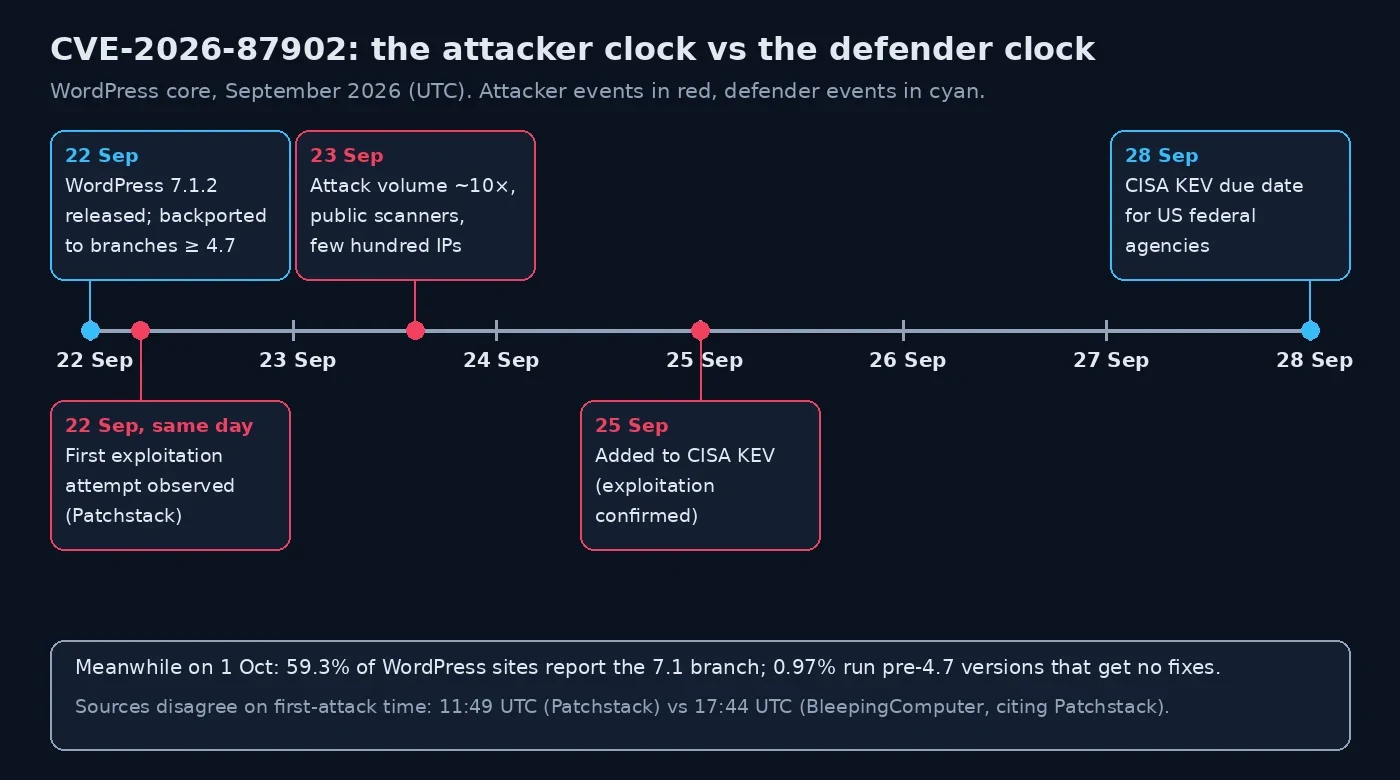
WordPress core, CVE-2026-87902. WordPress released 7.1.2 on 22 September, fixing an unauthenticated file-inclusion flaw that can lead to remote code execution on some server configurations. It backported the fix to every branch down to 4.7. Patchstack reported the first exploitation attempt the same day and file-write attempts a few hours later. Traffic grew roughly tenfold by 23 September, coming from "a few hundred" source addresses.
The sources disagree on the exact time of that first attempt. Patchstack's article gives 11:49 UTC on 22 September. BleepingComputer, citing Patchstack telemetry, reported the first malicious reconnaissance at 17:44 UTC, "less than 5 hours" after the patch. Either way, the attacker clock started on day zero.
Elementor Pro, CVE-2026-32475. Elementor Pro 4.2.2 fixed a critical (CVSS 9.0) file-upload flaw on 19 August. SecurityWeek reported, citing Defiant (Wordfence), that attackers started exploiting it immediately after the fix landed, and that more than 190,000 attempts had been blocked by 5 September.
The Events Calendar, CVE-2026-78006 and CVE-2026-78159. Two critical unauthenticated chains, both CVSS 9.8, were fixed in 6.17.4.1 and disclosed in mid-September for a plugin with more than 600,000 active installs.
How fast did site owners patch?
Here is the defender side, using wordpress.org's public version statistics pulled on 1 October 2026.
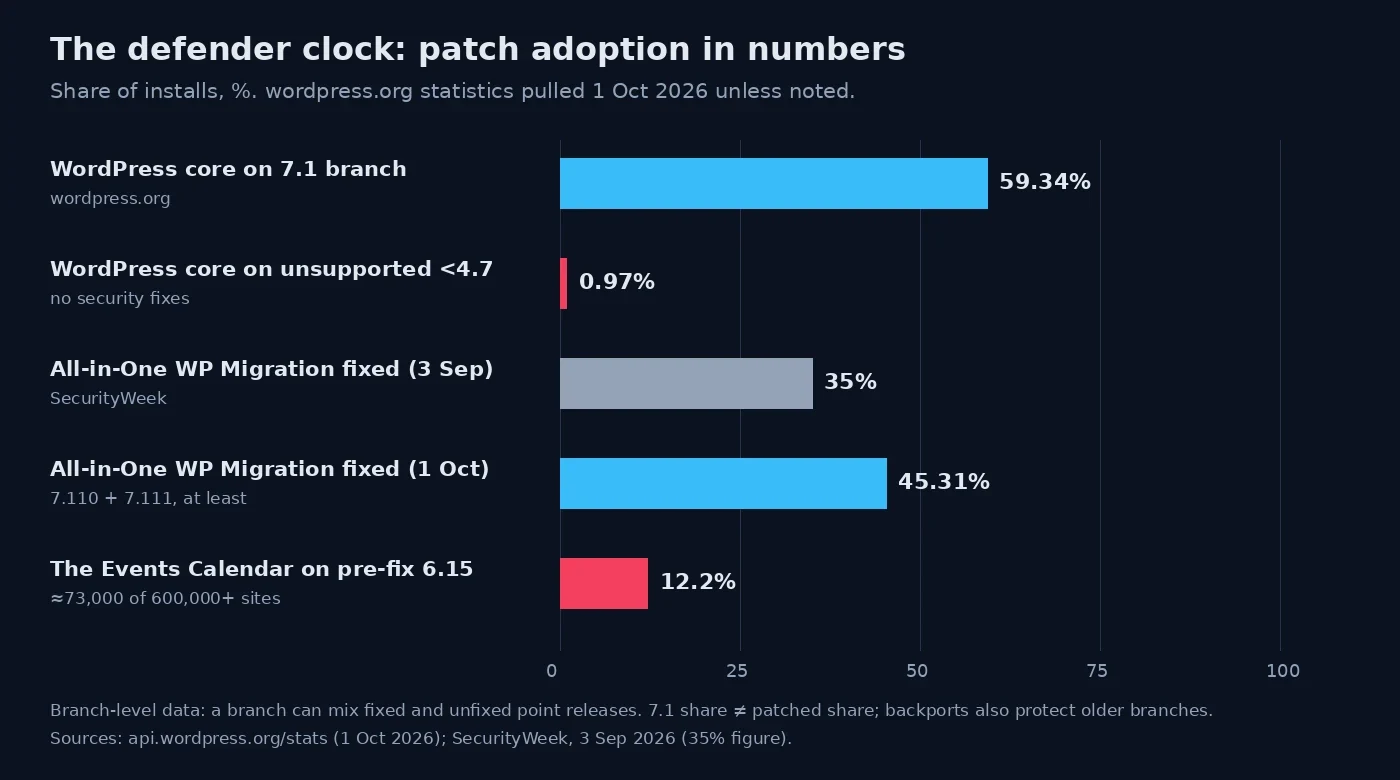
WordPress core. 59.3% of sites report the 7.1 branch. The remaining 40.7% are on older branches. That does not mean 40.7% are vulnerable, because the 87902 fix was backported to every branch from 4.7 up, and a fully updated 6.8 site is protected. But there are two harder numbers:
About 1% of WordPress sites (0.97%) run a version older than 4.7. Those branches get no security fixes at all, for this flaw or any other. At WordPress's scale that is a very large number of sites.
wordpress.org's statistics are grouped by branch (for example 7.1), not by exact release (7.1.0 vs 7.1.2). Branch numbers show where sites are, not whether they took the latest point release.
All-in-One WP Migration (5M+ installs). The CVE-2026-19949 fix shipped in 7.110 on 20 August. SecurityWeek reported on 3 September that only 35% of installs had updated. On 1 October, wordpress.org shows 9.86% on 7.110 and 35.45% on 7.111, the current release, so at least 45.3% are on a fixed version. That is about ten percentage points of progress in four weeks. The rest sit in buckets the API doesn't break out, so the true unpatched share can't be read exactly from public data.
The Events Calendar (600,000+ installs). 12.2% of installs report the 6.15 branch, which is older than the fix. That is roughly 73,000 sites on a branch that can't contain 6.17.4.1. The 6.17 branch (57.6%) mixes vulnerable and fixed releases, so the real exposed share is higher than 12.2%.
Elementor Pro. SecurityWeek reported that "approximately two-thirds" of installs were on a vulnerable version as of 4 September. Treat that figure with care: Elementor Pro isn't distributed through wordpress.org, and the article ties it to the free plugin's 10-million install count. We couldn't verify it independently.
What does a CISA KEV listing mean for WordPress sites?
CISA's Known Exploited Vulnerabilities catalogue lists flaws that are being exploited in the wild. CVE-2026-87902 was added on 25 September 2026 with a due date of 28 September, a three-day window for the US federal agencies the catalogue directs. The listing also marks it for forensic triage under CISA's BOD 26-04.
You probably aren't a federal agency, but the listing is still a useful signal. It means exploitation is confirmed, not theoretical. If a federal agency gets three days, a small business site with auto-updates off shouldn't count on three weeks.
Is my site affected by the patch gap?
Check these three things on every site you run.
1. Core version and auto-update status. In wp-admin, go to Dashboard → Updates. Or, with WP-CLI:
wp core version
wp core check-update
wp config get WP_AUTO_UPDATE_CORE
wp config get AUTOMATIC_UPDATER_DISABLED
If check-update lists anything, the site is behind. If AUTOMATIC_UPDATER_DISABLED is true, nothing will update on its own.
2. Plugins with pending updates, and whether they auto-update.
wp plugin list --update=available --fields=name,version,update_version,auto_updateEvery row is part of your patch gap. Every auto_update value of off is a plugin that waits for a human.
3. Unsupported core. If wp core version returns anything below 4.7, that site gets no security fixes at all. Upgrading it, carefully and with a backup, is the only real fix.
What you should do
Update now. Bring core to 7.1.2 (or the latest release on your branch) and apply every pending plugin and theme update, starting with anything on CISA KEV.
Turn on automatic updates where it's safe. Keep minor core security releases automatic. Turn on plugin auto-updates for plugins you don't customise. In wp-admin, that's Plugins → Enable auto-updates. Or:
wp plugin auto-updates enable --allCheck premium licences. Make sure every commercial plugin and theme has an active licence that can still deliver updates.
Take backups before updates, not after incidents. Fear of a broken update is the most common reason auto-updates get switched off. A tested backup removes most of that fear.
Remove what you don't use. Deactivated plugins and unused themes still sit on disk and still need patching.
Watch for the next one. Subscribe to a vulnerability feed that matches your installed versions, so you hear about the next patch in hours rather than weeks.
Were you targeted while you were behind?
If a site sat on a vulnerable version during an active campaign, check for the usual signs of compromise. These checks are generic on purpose: they cover what attackers do after getting in, whichever flaw they used.
# Core files that don't match the official release
wp core verify-checksums

# Plugin files that don't match wordpress.org (free plugins only)
wp plugin verify-checksums --all

# Administrator accounts, newest first
wp user list --role=administrator --fields=ID,user_login,user_email,user_registered --orderby=registered --order=DESC

# PHP files changed in the last 30 days, and PHP inside uploads (which should hold none)
find . -type f -name "*.php" -mtime -30 -not -path "./wp-content/cache/*" -ls
find wp-content/uploads -type f -name "*.php" -ls

# Must-use plugins load automatically and are a favourite hiding place
ls -la wp-content/mu-plugins/
For CVE-2026-87902 specifically, BleepingComputer reported attacker-written files named wp-pear-rce-flag.php, poc87902.php, luci_<random>.php and zeta_<random>.php in /tmp and /var/tmp, and listed source addresses 169.58.48.193, 169.58.48.195 and 2001:df1:e8c0::106b. Check for those files and search your access logs for those IPs:
ls -la /tmp/*.php /var/tmp/*.php 2>/dev/null
grep -E "169\.58\.48\.19[35]|2001:df1:e8c0::106b" /var/log/nginx/access.log* /var/log/apache2/access.log* 2>/dev/null
An unknown admin, a PHP file in uploads, or a checksum mismatch you can't explain all mean the same thing: treat the site as compromised, not just outdated.
Where PowerSEC fits
Updating is the fix. PowerSEC doesn't replace vendor patches; it shortens the time between "a patch exists" and "you know you need it", and it helps when that time ran out.
Know where the gap is. The vulnerability scanner checks the core, plugin and theme versions your sites actually report against a curated vulnerability feed. It's on every plan, including Free.
Patch the dangerous ones first. On Pro, issues known to be actively exploited, such as CISA KEV entries like CVE-2026-87902, are sorted to the top so the first update you apply is the one attackers are using.
Close the gap across many sites at once. Bulk updates push fixes to every affected site from one dashboard, which matters most for agencies with dozens of client sites. See the Agency plan.
Make updating less scary. Cloud backups with verified restore points mean a bad update is a quick restore, not a reason to leave auto-updates off.
See what changed. File integrity monitoring flags files that changed without a deploy, which is how you spot a successful attack during the gap.
Want a quick first look? The free WordPress security scan is a passive, external check. It doesn't cover every vulnerability yet, and exact version matching happens after you connect the site. If you think a site was already compromised, get help here; the assessment is free.
Bottom line
In September 2026 attackers needed hours to start exploiting a fresh WordPress patch. Site owners needed weeks to install one, and some never will. CISA's listing of CVE-2026-87902 removes any doubt about whether that gap matters.
You can't make attackers slower. You can make your own clock faster: automatic security updates where they're safe, backups that make updating low-risk, a version-matched vulnerability feed, and a quick check that the updates actually ran. Do that and the next patch closes your gap the same day, not six weeks later.
Sources
CISA, Known Exploited Vulnerabilities catalogue, CVE-2026-87902 entry (added 25 Sept 2026)
BleepingComputer, Hackers start exploiting critical WordPress flaw for code execution (23 Sept 2026)
SecurityWeek, Elementor Pro plugin vulnerability exploited to hack sites (5 Sept 2026)
SecurityWeek, WP2Shell WordPress vulnerabilities exploited in the wild (20 July 2026)
Cyber Security News, Critical Events Calendar flaws put 600,000 sites at risk (15 Sept 2026)
wordpress.org, WordPress version statistics (pulled 1 Oct 2026)
wordpress.org, All-in-One WP Migration version statistics (pulled 1 Oct 2026)
wordpress.org, The Events Calendar version statistics (pulled 1 Oct 2026)
Checked against CISA's Known Exploited Vulnerabilities catalogue on 1 October 2026: CVE-2026-87902 (WordPress core) is listed, added 25 September 2026. Check the catalogue yourself for the plugin CVEs above before relying on their status.