Contact Form 7 has a security update that deserves more than a quick click on "Update now." Its 29 October 2026 release announcement addresses an unauthenticated arbitrary file upload affecting versions 6.2 through 6.2.3. The same release changes how attachment filenames are handled.
For an agency, the useful question is: can you show that the fix is installed, legitimate attachments still reach the recipient, and unexpected files have been investigated? Treat those as separate checks before closing the ticket.
Install the security update, then verify the form your customers actually use.
The short version
Question | Answer |
|---|---|
What is the flaw? | Unauthenticated arbitrary file upload, according to the vendor advisory. |
Which versions are affected? | 6.2 through 6.2.3, inclusive, according to Patchstack. |
What fixes it? | 6.2.4 is the first fixed release. Patchstack identifies 6.2.4.1 as a separate regression fix in the same entry. |
What should I install today? | The current compatible release. The WordPress.org API reports 6.2.4.1, checked on 4 November 2026. |
How severe is it? | CVSS 8.1, as displayed by Patchstack. Its operational priority label is "Medium"; that is a separate label from the numeric score. |
Is there a CVE identifier? | Patchstack's entry still says Unknown at this check. Do not attach an older Contact Form 7 CVE to this issue. |
Current-state statements below were checked on 4 November 2026, US Eastern time. Source publication dates are distinguished from that check date.
How does the Contact Form 7 file upload flaw work?
This Contact Form 7 vulnerability concerns the handling of an untrusted attachment. The vulnerable release could retain files that should have been rejected or removed. A form's visible error therefore cannot, by itself, establish that no file remains on the server. That conclusion follows from the vendor's description of the flaw.
The patched file-handling code records uploaded files for subsequent handling. The filename sanitizer also changes to an extension safelist, renaming extensions outside that list.
Keep the vulnerability name precise: arbitrary file upload. Its consequences depend on the stored file and the server's configuration; the advisory does not establish automatic code execution on every installation.
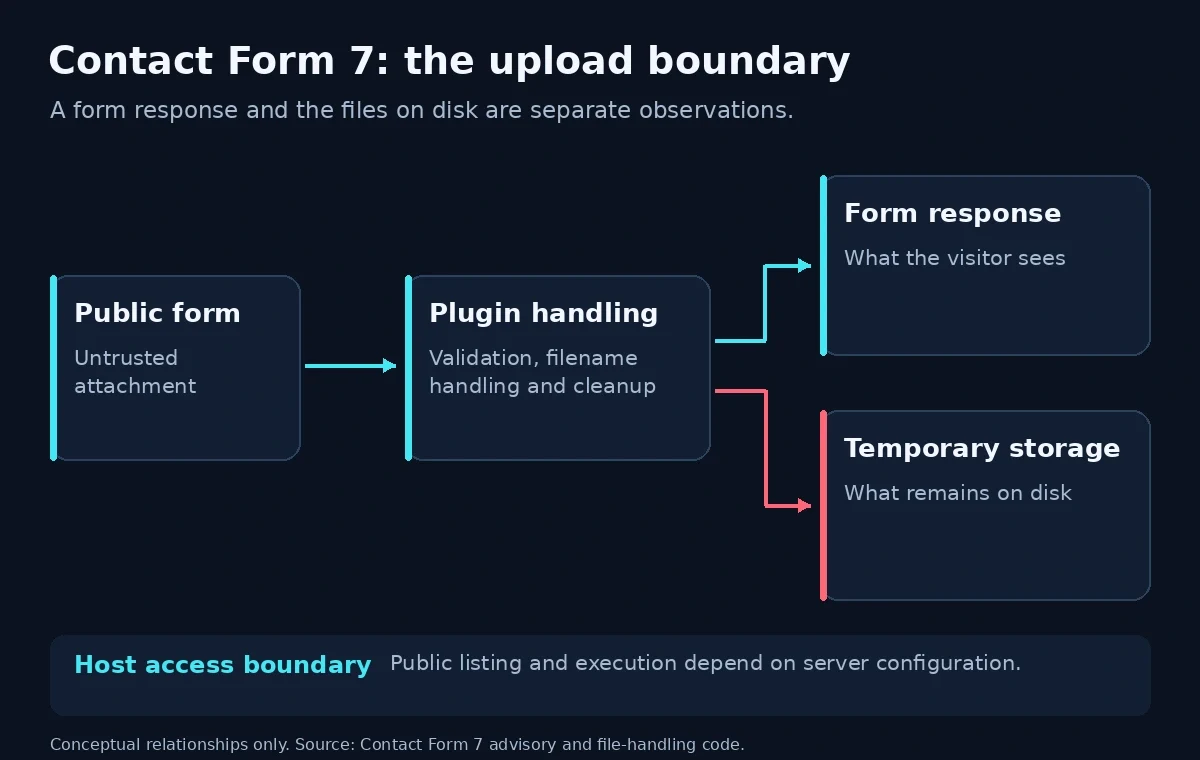
A visible form response and the state of temporary storage are different observations. This is a conceptual boundary diagram, not an exploit sequence.
What conditions make a site exposed?
The vendor describes the target conditions as an upload-enabled form on a server with public directory listing, running an affected release. No attacker account is required. It credits Shinya Murakami and Jakub Herman, reporting through WPScan.
Ask your host to check the effective configuration for the actual upload location. Do not decide exposure solely from the appearance of the form or from a configuration file that might not govern the serving web server. Missing a documented condition is useful context, not a reason to retain a vulnerable release.
The official WordPress.org plugin API returned an active-install value of 10,000,000 on 4 November 2026. That is a plugin-wide adoption figure. It does not count installations on affected versions, forms with upload fields, or servers with public directory listing.
Threat status: what is confirmed today?
As of 4 November 2026, Patchstack's entry, published 31 October, labels the issue "Known to be exploited!" Its risk paragraph also says exploitation is expected. Those statements are not consistent. We report the specific exploitation label with attribution, while recognizing that the page provides no campaign timeline or affected-site count.
Patchstack's use of "KEV" is separate from CISA's catalog. We found no matching Contact Form 7 entry in the official CISA catalog mirror checked today. The absence of an entry is not evidence that attacks have not happened.
Neither the vendor advisory nor Patchstack links a standalone public proof of concept at this check. A PoC would demonstrate the flaw under particular conditions; it would not establish how widely attackers used it. Public patch code is available, but it should not be described as a working exploit.
The practical decision does not depend on resolving every uncertainty: a vendor fix is available, so update.
Is my site affected?
In WordPress, open Plugins > Installed Plugins and locate Contact Form 7. Its official installation instructions also identify the Contact admin menu. Open your forms there and review their upload fields.
The upload documentation identifies file and file* form-tags, the filetypes: restriction, and the Mail > File attachments setting. Check both the accepted file types and where the attachment is supposed to go.
On a site you have no reason to suspect is compromised, run this read-only WP-CLI inventory command from the WordPress installation directory:
wp plugin get contact-form-7 --field=version --skip-plugins --skip-themesCompare its output with the affected and fixed ranges in the table. A version below the affected range is outside this specific advisory, not a general clean bill of health. Record the result again after updating.
WP-CLI documents that --skip-plugins still loads must-use plugins. If compromise is suspected, ask your host to inspect a preserved copy without bootstrapping the site's WordPress installation.
What you should do
Update first. Install the latest compatible vendor release through your normal controlled update process, with a recoverable backup available. Do not postpone the fix while waiting for a CVE identifier.
The current plugin readme, checked on 4 November 2026, requires WordPress 7.1 or later and PHP 8.3 or later. If the site's platform cannot run that release, arrange the platform change with the host and temporarily remove the exposed upload functionality while the work is completed.
What should you test after updating?
Use harmless sample documents on staging or another controlled form you own. Our recommended acceptance checks are:
Test case | What to verify |
|---|---|
An ordinary allowed attachment | The form accepts it, the intended recipient receives it, and the received file opens correctly. |
An optional attachment left empty | The rest of the submission completes as intended. |
A required attachment left empty | The form gives the intended validation response. |
A harmless file type your form disallows | The normal form rejects it. Ask the maintainer to verify temporary-file cleanup as well. |
A document or archive used in your workflow | The received filename and extension remain suitable for the recipient's workflow. |
The last check matters because the patched default extension safelist covers supported media types plus PDF and text. Office-document and archive extensions are not included in that default list, so an attachment can arrive with a changed extension even when your form permits that file type.
The vendor documents a customization filter. If your workflow needs an exception, have a developer review the narrow requirement. Avoid restoring a broad allow-anything policy just to make a test pass.
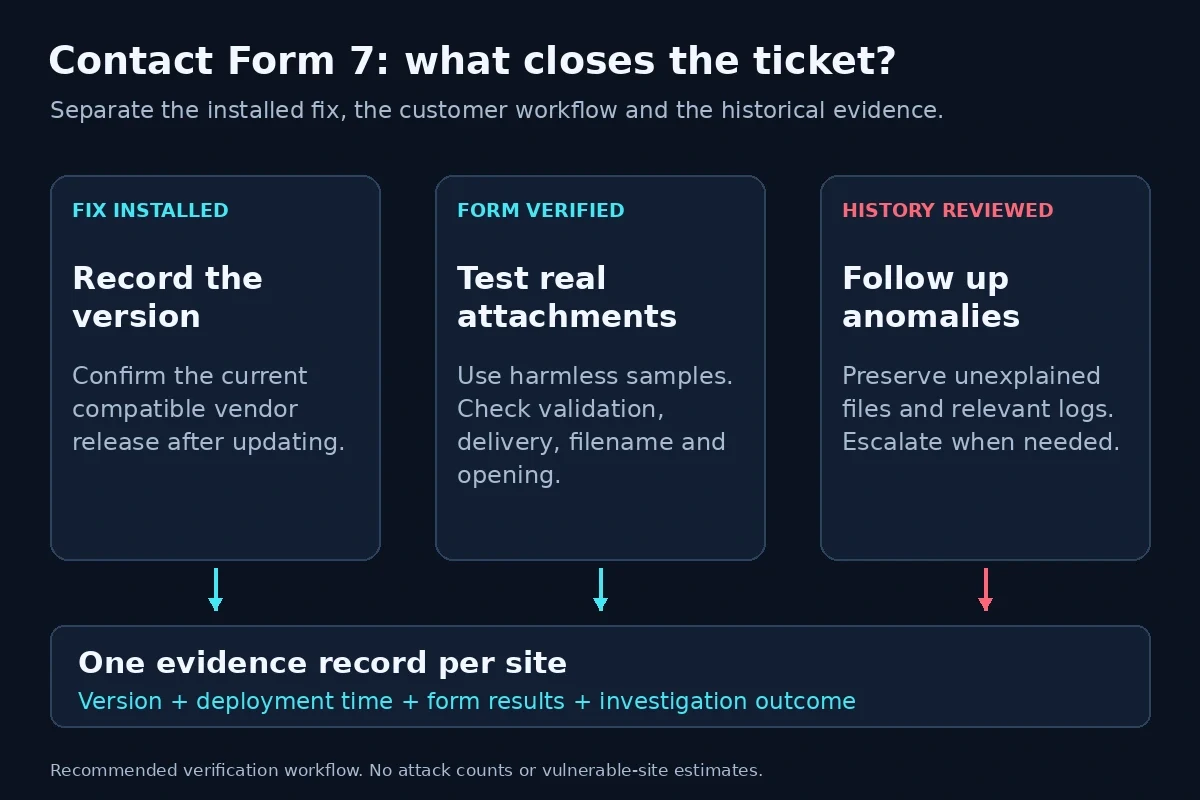
Close the update ticket with evidence for the software change, the customer workflow, and any suspicious history.
Keep the deployment timestamp, the resulting plugin version, and the form-test results together. If you manage several client sites, record a separate result for each site instead of assuming a successful test on one client covers the rest.
Were you targeted?
The advisories reviewed here do not provide a campaign-specific set of malicious hashes or IP addresses. The paths below are review locations, not confirmed indicators of compromise.
Contact Form 7 documents its default temporary directory as wp-content/uploads/wpcf7_uploads. The location can change with the upload configuration or WPCF7_UPLOADS_TMP_DIR. Confirm the actual path before using this read-only inventory command, preferably against a preserved copy:
find wp-content/uploads/wpcf7_uploads -type f -printThis lists files; it does not classify them. Unexpected executable files deserve investigation, but a filename alone is not a verdict. The plugin itself creates a defensive .htaccess file, so do not delete one merely because it appears in the output. Preserve suspicious files for your host or incident responder rather than opening them through the website.
For an existing, uncompressed access-log copy, this read-only search can help locate requests mentioning the default directory. Replace the example log path with your host's real local path:
grep -F -- '/wpcf7_uploads/' /var/log/nginx/example.com.access.logThis uses grep's fixed-string matching. It is a narrow lead, not an exploit detector: encoded paths, custom directories, missing logs, and requests outside that path can escape this search. A match requires context; no match does not clear the site.
The published commands were tested against benign fixtures. They do not send upload requests or change site files. Permission errors and missing paths are investigation results, not clean scans.
If you find unexplained files or access, retain the logs and escalate to the host. Record what evidence exists before cleanup. Updating the plugin and investigating earlier activity answer different questions.
Where PowerSEC fits
PowerSEC's current pricing, checked on 4 November 2026, includes vulnerability scanning on every plan, with CISA-known-exploited findings flagged first. Bulk plugin updates are included in Pro Protection, Pro + Backup Plus, and Agency. These features can help organize inventory and rollout.
The free external scan can provide an outside view, but it cannot replace authenticated version checks or examination of private files. We are not claiming detection or blocking of this specific flaw. The vendor update is the fix.
Bottom line
Do not close this ticket with a screenshot of the plugin version alone. Keep a small evidence record: the patched release, a successful real-world attachment test, and the outcome of any investigation into unexpected files.
That gives the next person maintaining the site something useful: a verified software change and a working customer workflow. A clean scan does not replace an attachment-delivery test or a review of suspicious history.
Sources
Contact Form 7 security release announcement, 29 October 2026; checked 4 November 2026.
Patchstack advisory, published 31 October 2026; checked 4 November 2026.
WordPress.org plugin information API and release readme, checked 4 November 2026.
Vendor file-handling code, filename-handling code, and upload documentation, checked 4 November 2026.
CISA's official KEV repository, catalog dated 4 November 2026.
WP-CLI plugin get, GNU find, and GNU grep, checked 4 November 2026.
KEV check: 4 November 2026, US Eastern time. No matching Contact Form 7 entry identified in CISA's official catalog mirror. Patchstack's exploitation label is reported separately.