The Elementor CSRF vulnerability, CVE-2026-62062, deserves a version check even if you recently updated WordPress itself. Patchstack disclosed it on 25 September 2026 and identifies Elementor Website Builder 4.3.0 and 4.3.1 as affected. Its database lists 4.3.2 as the fixed release. This is a plugin update to verify, not a reason to assume a core update covered it. [2]
Our recommendation: apply the Elementor security update, confirm the installed version, then review WordPress administrator accounts if your site ran an affected release. Those are separate jobs. A successful update answers whether the vulnerable code remains; an access review asks whether someone already used it.
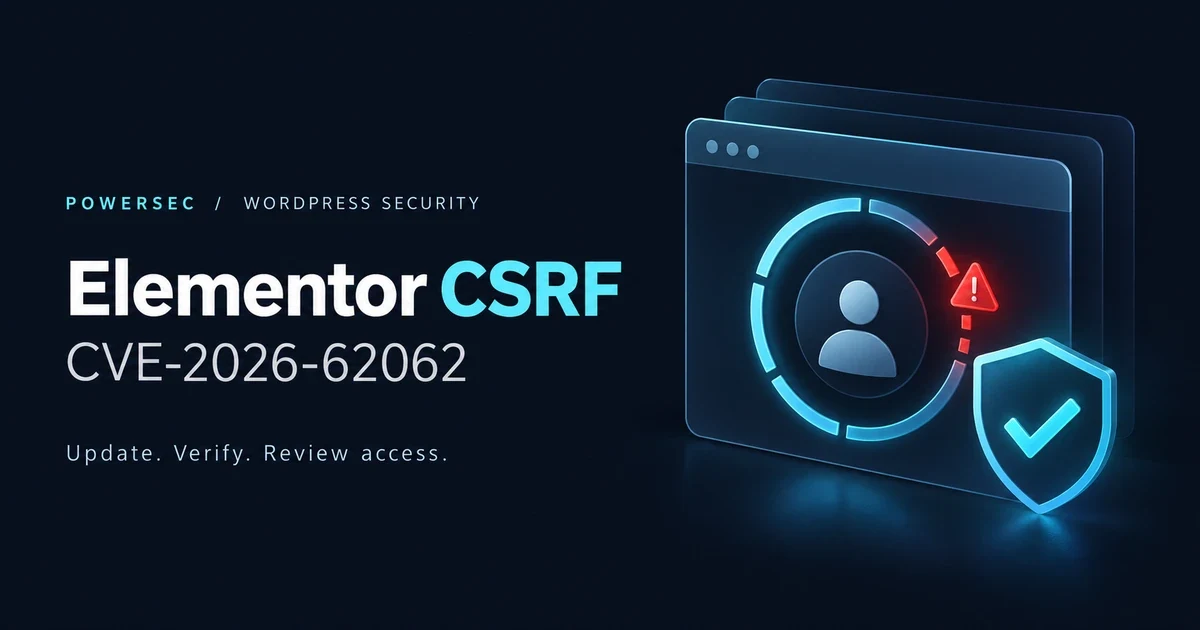
Elementor CSRF vulnerability: the vendor update fixes the flaw; reviewing access addresses a different question.
The short version: what needs attention?
Question | Answer |
|---|---|
Which component? | Elementor Website Builder, the |
Which CVE? | CVE-2026-62062 |
How severe? | CVSS v3.1 8.8, High; the CVE vector explicitly requires user interaction |
Which versions? | 4.3.0–4.3.1, according to Patchstack's detailed advisory and database |
What fixes it? | 4.3.2; the current WordPress.org release checked for this article is 4.3.3, dated 30 September 2026 |
Does the attacker need an account? | No, but the attack relies on a logged-in user's session and interaction |
What can happen? | An unwanted action using that user's permissions, including administrator-account creation when the victim has the necessary rights |
Is exploitation confirmed? | No primary-source confirmation located in this research run; see the dated status below |
Sources: Patchstack's advisory and database, the published CVE record, and the vendor-maintained WordPress.org changelog. [1–4]
How does the Elementor CSRF vulnerability work?
WordPress's REST API separates identity from permission. A browser's login cookie identifies the signed-in user. A request also needs the relevant capability, and cookie-authenticated REST requests normally use a nonce to defend against cross-site request forgery. These checks address different questions: who is signed in, what they may do, and whether another site is abusing that session. [5]
The affected Elementor code interfered with that request-intent protection beyond its own intended scope. The conceptual problem is an unwanted request being accepted with an existing user's authority. This is not a password-guessing flaw, and the attacker's own account is not what supplies the permissions. [4, 5, 19]
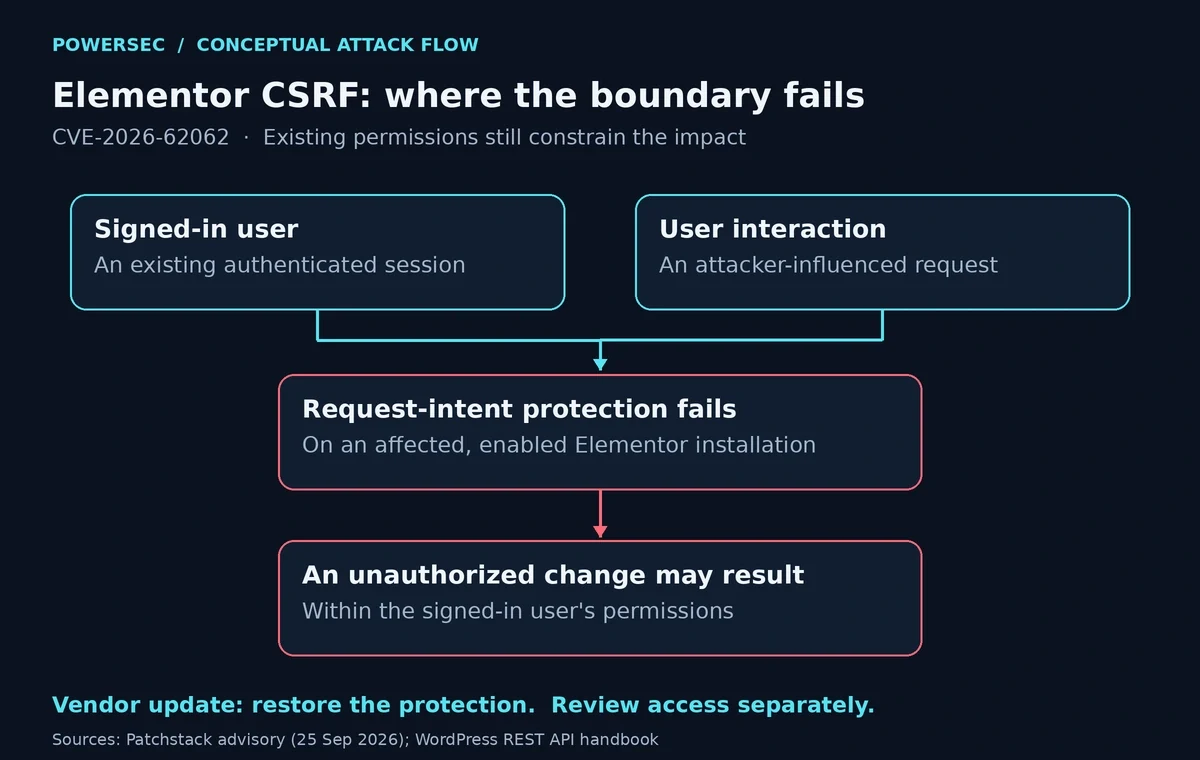
Conceptual flow only. The victim's existing permissions constrain the impact; the diagram contains no exploit request or operational attack sequence. [1, 5]
For administrators, the useful distinction is between patching this defect and adding general account security. Keep strong authentication, but do not treat it as a substitute for the vendor's code fix: this scenario already involves a signed-in user. That conclusion follows from the documented attack conditions. [1, 4]
What are the real exploit conditions?
Patchstack identifies several limits that matter when assessing exposure: [1]
The affected Elementor release must be running with the relevant Editor Events module loaded.
A user must be signed in and interact with the attacker-influenced request.
The unwanted action must fall within that user's permissions. Administrator-account creation requires an appropriately privileged victim.
The module's experiment complicates visual checks. The vendor's 4.3.1 source marks it hidden and sets a default-active rule for new sites with a minimum installation version of 3.32.0. Do not use the absence of a visible toggle as clearance. Updating is the simpler decision. [17]
There is a version-range disagreement worth preserving. The machine-readable CVE record broadly describes releases through 4.3.1. Patchstack's current database narrows this to 4.3.0–4.3.1. We use that explicit range for this flaw and disclose the difference rather than silently treating every older release as affected. [2, 4]
What is the threat status on 1 October 2026?
CISA KEV: CVE-2026-62062 was absent from CISA's official JSON mirror fetched for this run, catalog version 2026.10.01, released 1 October 2026. An absent entry is not proof that attacks have never occurred. [6]
Public PoC: Patchstack's public advisory contains a demonstration of the vulnerability. We reviewed the explanation but did not execute the example. Public reproducibility and observed exploitation are different kinds of evidence. [1]
Active exploitation: we did not locate primary-source confirmation of attacks against this specific CVE in the fetched material. Treat that as the scope of this research, not a guarantee. It remains a high-severity issue with a vendor fix available. [1, 2, 4]
The operational decision does not need to wait for a KEV listing or a confirmed victim: if the installed version is affected, update it.
Is my site affected?
In WordPress administration, open Plugins → Installed Plugins and find Elementor Website Builder. Record its version. Check the elementor component even if you also use Elementor Pro; the CVE record identifies elementor as the affected package. WordPress's plugin-management documentation explains the installed-plugin and update screens. [4, 7]
With WP-CLI, run this from the site's WordPress directory, as the account that manages the installation: [8]
wp plugin get elementor --fields=name,status,version --format=tableUse the exact point release. A result of 4.3.0 or 4.3.1 calls for an update. 4.3.2 contains this fix; 4.3.3 is the current repository release retrieved for this article. On multisite, use the network's plugin-management view and check the relevant sites rather than assuming one dashboard represents the fleet. [2, 3, 7, 8]
Why can't a download chart tell me how many sites are vulnerable?
The WordPress.org version-statistics response retrieved on 1 October 2026 reports 14.79% on branch 4.1, 16.45% on 4.2, 26.47% on 4.3, and 42.29% in other. These are the returned categories, not our estimates. [9]
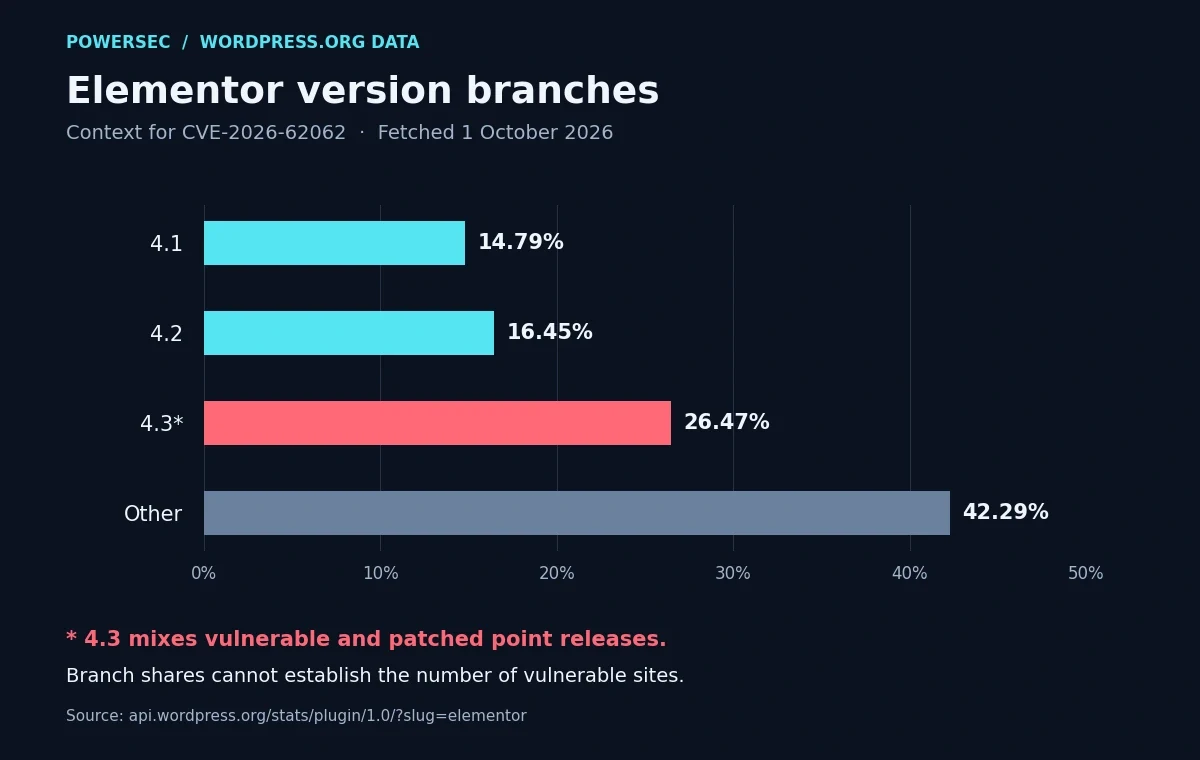
WordPress.org branch distribution, fetched 1 October 2026. The 4.3 bucket mixes vulnerable and patched point releases; "other" is unresolved. This chart does not measure infections or remaining exposure. [9]
Comparing those buckets with the advisory shows the limitation: 4.3 cannot separate 4.3.0/4.3.1 from 4.3.2/4.3.3. We therefore cannot turn today's public response into a reliable count of vulnerable sites. Your installed point release is the useful answer. [2, 3, 9]
What you should do: what comes first?
Update Elementor first. In Installed Plugins, use its update action, or run the commands below to install the current available release and read the version back. The minimum fixed release for this CVE is 4.3.2. [2, 7, 10]
wp plugin update elementor
wp plugin get elementor --field=version
Our recommended change procedure is to have a usable backup ready, keep the maintenance window short, and check the editor and important public pages after the update. If an update fails, capture the error and resolve it with the host or maintainer. Do not mark the site patched just because the operation was started. WordPress's hardening guidance supports maintaining updates and trusted recovery copies. [11]
Then make an exposure note: the version you found, when you replaced it, who verified the result, and where relevant logs are retained. We recommend this small record because it gives the account review a defined period instead of an open-ended guess.
Finally, decide whether plugin auto-updates fit your maintenance process. WordPress provides that control on the Installed Plugins screen. Whatever policy you choose, assign someone to verify that security updates actually complete. [7]
Were you targeted?
Which accounts and changes should you review?
Start with Users → All Users and compare privileged accounts with your approved roster. The following WP-CLI command lists administrators and their registration dates: [12]
wp user list --role=administrator \
  --fields=ID,user_login,user_email,user_registered \
  --orderby=registered --order=DESC
A registration date is not a role-change history. Review existing accounts too, and use retained audit records to investigate unexplained permission changes. An unfamiliar name deserves verification with the site owner; it does not establish attribution to this CVE. This review follows from the documented potential for unauthorized account creation. [1, 12]
Which indicators can help with log triage?
The vendor's affected proxy source identifies the literal route fragment `elementor/v1/events/`. Treat it as a search lead, not a malicious-IP list or a unique compromise signature: it is also the legitimate module's namespace. We did not verify campaign-specific IP addresses or file hashes for this CVE. [19]
On a log copy, replace the example paths with your host's actual filenames:
# Literal-text triage of an uncompressed access log
grep -nF 'elementor/v1/events/' /path/to/access.log

# The same search in a compressed rotated log
gzip -cd /path/to/access.log.1.gz | grep -nF 'elementor/v1/events/'
This is our proposed defensive filter, using fixed-string matching; gzip -cd reads the compressed log without replacing it. It misses encoded variants and data the logger did not record. Apache's logging documentation describes request-line logging and configurable formats; inspect your actual format and retention before drawing conclusions. A suspicious entry warrants correlation with user or settings changes, not an automatic declaration of compromise. [13, 14, 18]
For a separate file-integrity check, compare core and the affected repository plugin with their official checksums: [15, 16]
wp core verify-checksums
wp plugin verify-checksums elementor
These commands check files, not the legitimacy of database accounts. Passing them does not settle the account question. Investigate unexplained mismatches, preserve relevant evidence, and involve your host or incident responder when access changes cannot be accounted for. [12, 15, 16]
Where PowerSEC fits: what can it help you verify?
The vendor update is the fix. A scan neither repairs this flaw nor proves it was never exploited.
PowerSEC's vulnerability scanner is available on every plan, including Free, and helps compare reported component versions with known issues. Use it to find sites needing attention, then verify the update result.
The vulnerabilities view marks CVEs listed in CISA's Known Exploited Vulnerabilities catalog and sorts them to the top, on every plan. This CVE was not in the catalog we checked. Pro and Agency bulk-update features help apply plugin updates across managed sites; they do not replace checking the outcome.
For an initial external view, the free WordPress security scan checks public signals. It cannot establish every installed version or rule out unauthorized accounts. Exact version matching and server-side findings require connecting the site.
Bottom line: what should you do now?
Verify the Elementor point release, apply the vendor fix, and review privileged access if you ran an affected version. Keep the conclusions separate: "updated" is a software state; "no unexplained access changes found" is an investigation result. Record both, including the limits of the evidence you retained.
Sources: where can you verify the findings?
All sources below were fetched during this research run on 1 October 2026, America/New_York. Dates in parentheses are publication or release dates where verified; undated documentation was accessed during the run.
Patchstack: Elementor CSRF technical advisory, 25 September 2026; scope, conditions and public demonstration.
Patchstack: CVE-2026-62062 database entry, 25 September 2026; affected range and fixed version.
WordPress.org: vendor-maintained Elementor listing and changelog, fixed release 24 September, current release 30 September 2026.
CVE Program: CVE-2026-62062 record, published 25 September 2026; identifier, CVSS vector and broad version wording.
WordPress REST API authentication handbook, updated 4 June 2025; background, not the news hook.
CISA's official KEV JSON mirror, catalog 2026.10.01, released 1 October 2026.
WordPress: Manage Plugins, administrative checks and updates.
WP-CLI: plugin get, installed-version inspection.
WordPress.org: Elementor version statistics, live response fetched 1 October 2026.
WP-CLI: plugin update, update command.
WordPress hardening handbook, updates, backups and logging.
WP-CLI: user list, account inventory and available fields.
Apache HTTP Server: log files, request logging and format limitations.
GNU grep manual, fixed-string log filtering.
WP-CLI: core verify-checksums, core-file verification.
WP-CLI: plugin verify-checksums, repository-plugin verification.
Elementor 4.3.1: vendor module source, hidden experiment and activation defaults.
GNU gzip manual, decompression to standard output without replacing the source file.
Elementor 4.3.1: vendor REST proxy source, request-intent handling and the namespace used as a log-search lead.
KEV checked on 1 October 2026 against CISA's official mirror, catalog 2026.10.01: CVE-2026-62062 was not listed. This does not establish that exploitation is absent.