ManageWP alternatives should be evaluated as agency workflows, not just dashboards with similar screenshots. Your team needs to know which sites are backed up, who can run changes, what happens after a security finding and what the client receives as evidence of work.
This guide compares ManageWP with PowerSEC, WP Remote, WP Umbrella and MainWP. PowerSEC is our product. We compare documented scope and operating models, without claiming independent performance results or guaranteed savings. Vendor pages were checked on 14 November 2026, including current backup and security offerings that older comparison articles may miss.

Choose the workflow your agency can operate and explain to clients.
The short version
Platform | Operating model to evaluate | Important buying question |
|---|---|---|
Free management features with paid add-ons | Which add-ons does each client actually need? | |
Protected-site package with security workflow and shared cloud storage | How many sites need paid protection, and how much storage do they consume? | |
Per-site tiers with management, backup and security options | Which tier and cleanup extras match the service contract? | |
Per-site maintenance subscription with optional security and backup upgrades | Which extras are needed beyond the base service? | |
Your own management dashboard, free Core and paid Pro | Who operates the dashboard, storage and integrations? |
All of these deserve a scope review. None should be dismissed with a blanket statement that it cannot do backups or lacks every security feature.
Which ManageWP alternatives solve your agency's problem?
Describe the reason for switching before opening a pricing calculator. Is the difficulty understanding security findings, obtaining client-ready evidence, coordinating recovery or managing access? A replacement should address the specific bottleneck rather than simply change the interface.
Inventory the services already sold to clients. Separate monitoring, updates, backups, incident response and reporting. Then identify which platform capability supports each promise and which work remains a human responsibility.
Use representative client sites in a pilot: different hosting environments, business functions and backup sizes. The purpose is to test your proposed workflow, not to produce a universal product ranking. Keep the same acceptance criteria across the shortlisted tools.
Finally, decide what a successful handoff looks like. Another team member should be able to identify the site's protection status, recent backup, unresolved findings and next action without relying on the original operator's memory.
Understand the pricing model before calculating a fleet total
ManageWP documents Premium Backup at $2 per site per month and scheduled Security Check at $1 per site per month, with separate bundle options. A selected add-on total is not necessarily the complete cost of the agency's service stack.
WP Remote's current table lists Essential at $1.99, Premium at $4.99 and Advanced at $14.99 per site per month. It separately lists malware cleanup from $100 per cleanup for eligible plans. Do not treat cleanup as an unqualified included service across every tier.
WP Umbrella displays a base price of EUR 1.99 per site per month and a security add-on at EUR 2 per site per month. Its page also has USD pricing. Keep the selected currency consistent and check the final billing terms rather than mixing currencies into an invented savings claim.
PowerSEC Agency costs $790 yearly or $79 monthly and includes 5 protected sites, not an unlimited number of paid protection licenses. Compare the actual protected fleet, shared storage needs and operational scope before deciding which offer is more economical.
What backup responsibility are you buying?
ManageWP provides free monthly off-site backups and Premium scheduling options. WP Umbrella's base plan includes backup storage with a stated 50-day retention period. Those are meaningful recovery capabilities, not missing features to be used as a promotional contrast.
MainWP's current Built-In Backups page describes backup and restoration in free Core, including storage destinations owned by the operator and automated test restoration. Its documentation identifies the required Dashboard and Child versions. Older descriptions that frame MainWP backups solely as external integrations are incomplete for the current offering.
PowerSEC's Agency package includes a shared 250 GB cloud pool and 14 restore points per protected site, with an 8 GB maximum single backup. The shared pool requires capacity planning across clients. It is not a separate 250 GB allowance for every site.
For each platform, test who can retrieve and restore a backup when the usual operator is unavailable. A dashboard feature is valuable only within a recovery process your agency can carry out.
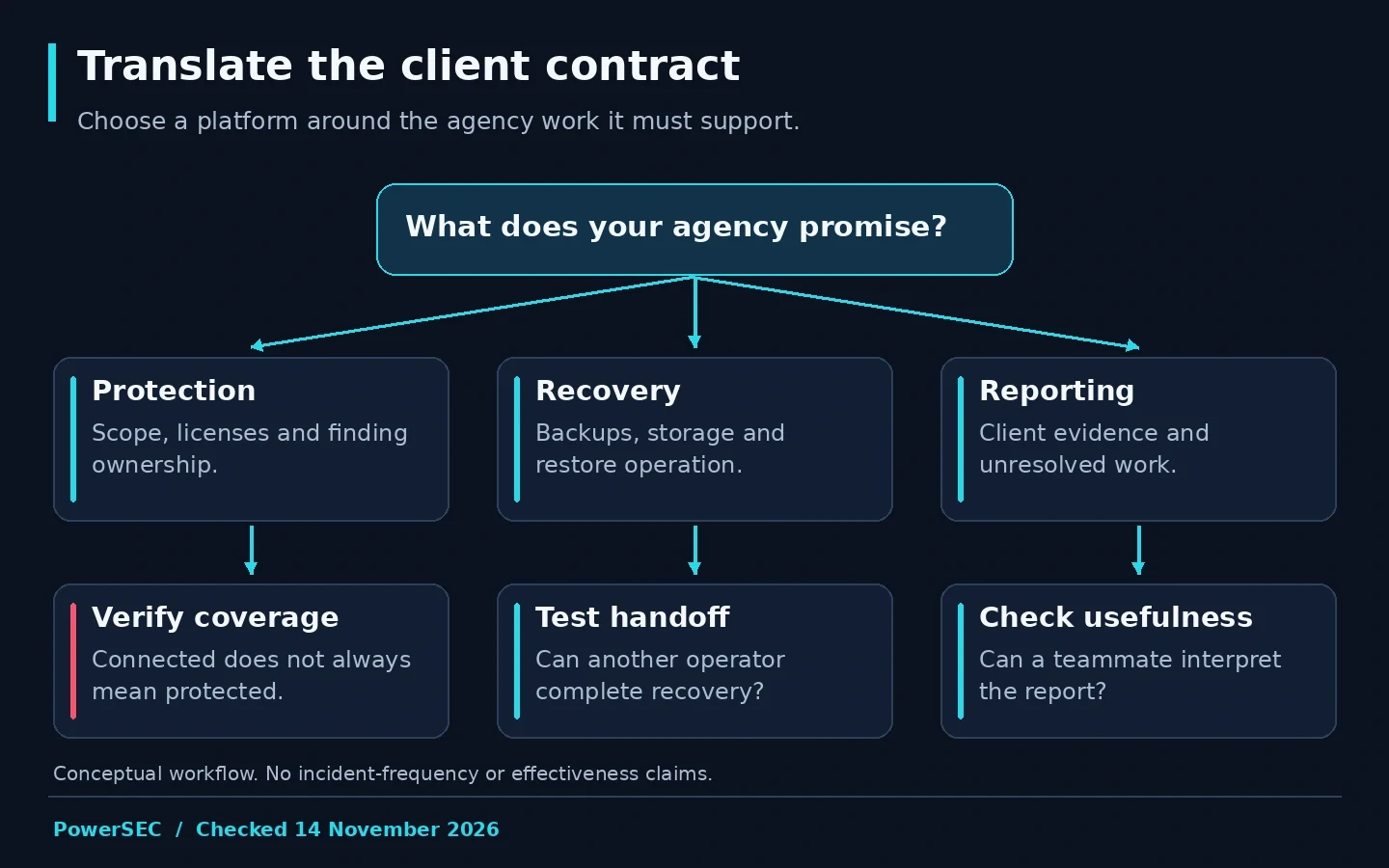
Translate the client contract into responsibilities that the platform and team can actually fulfill.
Does a security check include incident response?
ManageWP explicitly describes Security Check as an alerting service rather than malware removal. That is a useful scope statement. Your agency still needs a response arrangement for findings that require investigation or cleanup.
WP Umbrella's security add-on documents a firewall with virtual patching and daily malware scanning. WP Remote's pricing page separates its security capabilities and cleanup extras. Review the selected entitlement and how a finding becomes an assigned action, not just whether the word "security" appears on the page.
For MainWP, examine both the native extensions and third-party integrations needed for your workflow. An integration can expose another product's capabilities without making its license, service scope or operating responsibilities disappear.
Our suggested pilot follows a benign, known maintenance finding from detection to assignment, correction and verification. Do not launch attacks against client sites to compare products. The objective is to understand the operational handoff and the quality of the evidence the team can retain.
What should a client report demonstrate?
Define reporting requirements before choosing a platform. A useful report separates completed work, current observations and unresolved issues. A large count of scans or blocked requests does not, by itself, show that the important maintenance work was completed.
ManageWP has a Client Report feature, WP Umbrella documents white-label reporting, and MainWP Pro describes branded reports and team roles. WP Umbrella and MainWP should receive credit for the capabilities their current pages describe.
PowerSEC's Agency page documents read-only status links and monthly client reports. In a pilot, check whether the output explains the state your client needs to understand and whether the access model fits your handoff process.
Ask a teammate to interpret the sample report without a verbal explanation. Can they identify what was done, what remains and who owns it? This is a practical usability exercise, not a fabricated satisfaction score or a claim that one vendor's reports are objectively superior.
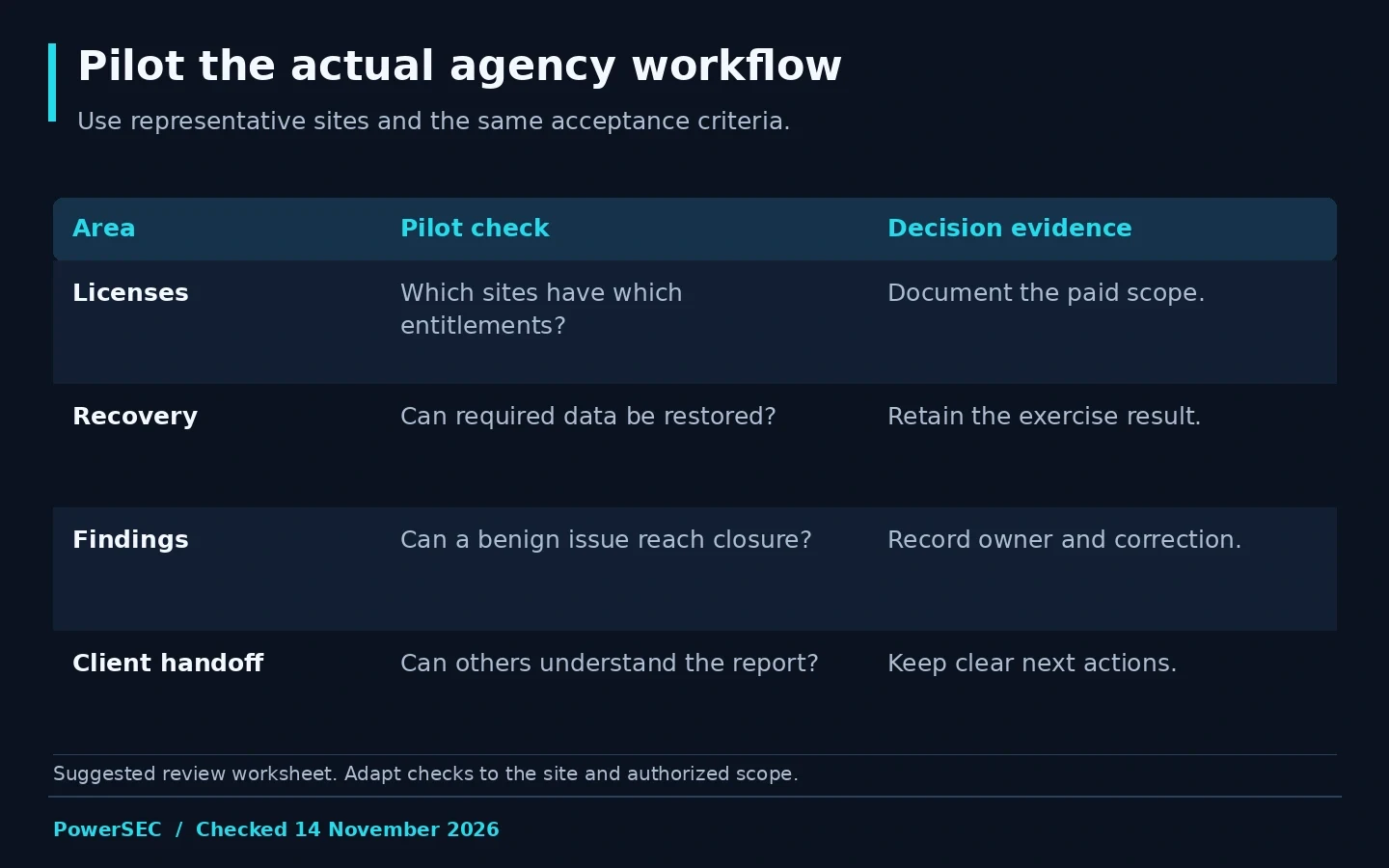
A good pilot tests licensing boundaries and operational evidence as well as the interface.
How do you switch without creating a monitoring gap?
Create a migration inventory with the client, site owner, current subscriptions, backup history and required integrations. Keep the outgoing workflow available until the replacement's relevant functions have been verified. Agree who receives alerts during the transition.
Test connections and permissions with an authorized administrator. Avoid sharing a single personal account across the agency merely to simplify setup. Review which team members can perform sensitive actions and how access will be removed when someone leaves.
Do not assume historical backups, reports or settings will transfer between products. Determine what must be exported or retained and verify access before cancelling an existing service. The migration plan should state which history remains available and where it lives.
Use a staged rollout with documented acceptance checks. PowerSEC's agency onboarding guide can help organize its connection workflow, but the agency still needs to verify client-specific scope, recovery and reporting before treating onboarding as complete.
Where PowerSEC fits
Request PowerSEC Agency access when your priority is a combined security and recovery workflow for protected client sites. The documented package includes Pro Protection features, shared cloud backup capacity, incident tools, bulk operations and client reporting.
Keep the license distinction clear: unlimited connected monitoring sites does not mean unlimited protected sites or unlimited storage. The value proposition is the set of responsibilities covered for the sites you license, not a claim that PowerSEC is the lowest-cost choice for every fleet. Bring your site inventory and backup sizes to the plan discussion.
Bottom line
Shortlist ManageWP alternatives around the work your agency promises to clients. Compare the actual licenses, recovery process, security handoff and reporting evidence. PowerSEC is a relevant option when integrating those security and recovery responsibilities is the operational problem you want to solve.
Sources
Primary sources checked on 14 November 2026: