Checkout Files Upload for WooCommerce has a newly disclosed security flaw with an easy-to-miss condition: leaving "accepted file types" empty. WPScan's advisory, published on 26 October 2026, identifies an unauthenticated arbitrary file upload vulnerability, CVE-2026-103688. Patchstack now includes it among its recently exploited vulnerabilities.
Update the plugin, then check the upload settings and an ordinary customer upload. The fix changes what an empty setting means. For a store accepting customer artwork or documents, verifying that change belongs in the security update task.

Check the upload policy as well as the installed plugin version.
The short version
Question | Answer |
|---|---|
Which component? | Checkout Files Upload for WooCommerce, the |
Which versions? | Releases before 2.4.0 are affected; 2.4.0 is fixed. CVE record, vendor changelog |
What is the vulnerability? | Unrestricted upload of dangerous file types, CWE-434. Server-side code execution additionally depends on the host executing PHP in the upload location. CVE record |
How severe? | CVSS v3.1 9.8, assigned by CISA-ADP in the CVE record. Patchstack separately displays 10.0. CVE metrics, Patchstack |
Current repository release? | 2.4.0, checked on 29 October 2026. WordPress.org API |
Immediate action? | Install the vendor update, verify the allowed file types, and investigate unexplained files. |
All live checks below are dated 29 October 2026, US Eastern time. The release, disclosure and exploitation labels describe different events.
How the Checkout Files Upload flaw works
The plugin provides a customer upload feature around checkout. Its maintainer's documentation describes an accepted-file-types setting. In vulnerable releases, leaving that field blank skips the file-type restriction. WPScan explains that this permits dangerous files as well as normal customer documents.
The broken boundary is between an untrusted upload and the store's permitted content. Calling the flaw arbitrary file upload preserves the vulnerability type. Remote code execution is a possible consequence under the server condition described in the CVE record, rather than a separate outcome demonstrated for every installation.
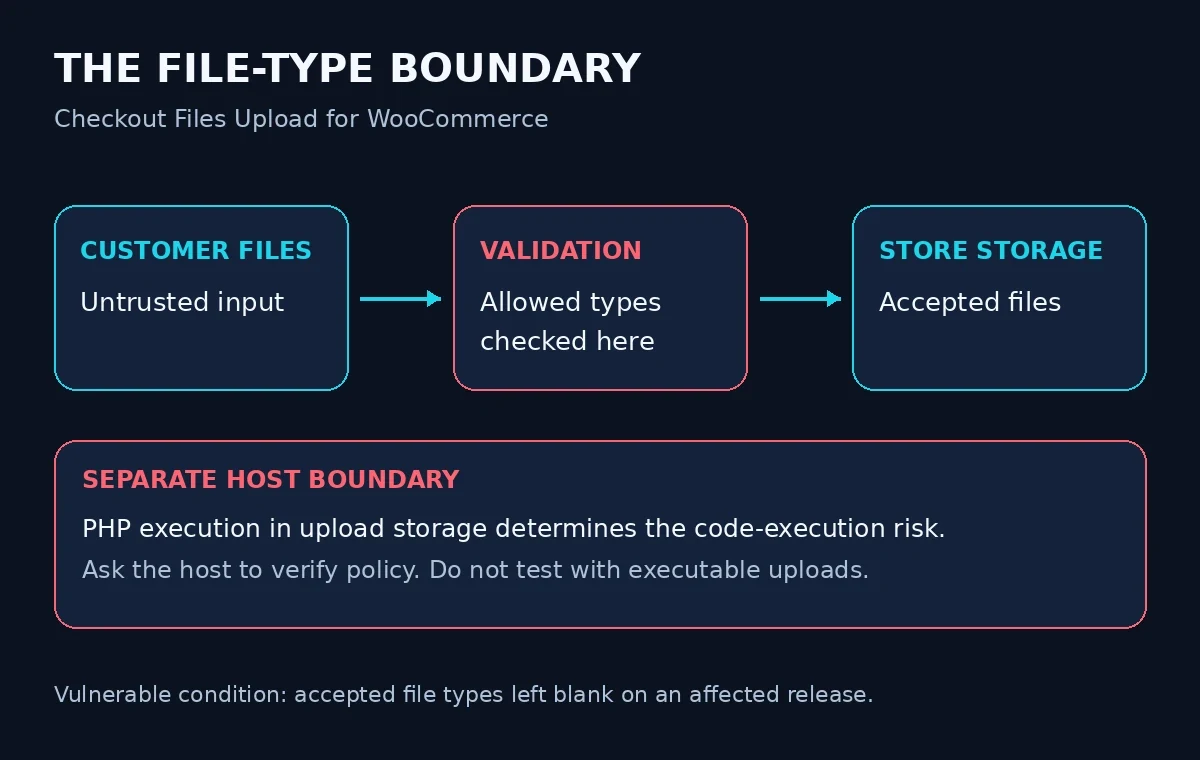
Conceptual boundaries from the WPScan advisory. The diagram contains no exploit request or payload.
Credit goes to Josef Azizov (Spoofable), named as the finder in the CVE record. WPScan is the assigning CNA and coordinator; CISA-ADP supplies the score quoted above. Keeping those roles separate avoids attributing that score to the wrong organization.
What conditions make a store exposed?
The advisory identifies an affected release and an empty accepted-types setting. The attacker needs access to the upload feature but no WordPress account. The CISA-ADP vector also specifies no victim interaction. Code execution requires PHP execution from the upload directory.
Ask your host to verify that last condition from the actual server configuration. A file appearing on disk, a request for that file, and confirmed execution are different findings. For exposure assessment, record each separately. Do not test the condition by uploading executable code to a live shop.
Threat status on 29 October 2026
Exploitation: Patchstack's entry, dated 28 October 2026, labels the flaw known to be exploited. Its statistics page also places the entry in the recently exploited category. These are Patchstack's classifications; the reviewed pages provide no attack totals, victim count or incident timeline.
A source disagreement: CISA's enrichment in the CVE record, timestamped 28 October 2026, records the SSVC exploitation field as none. The public sources are not aligned. We cannot reconcile their underlying evidence, so we retain both assessments and recommend patching.
CISA KEV: The identifier was absent from CISA's official JSON mirror, catalog 2026.10.28, checked today. Patchstack's "KEV" label is its own status, not evidence of a CISA catalog entry.
Public PoC: WPScan says its proof of concept will be displayed on 26 November 2026. We did not verify a publicly accessible PoC elsewhere in this run. The CVE's reference tag exploit does not establish that WPScan currently displays the demonstration. A PoC demonstrates behavior under test conditions; it does not establish how many shops were compromised.
Is my site affected?
Open Plugins > Installed Plugins and locate the plugin. WordPress documents the plugin inventory and update controls. Record its exact installed version before making the change.
Next, open WooCommerce > Settings > Checkout Files Upload, the settings path in the vendor's installation instructions. Record whether accepted file types is blank and where customer uploads are enabled. Capture the configuration privately; customer documents do not belong in a public support ticket.
For routine inventory on a site with no indications of compromise, run this read-only WP-CLI command from its WordPress directory:
wp plugin get checkout-files-upload-woocommerce --field=version --skip-plugins --skip-themesA missing-plugin error is an inventory problem to resolve, not proof that another installation is unaffected. Confirm the site and working directory. WP-CLI also documents that --skip-plugins still loads must-use plugins. If you suspect compromise, have the host inspect preserved files in a trusted environment instead of bootstrapping the site's PHP. WP-CLI global parameters
The vendor sells a Premium edition too. If that is your package, ask WP Wham to confirm its applicable fixed build. The repository version verified here does not establish the state of a different installed package.
What to do
Update first. Install the current compatible vendor release through your normal maintenance process. For the repository package, 2.4.0 is the current fix as checked today. Keep a usable backup and read the version back after updating. Repository API, WordPress update guidance
Then review the behavior change. The changelog dated 20 October 2026 says a blank setting now accepts only certain WordPress-permitted file types. Additional types require an explicit list, including the other types the store needs to accept. This patch predates the advisory; the fresh news is the disclosure and exploited-status listing, not a new release today.
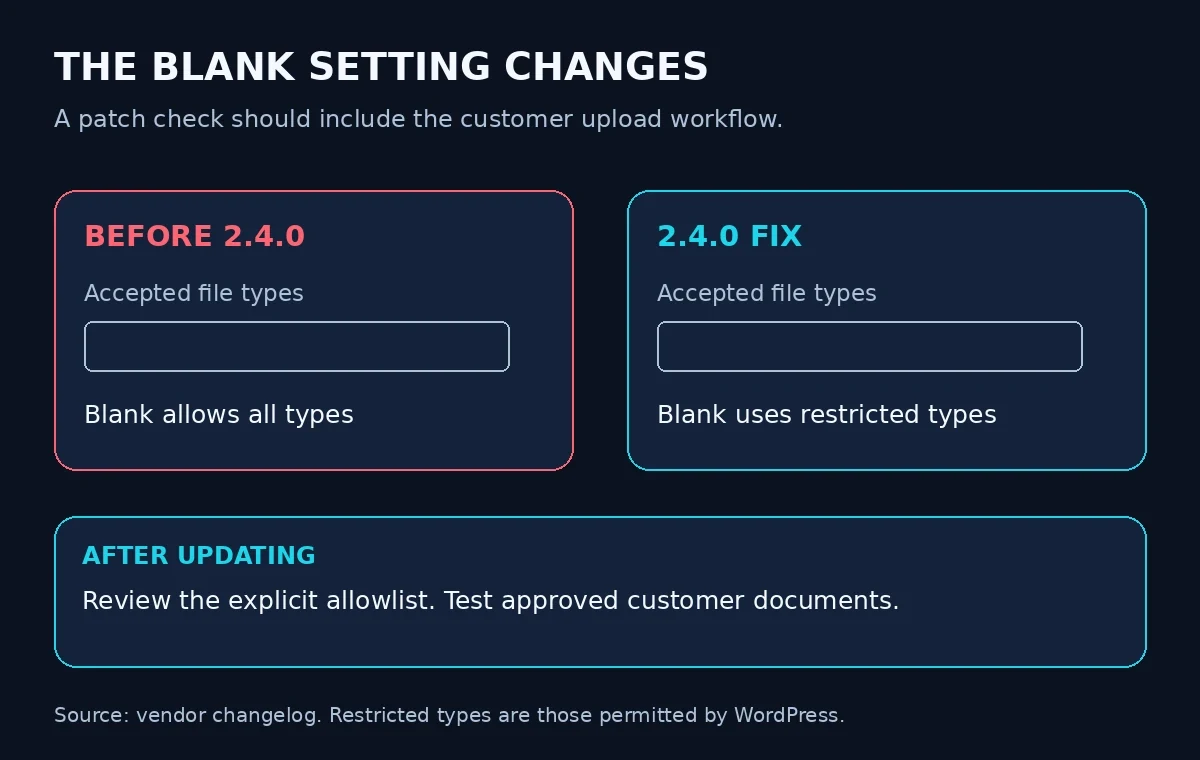
The vendor changelog calls this a breaking change. Verify approved customer uploads after patching.
Our recommended acceptance check is practical: list the business file types the shop actually needs, review that list with the maintainer, and use harmless sample files in staging. Confirm that an approved upload reaches the expected order workflow. Check the rejection message with a harmless disallowed document. Avoid enabling extra formats merely to make a test pass.
If a necessary upload stops working, investigate the allowlist instead of rolling back to the vulnerable release. Ask the host to review execution restrictions in upload storage as a separate hardening task. Keep the vendor update in place while resolving compatibility.
For agencies, put the version, configuration owner, upload-test result and investigation status in the same maintenance record. Our WordPress patch-gap article explains why deployment verification matters. Here, include the store's customer workflow in that verification.
Were you targeted?
The WPScan advisory and Patchstack entry reviewed today do not publish campaign-specific IP addresses, domains or file hashes. The following are generic triage checks, not CVE-specific indicators of compromise.
On a preserved filesystem copy, run this from the copied WordPress directory. It lists selected script-like filenames without executing or deleting them. Substitute your actual upload directory if it differs. find reference
find wp-content/uploads -type f \( \
  -iname '*.php' -o -iname '*.phtml' -o -iname '*.phar' \
\) -print
On an exported, uncompressed access-log copy, this filter looks for requests containing similar paths. The filename is an example; use your retained log. grep reference
grep -niE '/wp-content/uploads/[^ ?"]*\.(php|phtml|phar)([/? ]|$)' example.com-access.logThese commands were tested with harmless matching and nonmatching fixtures. A legitimate file can match. Encoded URLs, alternative directories, other extensions and missing logs can evade these filters. Missing paths or permission errors need investigation; they are not clean results.
Apache's logging documentation explains that recorded fields depend on the configured format. Ordinary request-line logs do not reconstruct the uploaded content. Correlate suspicious paths with retained upload records, file contents and host telemetry before judging what happened.
If findings cannot be explained, preserve a filesystem and database snapshot and involve the host or responder. WordPress's incident guidance recommends preserving evidence and reviewing access during recovery. A completed plugin update does not establish that earlier unwanted files have been removed.
Where PowerSEC fits
As checked today, PowerSEC's pricing page includes local malware and vulnerability scanning in Free, with CISA KEV issues flagged first, and bulk plugin updates in Pro Protection. These can support inventory and follow-up; a scan neither fixes this flaw nor proves a store was not compromised. The vendor update is the fix. For unexplained uploads or access, request a PowerSEC assessment.
Bottom line
Check the installed package, apply the fix and verify the store's allowed uploads. Keep an investigation open where files or activity are unexplained. The useful completion record is a patched plugin, a reviewed file policy and a working customer upload flow, with any evidence gaps stated plainly.
Sources
All sources were fetched on 29 October 2026. Documentation supplies background; the dated vulnerability disclosures supply the news hook.
WPScan advisory: published 26 October, updated 28 October 2026; conditions, fix, researcher and scheduled PoC.
CVE Program record: published and updated 28 October 2026; WPScan CNA description and CISA-ADP metrics.
Patchstack advisory: published 28 October 2026; score and exploited-status label. Recently exploited list: checked today.
Vendor changelog: fixed release dated 20 October 2026. WordPress.org API: current release checked today. Vendor product page: edition context.
CISA's official KEV JSON mirror: catalog 2026.10.28, released 28 October 2026.
Operational references: plugin management, WP-CLI inventory, incident response, find, grep and Apache logs.
PowerSEC pricing: current feature and plan claims checked today.
KEV checked on 29 October 2026 against CISA's official mirror, catalog 2026.10.28: CVE-2026-103688 was not listed. Patchstack separately classifies it as exploited.