UpdraftPlus alternatives are worth comparing when your recovery needs change, not simply because another plugin has a longer feature list. You may want managed storage, a different backup cadence or security and recovery in the same workflow. First identify which problem you are trying to solve.
This guide compares UpdraftPlus with PowerSEC, Jetpack VaultPress Backup and ManageWP Backup. PowerSEC is our product, and the comparison uses documented capabilities rather than an independent performance benchmark. Prices, storage allowances and product details were checked on 14 November 2026. No product is declared universally cheapest or fastest.
Compare the recovery workflow, storage model and limits behind the backup checkmark.
The short version
Product | A useful reason to consider it | Boundary to examine |
|---|---|---|
Backup and migration workflows with multiple storage options | Which Premium features and storage allowance you need | |
Managed cloud backup with optional security automation and own-bucket mirroring | Storage, restore-point and single-backup limits | |
Real-time cloud backup and a restore-oriented activity history | Plan storage and supported site configurations | |
Backup management within a multi-site maintenance dashboard | Free versus Premium cadence and download capabilities |
UpdraftPlus already supports scheduled backups and customer-controlled remote destinations in its free offering. Its official plugin listing makes that clear. A comparison that claims alternatives are necessary just to obtain cloud backup would be misleading.
Which UpdraftPlus alternatives match your actual requirement?
Start with a sentence describing the gap. Examples include needing an easier off-site recovery process, wanting an independent storage copy, or reducing the number of separate security and backup workflows. Treat those as requirements to test rather than reasons to replace a product immediately.
Keep the current system in the shortlist. If UpdraftPlus already meets the requirement with a configuration change or an appropriate plan, that may be a better operational decision than a migration. The cost of learning and validating a new recovery process belongs in the decision even when it is not a software invoice.
List the required recovery scope and the person who will perform it. A site owner relying on host support has different operational needs from an agency with a tested restoration runbook. A feature comparison should explain those tradeoffs rather than award a winner from a count of checkmarks.
What do the displayed prices actually include?
The following are selected public offers as of 14 November 2026. Annual and monthly commitments are labeled explicitly. Taxes, optional storage and other services can add to the total.
Offer | Displayed price | Included scope relevant to this comparison |
|---|---|---|
$70/year | 2 site licenses and 1 GB included storage | |
$100/year, or $10 monthly | 1 site, 25 GB cloud storage, 7 restore points | |
$119.40 billed yearly | Starting at 10 GB, with a 30-day archive | |
$2/site/month | Premium backup workflow; frequency and options should be checked for the intended setup |
These figures do not support a claim that PowerSEC is cheaper than UpdraftPlus Personal. They show different license and storage packages. Compare the configuration you would actually buy, including the cost of any separate storage account.
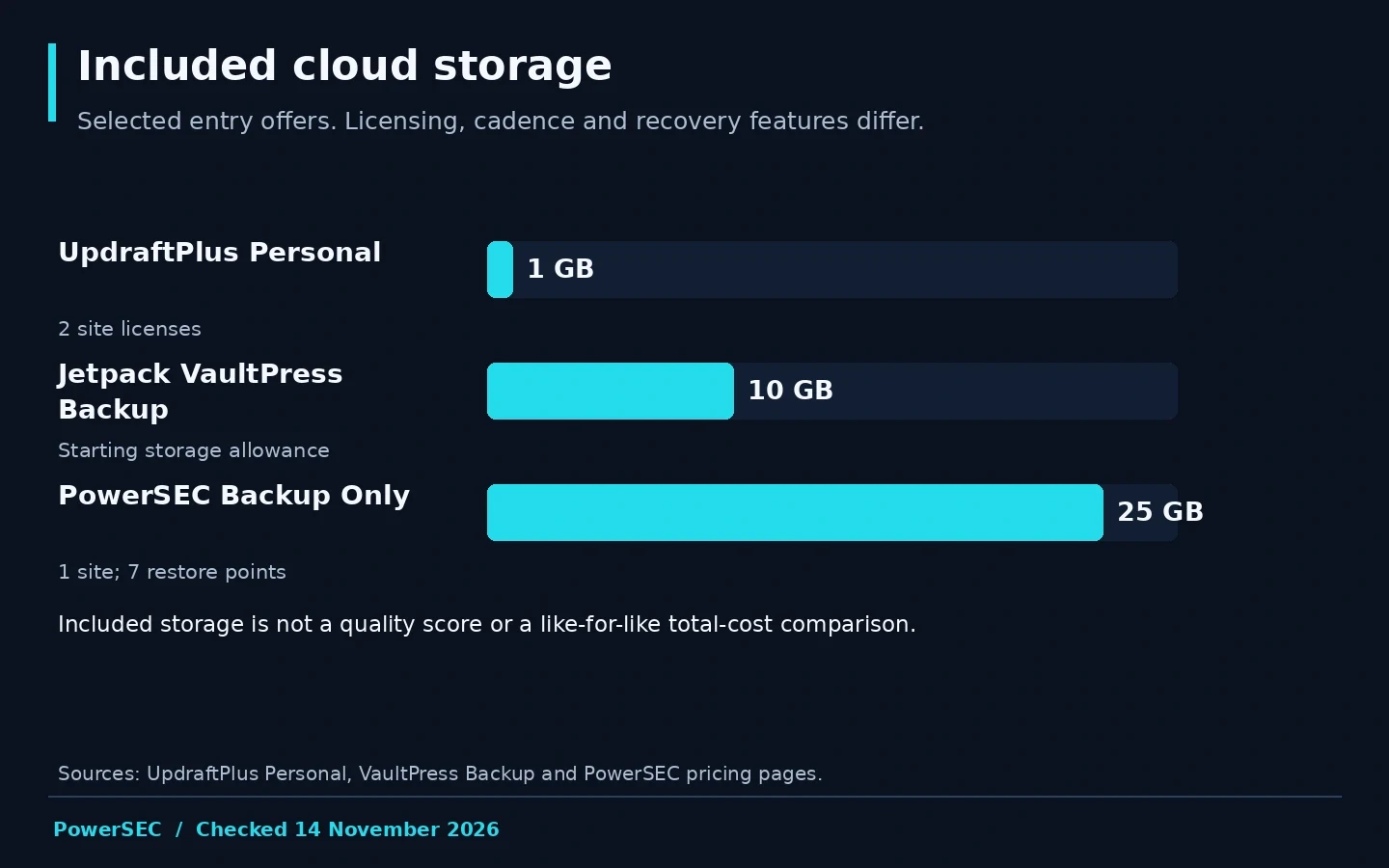
Included storage checked on 14 November 2026: UpdraftPlus Personal 1 GB, VaultPress Backup 10 GB and PowerSEC Backup Only 25 GB. Site allowances and recovery features differ. Sources: linked pricing pages above.
Who owns and pays for the storage?
UpdraftPlus supports remote storage destinations such as customer-controlled cloud accounts. Its storage documentation is the appropriate place to verify the chosen provider and entitlement. Separate the plugin license from the storage account's own pricing, access and retention responsibilities.
PowerSEC's Bring Your Own Storage feature mirrors paid cloud backups into supported buckets in addition to the managed copy. The customer's bucket usage is excluded from PowerSEC's storage quota, but the storage provider can still charge for it. BYOS is available on paid cloud-backup plans, not Free.
Jetpack's VaultPress documentation describes storage on Jetpack infrastructure and says it does not save directly to Google Drive or Dropbox. Downloading a copy is a different workflow from configuring a native destination. Choose based on the control and operational simplicity you require.
For each model, ask who controls credentials, who can retrieve a backup if an administrator is unavailable, and who manages retention. An independent account can be valuable, but only if your team can operate it and recover access when needed.
How do schedule and retention change the decision?
A backup cadence and a retention window answer different questions. Cadence determines how frequently new recovery states are created. Retention determines which older states remain available within the product's policy and capacity.
ManageWP documents monthly free backups and a Premium service with more flexible scheduling. Jetpack markets VaultPress as real-time backup. PowerSEC's paid cloud-backup schedule uses weekly full and daily differential backups, with the database backed up in full each time. These should not be labeled as identical recovery models.
Do not infer guaranteed data-loss or recovery-time figures solely from the schedule name. Check whether jobs completed, whether artifacts are available and how the product handles the site's actual changes. For stores, include a store-specific recovery exercise rather than judging suitability from a general backup label.
Choose the history you need around realistic discovery and rollback scenarios. A longer list of restore points is useful only when the required artifacts remain available and the team understands which point to select.
What limits should you check before moving?
Review site licenses, total storage, maximum individual backup size and supported configurations. These limits can describe different things. Total stored usage is not necessarily the size of the live website or an allowance for every individual restore point.
PowerSEC's Backup Only plan has a 5 GB maximum single backup alongside its 25 GB total cloud allowance. A larger total pool does not erase that per-backup boundary. If the site does not fit, evaluate the appropriate package before starting a migration.
For UpdraftPlus, review the Premium feature list for capabilities such as incremental backups, pre-update backups and multiple destinations. Do not describe these paid features as though they define the free baseline.
Jetpack's current documentation lists configuration limitations, including lack of WordPress multisite support. Verify your own site type rather than assuming a WordPress backup product supports every deployment. Where a vendor's scope is unclear, get written clarification instead of filling a comparison cell with an invented answer.
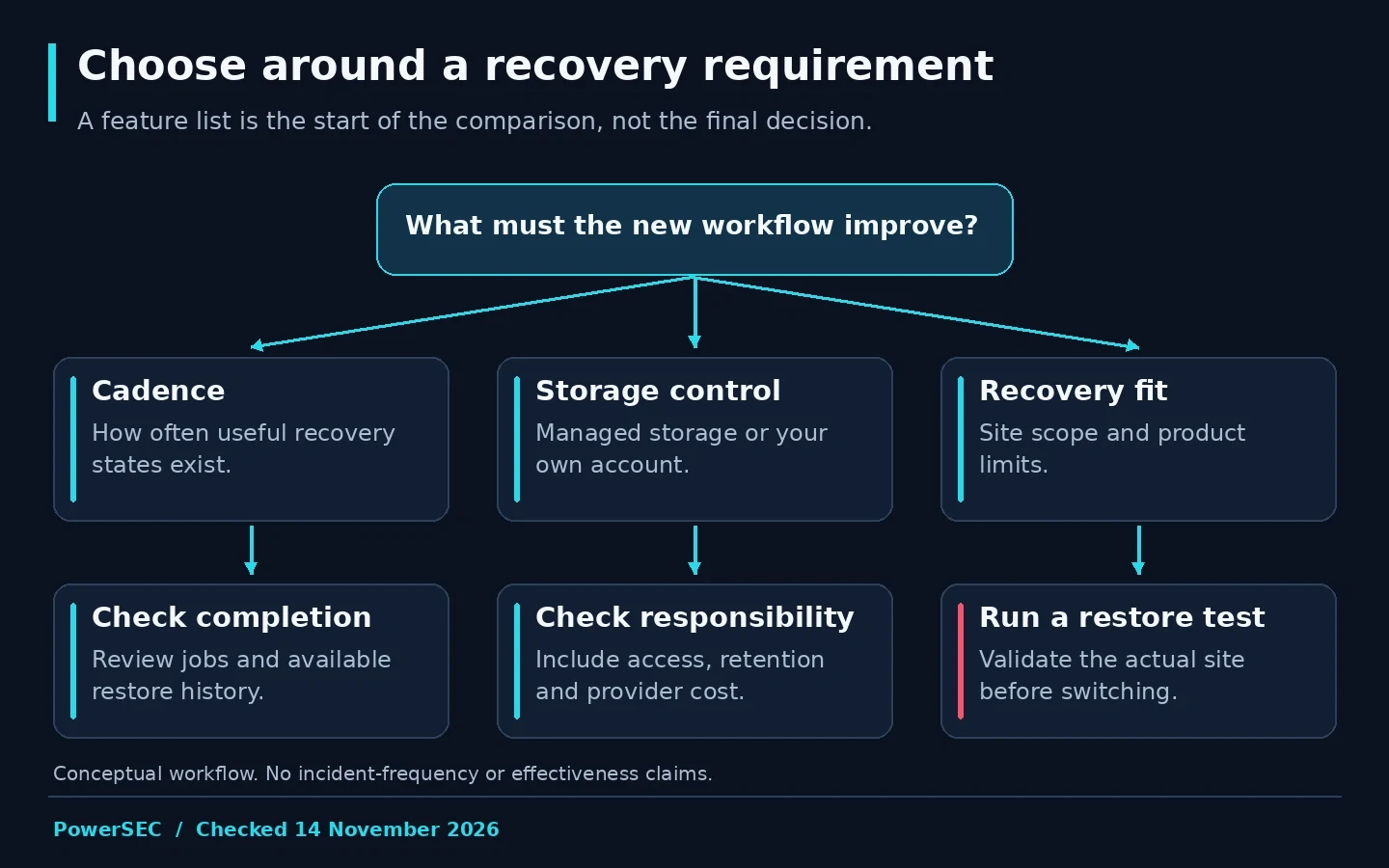
A shortlist should survive a recovery test, not just a pricing comparison.
How should you migrate without losing confidence?
Keep the existing backup process available while the replacement is configured and tested. Document which product is responsible for current backups and which history is retained for recovery. Avoid deleting the old archive merely because the new dashboard shows a connected site.
Run a controlled restore exercise with the proposed product. Verify the scope, access requirements and important site functions. Record any manual work needed. This is the evidence that the new workflow fits your team, rather than a benchmark of every possible recovery situation.
Decide how old restore points will be retained or retired. Confirm the effect of cancellation with the outgoing provider and arrange any downloads or storage transfer that your policy requires. Do not assume a new product can import and use another vendor's backup format.
Finish with an updated recovery runbook and a named owner. A successful migration changes both software and procedure. If only the plugin changes, the person handling the next outage may still be following instructions for the old system.
Where PowerSEC fits
Choose PowerSEC Backup Only when scheduled managed cloud backup and restoration are the main requirements. Pro Protection adds security automation, while Pro + Backup Plus increases the included cloud capacity and restore-point allowance.
The practical attraction is a recovery workflow that can sit beside vulnerability review and incident operations, with optional own-bucket mirroring on paid cloud-backup plans. PowerSEC Free remains local-backup only. A documented feature combination is the reason to consider it, not a claim that UpdraftPlus lacks useful backups or that PowerSEC guarantees a clean restore.
Bottom line
Compare UpdraftPlus alternatives against a specific recovery requirement. Match cadence, storage ownership and limits, then test restoration with your own site. PowerSEC is a relevant option when managed recovery and integrated security operations are the gap you want to close.
Sources
Primary sources checked on 14 November 2026: