WordPress backup test results should answer a concrete question: can your team restore the required site state and demonstrate that the important functions work? A completed upload, a checksum match and a healthy-looking dashboard are useful observations, but they do not each answer that question on their own.
This guide describes a controlled recovery exercise and the evidence to keep afterward. It is for routine readiness, rather than choosing a clean backup during an active compromise. WordPress, WooCommerce and PowerSEC documentation were checked on 14 November 2026. No recovery-time benchmark is claimed.

A recovery exercise should produce evidence of the restored application's behavior.
The short version
Check | What it establishes | What remains to verify |
|---|---|---|
Backup job completed | The job reported completion | Required content and usable artifacts |
Artifact available | A copy can be accessed | Integrity and restoration |
Checksum matches | The copy matches the recorded digest | Whether the saved state is appropriate and functional |
Restore completes | The restoration process finished | Business workflows and data correctness |
Acceptance checks pass | The tested functions worked | Untested functions and future changes |
Treat these as distinct evidence items. A stronger readiness record explains which checks were performed and where uncertainty remains.
What should a WordPress backup test prove?
Define the recovery objective before selecting a backup. Which site is being restored? Which components must be included? Who needs to access the result? Which functions matter to the business? Write those answers in a brief test plan.
WordPress's backup documentation separates site files from the database. Use that distinction to confirm the selected scope. A file archive, a database export and a full backup should not be treated as interchangeable merely because they appear in the same dashboard.
Choose acceptance checks based on the site's purpose. An editorial site might prioritize recent content, media and editorial access. A membership site needs its own access checks. A store needs order and payment-related testing appropriate to its configuration.
Our recommendation is to define success as a set of observed results, not a percentage score. That makes it possible to repeat the exercise after a hosting change or major site modification and compare like with like.
Prepare an isolated recovery environment
Agree with your host or developer where the test will run. Keep the recovery target separate from production and restrict access to the people performing the exercise. Document which environment is live and which is the test before any restore begins.
Review outbound email, payments and integration behavior. A copied site should not unintentionally send real customer notifications or trigger fulfillment. WooPayments documents development-mode safeguards for copied development and staging sites; use the relevant provider's controls for your own payment setup.
Use approved test identities and protect any personal data contained in the backup. Define who can access the environment and when it will be removed. Avoid leaving a long-lived, unmaintained copy online after the exercise.
Record the prerequisites that took effort to obtain: storage access, recovery credentials, host assistance or an unavailable license. Those are recovery dependencies. Discovering them during a drill is useful even if the eventual restore succeeds.
Inspect the backup set before restoration
Identify the exact restore point and the artifacts required by the chosen scope. Confirm that the copies are available through the method you expect to use during a real incident. A backup that can be seen in a list but cannot be retrieved needs investigation before the drill continues.
Review exclusions and dependencies. Ask whether required custom directories, database tables or external assets are included or restored separately. Do not silently change the scope to make an incomplete exercise appear successful.
For PowerSEC, the restore safety documentation describes artifact availability checks, stored SHA-256 checksum checks, a current-state checkpoint and environment checks before destructive steps. Those checks are part of the restoration process; they should not be represented as a previous full application test.
If the artifact or integrity checks fail, retain the error and resolve the cause. Do not bypass a failed safety check merely to produce a completed status. The failure is a useful readiness finding that should have an owner and a corrective action.
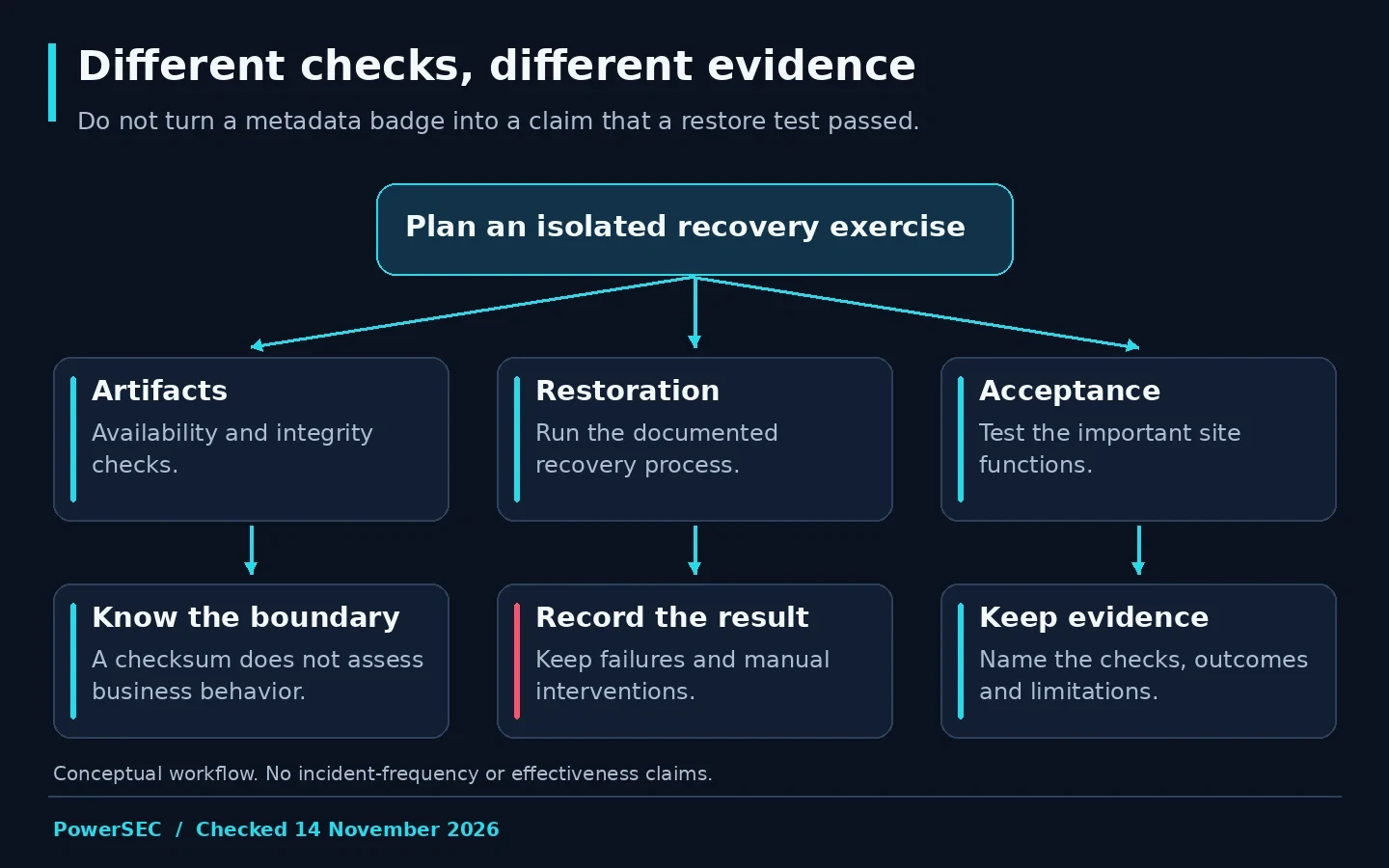
Each stage establishes something different about recovery readiness.
Run the restore and record the observed result
Use the backup product's documented procedure for the selected recovery scope. Have an authorized operator confirm the target environment before proceeding. Keep a record of the restore point, start time, completion or failure time and any intervention required.
Measure the exercise rather than inventing an expected duration. If your team records elapsed time, describe the environment and scope beside the result. A test on an isolated clone does not automatically predict production recovery time under incident conditions.
Capture errors as evidence. Record whether the issue came from missing artifacts, unavailable access, environment capacity or an application problem after restoration. This distinction helps determine whether the backup process, hosting preparation or site configuration needs work.
Do not stop at a completed progress bar. Move to the acceptance plan and document what the restored site actually does. If a check cannot be performed in the isolated environment, say so and define a suitable alternative rather than marking it passed.
Which functions should you verify?
The following is a proposed worksheet, not a universal completeness guarantee. Adapt it to the site's real purpose and retain the observed outcome for each row.
Area | Example acceptance question | Evidence to retain |
|---|---|---|
Access | Can the intended test role use the required function? | Role, function and result |
Content | Are selected pages and media present? | Checked URLs and observations |
Forms | Does the test submission reach the controlled destination? | Redacted result and delivery confirmation |
Store | Does the approved test checkout produce the expected state? | Test-order reference and observed outcome |
Integrations | Are test connections behaving as intended? | Destination owner and verification result |
Operations | Are relevant background tasks and errors reviewed? | Review note and unresolved items |
For store recovery, include the reconciliation problem in the exercise. WooCommerce's Subscriptions backup guidance warns that restoring an older database can remove later records and affect already processed scheduled activity. A functional clone does not establish that a real production rollback would preserve subsequent business events.
What does a readiness badge really mean?
Read the product's definition. PowerSEC's restore-confidence states are based on backup records and checksum metadata. A Healthy state means that metadata looks complete; it is not a guarantee that a full restore exercise has already passed.
That distinction is useful rather than disappointing. Metadata can help identify obvious readiness problems before recovery is needed. A controlled restore test supplies a different kind of evidence. Keep both results and their dates instead of treating them as competing descriptions of the same test.
Our suggested status note states the restore point examined, the checks performed, their outcomes and limitations. Avoid converting the note into "fully recoverable" if only metadata was reviewed. Clear wording helps a future responder understand what preparation actually exists.
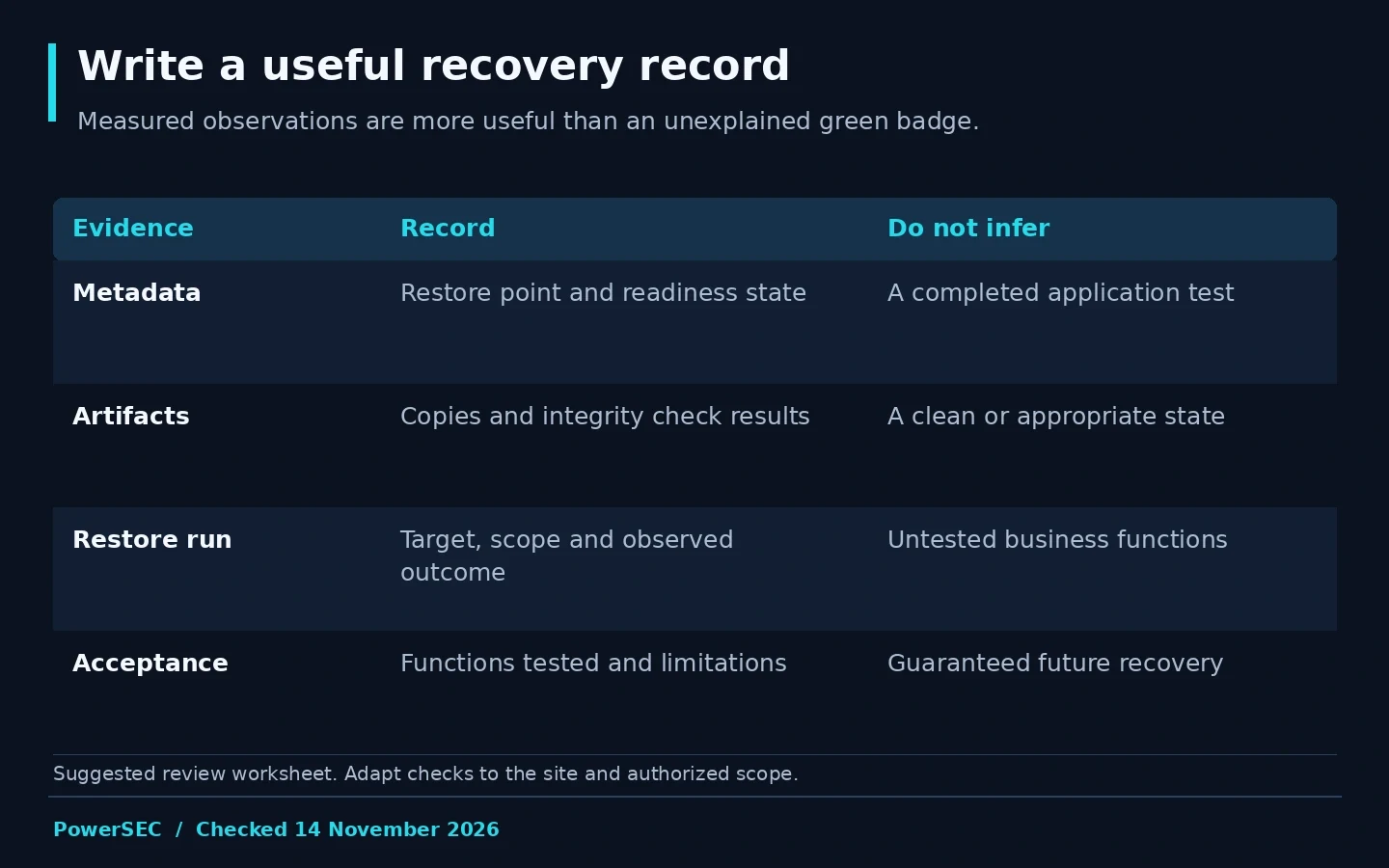
Keep metadata checks, restore execution and business validation as separate dated evidence.
Turn the drill into a recovery runbook
Document the procedure that worked, including access prerequisites, storage location and support contacts. Keep secrets in the approved credential system and refer to them by location rather than copying them into the runbook.
Assign corrective actions for every unresolved finding. If the first test failed and a later attempt passed, retain both outcomes and explain the change. The failed attempt often reveals the dependency that would otherwise surprise the team during an outage.
Choose when to repeat the exercise based on material changes to the site, host, backup configuration or recovery responsibilities. Do not invent a universal testing frequency that ignores the business. Record the next review owner so the runbook stays connected to an actual process.
Where PowerSEC fits
PowerSEC Backup Only is the relevant starting plan when scheduled cloud backup and restoration are the main need. Pro Protection and Pro + Backup Plus combine that recovery capability with additional security workflows, while Agency provides shared capacity for protected client sites.
Use the documented readiness states and restore checks to prepare the exercise, then perform the application-level validation appropriate to your site. PowerSEC's metadata checks support recovery planning; they do not replace the drill described here or establish that a saved state is free of compromise.
Bottom line
A useful backup test leaves behind a repeatable procedure and observed results. Verify access to the artifacts, complete the restore in a controlled environment and test the site's important functions. When something fails, treat it as a readiness finding to resolve before the backup is needed under pressure.
Sources
Primary sources checked on 14 November 2026: