The LatePoint vulnerability disclosed on 6 November 2026 can let an unauthenticated attacker take over a booking customer's account. The CVE record, published the following day, identifies CVE-2026-118066 and credits researcher Jakub Herman.
For an agency, the easily missed question is where those customer accounts live. LatePoint maintains its own customer records and can link them to WordPress users. Checking only the WordPress administrator list leaves part of that account inventory unexamined. The vendor's account-linking settings explain that relationship.
Update the plugin, then review the booking accounts and any linked WordPress access.
The account review should follow the booking system your customers use.
The short version
Question | Answer |
|---|---|
What is the flaw? | Authentication bypass leading to customer-account takeover, classified as CWE-287: Improper Authentication in the CVE record. |
Which versions are affected? | Through 5.7.6, inclusive. CVE affected range |
What fixes it? | 5.7.7 is the first fixed release, according to WPScan and Patchstack. |
What is current? | The WordPress.org API reports 5.7.8, checked on 8 November 2026. |
How severe? | CVSS v3.1 9.1, Critical, assigned by Wordfence, the CNA. Other databases display different scores, discussed below. CVE metrics |
What should I check? | Installed version, LatePoint customer accounts, the WordPress account-linking setting, and unexplained reset or booking activity. |
All current-state checks below are dated 8 November 2026, US Eastern time. Publication dates and release dates describe different events.
How the LatePoint vulnerability works
A password-reset request should establish that the requester is entitled to change the intended customer's credentials. In the affected code, customer-supplied input can change how the underlying account lookup is interpreted. That weakens the connection between a reset request and the account it is supposed to authorize. WPScan's description
This LatePoint account takeover can expose the affected customer's bookings, orders and personal information. Where WordPress account linking is enabled, the impact can extend to the linked Subscriber or Customer account. Those are the roles described by the CNA; this advisory should not be relabeled as automatic administrator takeover or remote code execution.
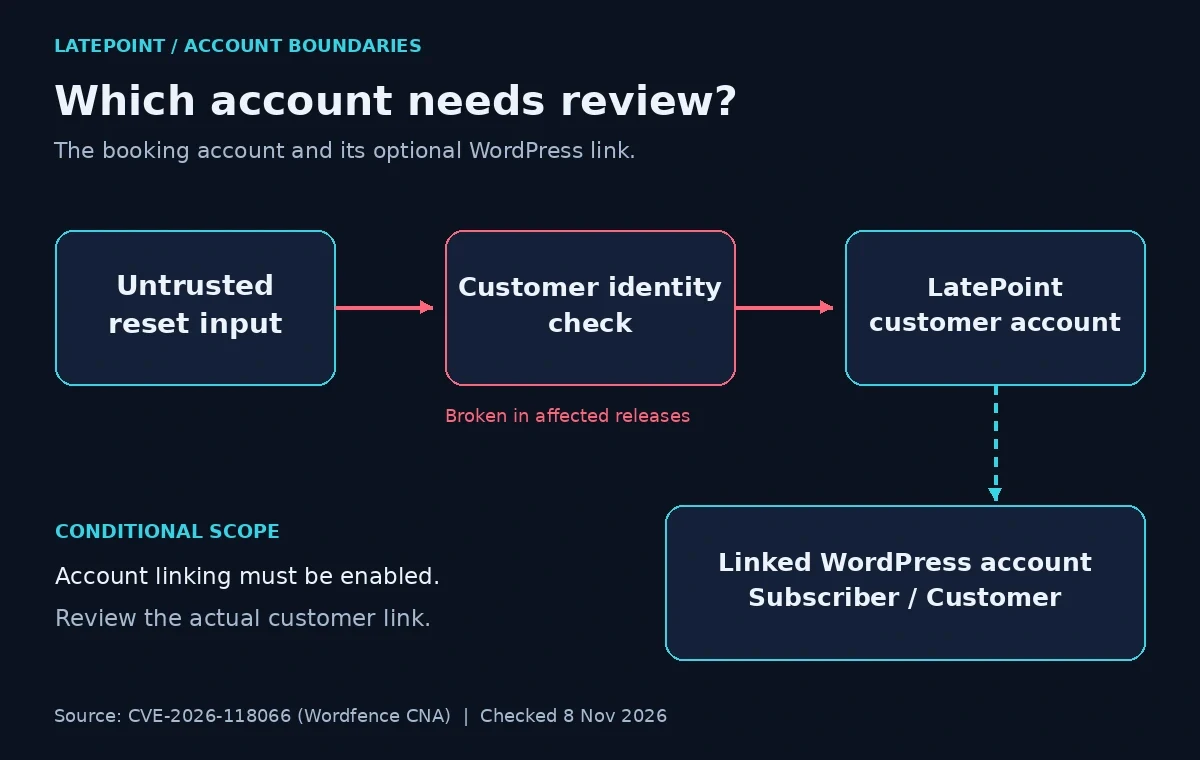
Conceptual impact boundaries from the CVE record. The WordPress-account branch depends on account linking.
That distinction changes the investigation. An attacker who obtains an existing customer account need not create a new administrator. The relevant questions include whether the customer still controls their login and whether their bookings or profile changed unexpectedly. This is our incident-review recommendation based on the documented impact.
What conditions matter?
The vulnerable plugin must be present with the relevant public customer-reset functionality reachable. The CNA's vector specifies no attacker privileges and no victim interaction. Its description also identifies password-reset state as part of the exploit conditions. Do not assume the absence of a reset request reported by a customer proves the site was unreachable.
Account linking is an additional scope question. The vendor's "Use WordPress users as customers" option connects customer records with WordPress identities. Its settings code describes automatic linking and a configurable default role for newly created WordPress users. Record the actual configuration and review existing links.
LatePoint also offers password and OTP authentication options in its authentication guide. That feature list does not establish a workaround for this CVE. Do not treat switching the visible login method as a verified substitute for installing the patch.
Threat status on 8 November 2026
Exploitation reports disagree. Patchstack's entry, published 7 November 2026, labels the issue "Known to be exploited!" Its generic risk text also says exploitation is expected, and the page provides no campaign timeline or victim count. We are reporting Patchstack's classification, not an independently measured attack total.
Meanwhile, CISA-ADP's assessment in the CVE record, timestamped 8 November 2026, records its exploitation field as none. The public evidence does not let us reconcile those assessments.
CISA KEV: The identifier is absent from CISA's official catalog mirror, catalog 2026.11.06, checked today. Patchstack's own KEV label is separate from CISA's catalog. Absence from the latter does not prove that attacks have not occurred.
Severity also differs. Patchstack displays 9.8, while WPScan displays 6.5, Medium, and marks its entry Verified: No. We use Wordfence's 9.1 CNA metric as the article's reference score. These figures are assessments of the same flaw, not numbers to average or estimates of compromised sites.
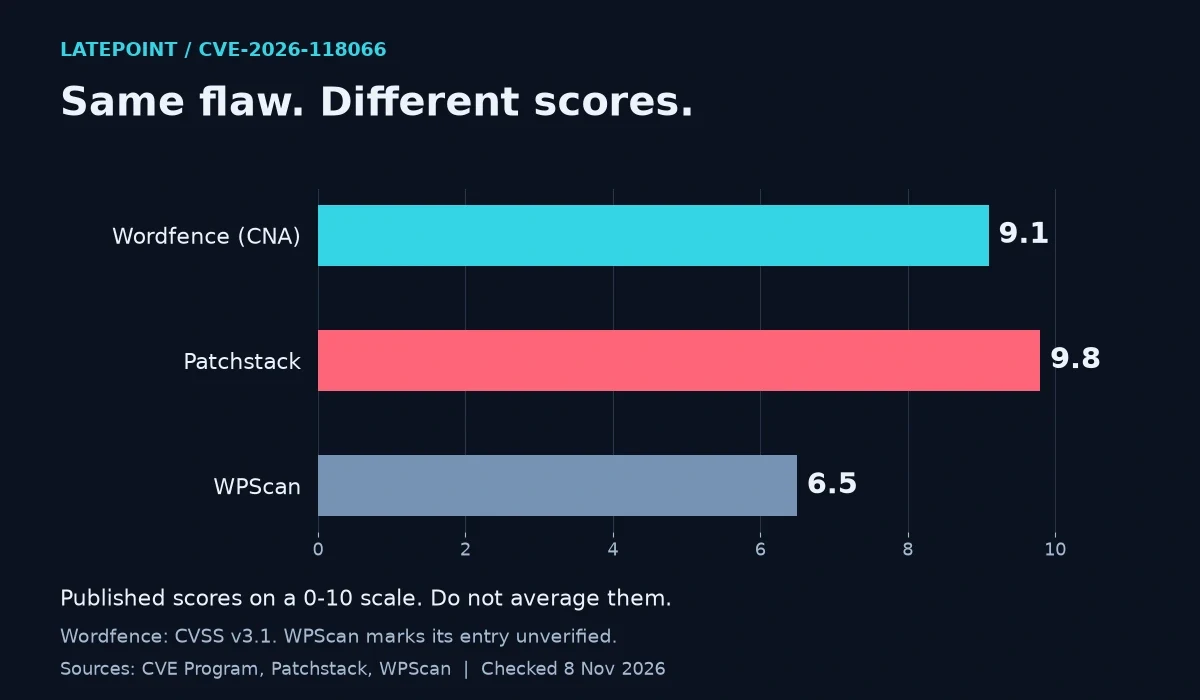
Scores retrieved on 8 November 2026 from the CNA record, Patchstack and WPScan. The chart preserves the disagreement; it does not measure exploitation.
Public PoC: The fetched WPScan entry does not contain a standalone demonstration, and our GitHub repository search returned no matching repository. This limited check does not establish that no public PoC exists. The CVE already publishes technical details. A PoC would demonstrate behavior under test conditions; it would not establish attacks against your site. No exploit was executed for this article.
Is my site affected?
Open Plugins > Installed Plugins and find LatePoint. Record the complete version, using the WordPress plugin-management screen.
For routine inventory on a site without indications of compromise, run this read-only WP-CLI command from its WordPress directory:
wp plugin get latepoint --fields=name,status,version --format=table --skip-plugins --skip-themesCompare the result with the affected and fixed ranges above. A missing-plugin error requires checking the installation and directory being queried. It is not a fleet-wide result.
WP-CLI documents that --skip-plugins still loads must-use plugins. If compromise is suspected, ask the host to inspect a preserved copy in a trusted environment instead of loading the site's WordPress installation.
Next, use LatePoint > Settings > Authentication, the path in the vendor guide, and locate "Use WordPress users as customers" in the customer settings. The current settings source places that toggle in its WordPress subsection.
Record these separately:
Review area | What to establish |
|---|---|
LatePoint customer records | Who owns the booking account, and whether reported changes are expected. |
WordPress account links | Whether linking is enabled and which existing WordPress identity corresponds to the customer. |
Customer-facing pages | Which login and dashboard pages the business actually uses. |
The vendor's customer-dashboard documentation explains that customers can log in and manage appointments through a page containing its dashboard shortcode. Include that page in your maintenance checks.
What to do
Install the vendor update first. Use the current compatible release through your normal update process, with a usable backup available. LatePoint's changelog dates the first fixed release to 2 November 2026 and the current repository release to 3 November 2026. The fresh hook is this week's disclosure, not a claim that the patch shipped today.
Read the installed version back after deployment. Then use controlled test accounts and harmless bookings on staging to check the normal customer journey:
Sign in using the authentication method the site actually offers.
Complete an ordinary password reset where password login is used.
Verify that the expected customer sees their own appointments.
Where linking is enabled, confirm the intended WordPress identity and role.
These are acceptance checks we recommend, not an attempt to reproduce the vulnerability. Keep production customer data out of test reports.
If you cannot update promptly, ask the maintainer or host to restrict the affected booking functionality while arranging the fix. Plan a temporary contact or booking route with the business owner. Avoid assuming that hiding a login button disables its server-side functionality.
For agencies, add the customer-account review to the update ticket. Our Contact Form 7 maintenance guide applies the same practical discipline to a different feature: verify the customer workflow after the software change.
Were you targeted?
The reviewed Patchstack and WPScan entries do not supply campaign-specific malicious IP addresses or file hashes. Use the following as investigation leads, not confirmed indicators of compromise.
Ask the host to preserve relevant logs and database history before cleanup. WordPress's incident guidance recommends documenting the incident and retaining a snapshot. Review unexpected reset emails, customer lockout complaints, changed profile details, and disputed appointment activity with the business owner.
For a database review, a responder can run this read-only query against a preserved copy. Replace wp_ with the actual site's table prefix. On Multisite, identify the relevant site's table. The plugin's table definition and customer model establish these names and fields.
SELECT id, wordpress_user_id, created_at, updated_at
FROM wp_latepoint_customers
ORDER BY updated_at DESC, id;
This lists customer identifiers and account links without selecting passwords or reset tokens. Keep the output private. Correlate unexpected records with the customer and retained history.
An update timestamp is not a password-reset audit log. The base model updates that field during ordinary record writes too. A recent date is a lead for review, not proof of account takeover; an older date does not clear the account.
If retained application or WAF logs include the relevant route name, this fixed-string search can help locate entries. Use a local, exported log copy:
grep -nF -- 'customer_cabinet__change_password' example.com-application.logThe route name appears in the advisory and also represents legitimate activity. A match is not an exploit verdict. Standard Apache request-line logs do not record complete submitted request bodies, so the marker may be absent even when the request reached the application. Missing logs, encoded values and other logging formats remain limitations.
These commands were tested with harmless fixtures, including missing-plugin and missing-log cases. They do not attempt authentication or send an exploit. If account changes cannot be explained, involve the host or responder to assess access, recovery and customer impact. An empty search cannot close that investigation.
Where PowerSEC fits
PowerSEC's pricing, checked today, includes vulnerability scanning on every plan, including Free, with CISA KEV findings flagged first. Bulk plugin updates are included in Pro Protection, Pro + Backup Plus and Agency. These features support inventory and rollout. The free external scan checks public signals and cannot inspect private customer records. A scan does not repair this flaw or establish that an account was untouched. The vendor update is the fix.
Bottom line
A familiar administrator list is not the completion test for this incident. Verify the patched LatePoint release, review its customer accounts and WordPress links, and check that the normal booking login works.
Keep the software result and the investigation result separate in the handoff. The useful record says what changed, which accounts were reviewed, and what evidence was unavailable.
Sources
All sources were fetched on 8 November 2026. Undated technical documentation supplies background.
CVE Program record: disclosed 6 November, published 7 November, updated 8 November 2026. Type, CNA score, affected range, researcher credit and CISA-ADP assessment.
WPScan advisory: publicly published 6 November, updated 7 November 2026. Fixed version, impact, score and verification label.
Patchstack advisory: published 7 November 2026. Fixed version, score and exploited-status label.
LatePoint changelog and WordPress.org API: release dates and current version.
CISA's official KEV mirror: catalog 2026.11.06, released 6 November 2026.
Vendor references: authentication, dashboard, account-linking settings, customer model, table names and record timestamps.
Operational references: WP-CLI inventory, plugin management, GNU grep, Apache logs and WordPress incident response.
GitHub repository search: limited public-PoC check dated 8 November 2026.
KEV checked on 8 November 2026 against CISA's official mirror, catalog 2026.11.06: CVE-2026-118066 was not listed. Patchstack separately labels it known to be exploited.