The WordPress Click2Shell vulnerability lets an attacker silently install a theme on your site if a logged-in administrator opens one crafted link, and, if that theme is one of the dozens with an unprotected installer, turn the install into remote code execution. WordPress fixed it in 7.1.1 on 17 September 2026, with backports to older branches. If your sites are on 7.1.2 (or the latest release on your branch), you already have the fix. Here is how the chain works, what it really needs to succeed, and how to check whether anyone tried it.
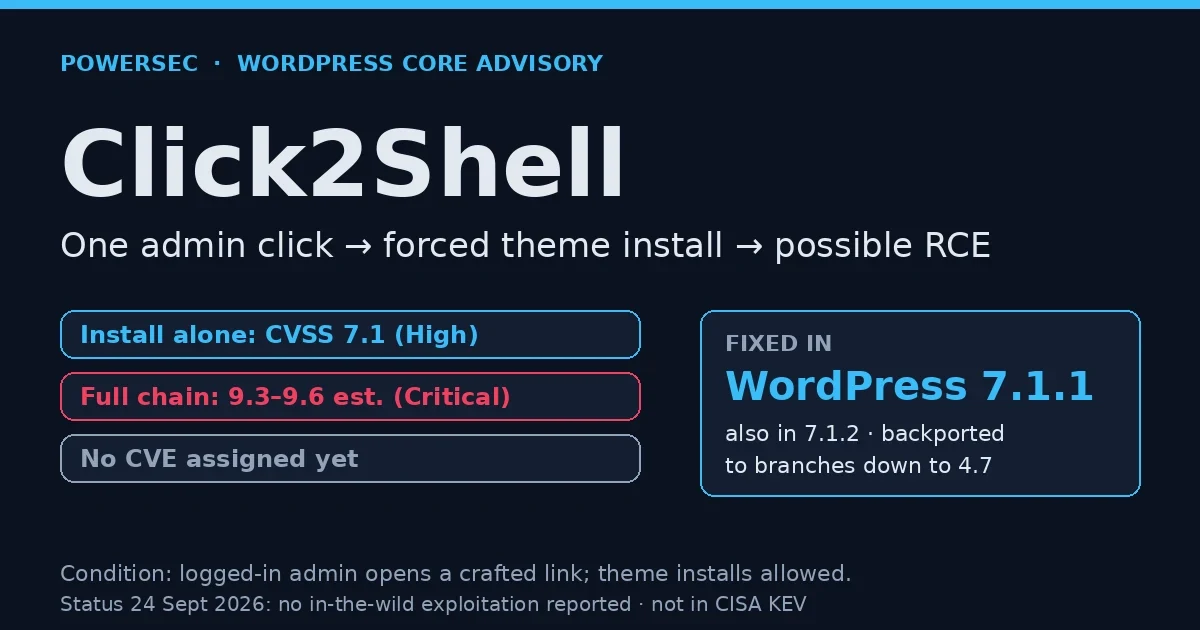
On 18 September 2026, researcher Paulos Yibelo of pwn.ai published the full technical write-up of Click2Shell, one day after WordPress shipped the fix in its 7.1.1 maintenance and security release. It is one of eleven security fixes in that release, and it has drawn attention because it touches WordPress core rather than a plugin, every self-hosted site that allows theme installation had the vulnerable code.
It is also a useful reminder that "needs an admin to click something" is not the same as "safe". Here is the honest picture.
The short version
Name | Click2Shell (WordPress core theme-installer selector injection) |
Identifiers | No CVE assigned in the reports we reviewed (WordPress said one would follow) |
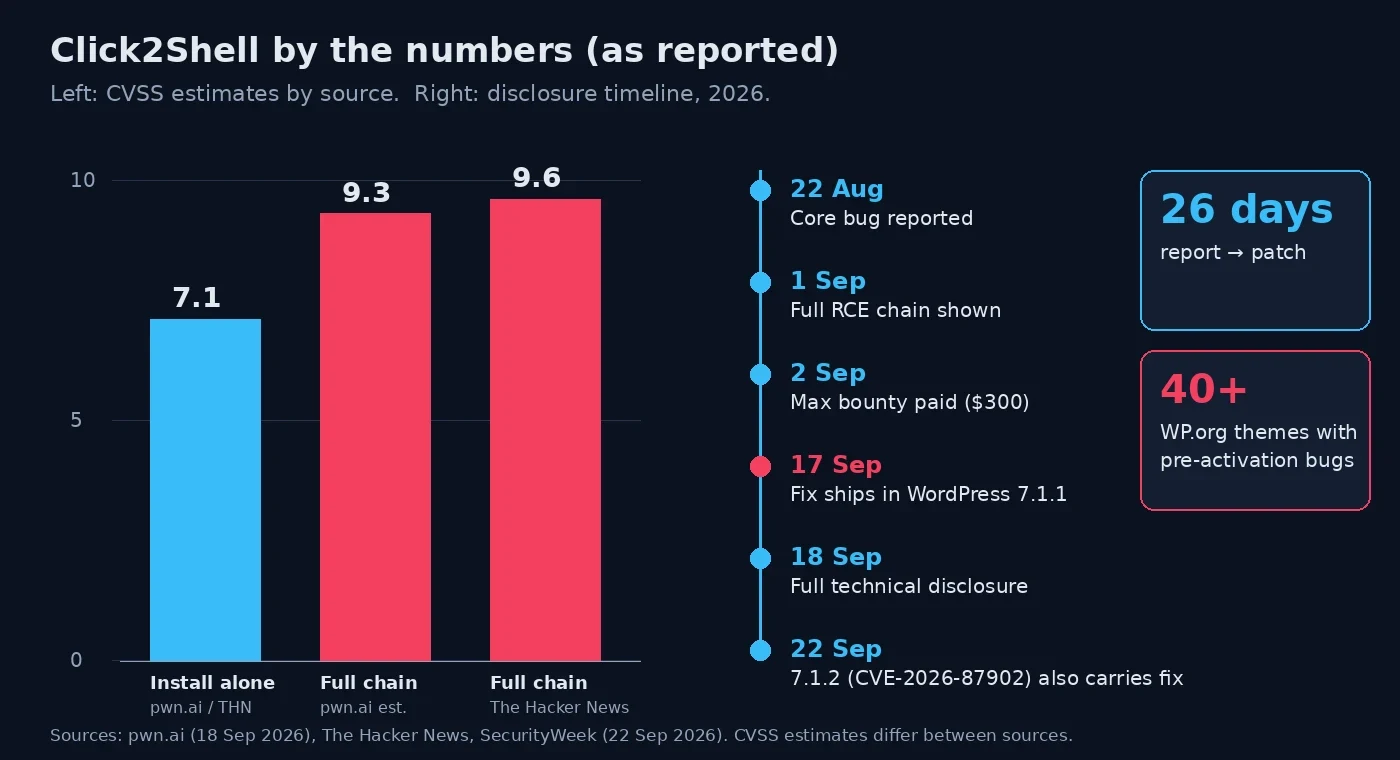
Severity | CVSS 7.1 (High) for the forced install alone; 9.3–9.6 (Critical) estimated for the full chain, sources differ |
Affected | WordPress core before 7.1.1, sources disagree on the oldest affected branch (see below) |
Fixed in | 7.1.1 (17 Sept 2026), backported to supported branches down to 4.7; also included in 7.1.2 |
Authentication | Attacker needs none, but a logged-in administrator must open the crafted link |
Precondition | Theme installation allowed (no |
Class | CSRF-style forced action via jQuery selector injection → chained RCE |
Discovered by | Paulos Yibelo / pwn.ai |
Exploitation | No in-the-wild exploitation reported as of 24 Sept 2026; technical write-up public |
How does the Click2Shell vulnerability work?
Click2Shell is not a single broken function. It is a disagreement between two parts of WordPress about what a piece of text means.
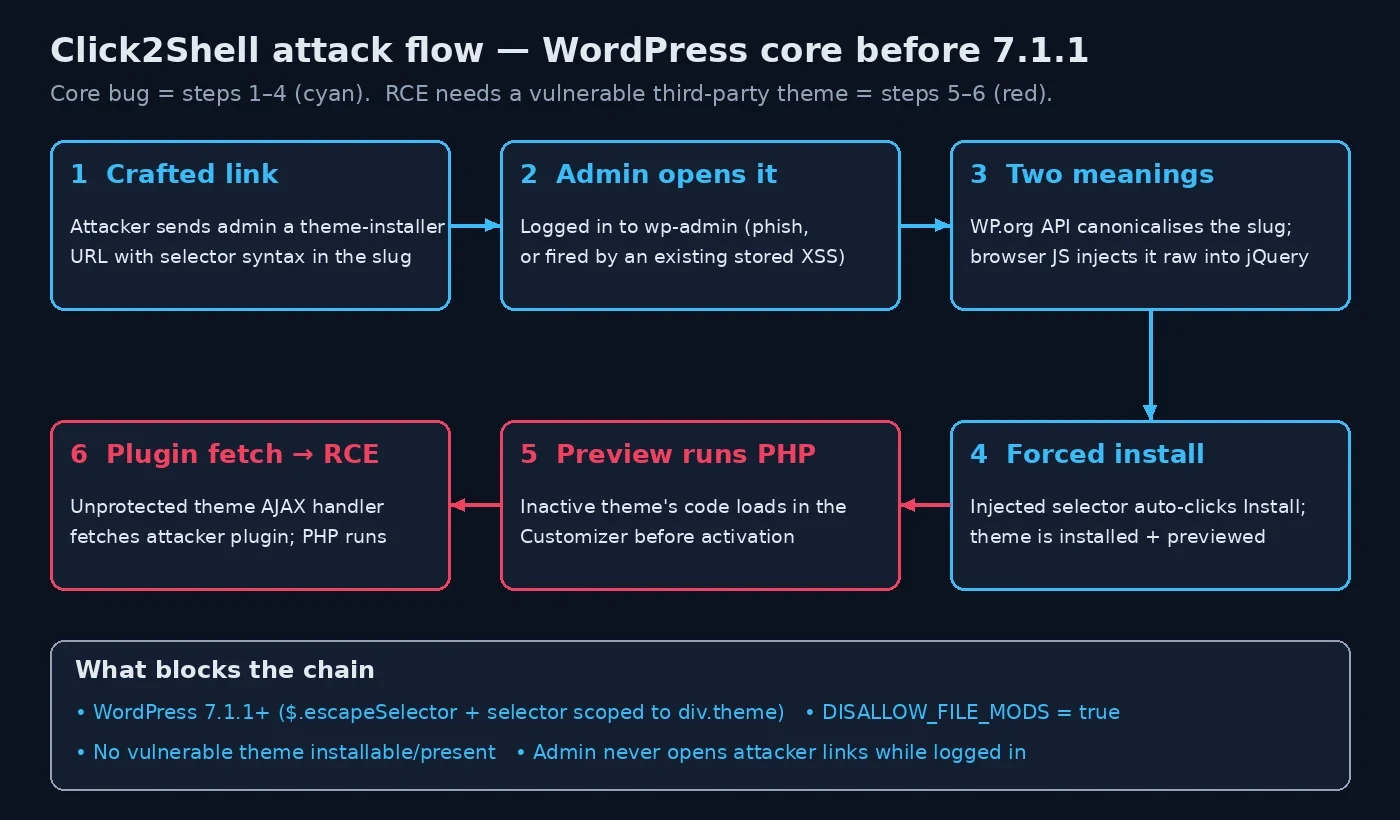
When an administrator opens the theme installer with a theme named in the URL, two things happen with that value:
The server side asks the WordPress.org themes API about it. The API canonicalises the value as a slug, stripping the characters it doesn't expect, and returns a perfectly legitimate theme from the official directory.
The browser side, the installer's JavaScript, took the original, un-canonicalised value and dropped it straight into a jQuery attribute selector used to find that theme's card and trigger a click on it.
Because the browser-side value was never escaped, an attacker could add quotes and CSS combinators to close the attribute selector early and point the "click" at a different element: the Install button. The admin's own session does the rest. No password prompt, no confirmation, the theme is downloaded and installed, and a preview can be opened.
According to pwn.ai's write-up, the fix in 7.1.1 does two things: it escapes the value with $.escapeSelector() before it reaches the selector, and it narrows the selector to theme cards only (div.theme[...]), so injected text can no longer escape into the rest of the page.
Why is a forced theme install dangerous?
On its own, installing a theme from the official directory sounds harmless. The theme is legitimate and it is not activated.
The problem is what "not activated" really means. When WordPress opens an inactive theme in the Customizer preview, it loads that theme's PHP. pwn.ai reported finding more than 40 third-party themes on WordPress.org with installer or helper code that runs before activation and exposes an unprotected AJAX handler accepting an external plugin URL. Its demonstration used the Mobile Repair Zone theme (version 2.5.4).
So the full chain is:
Force-install a known-vulnerable theme from the official catalogue.
Load it in the preview, which runs its PHP.
Hit the theme's unprotected handler to pull in an attacker-hosted plugin package.
That plugin's PHP runs on the server, remote code execution.
The core bug supplies steps 1 and 2. Steps 3 and 4 depend on third-party theme bugs, which is why scores for the chain vary.
What are the real exploit conditions?
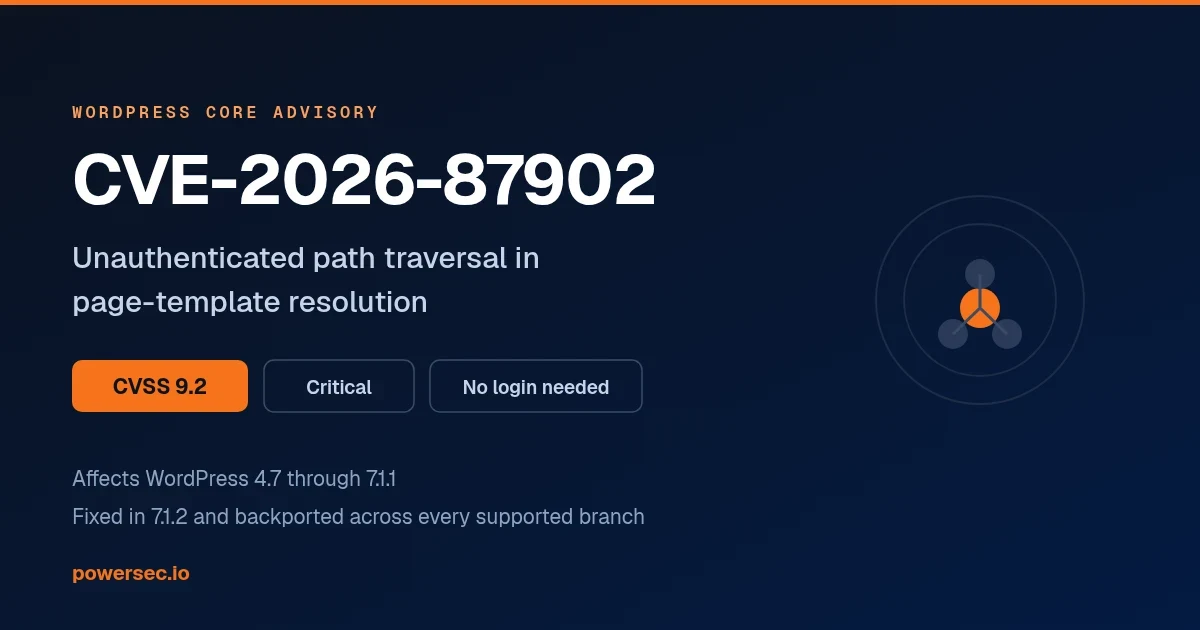
Being precise here matters, because this is not a drive-by, mass-exploitable flaw like CVE-2026-87902.
An administrator must open the link while logged in. This means targeted phishing, a link in a support ticket or comment the admin clicks, or, as Patchstack points out, an existing stored XSS on the site that fires the request automatically when an admin views the page.
Theme installation must be allowed. Sites with
DISALLOW_FILE_MODSset totrue(common on managed hosts and hardened builds) cannot be forced to install anything.RCE needs a second, vulnerable theme. Without one, the result is an unwanted, inactive theme on your site, an integrity problem, not a shell.
The attacker needs no account. The admin's session does the work.
Where the sources disagree
Affected versions. pwn.ai says all versions before 7.1.1; SecurityWeek says 4.7 through 7.1.0; The Hacker News says 6.0 onward. The practical answer is the same: if you are not on the latest release of your branch, update.
Chain severity. pwn.ai estimates 9.3 for the full chain; The Hacker News reports 9.6. Both agree the standalone forced install is 7.1.
Public PoC. SecurityWeek says pwn.ai published proof-of-concept code; The Hacker News says no public exploit code was mentioned. pwn.ai's post does publish the vulnerable line of code and a detailed description of the chain, which is enough for a capable attacker to rebuild it.
Click2Shell threat status as of 24 September 2026
In-the-wild exploitation: none reported by The Hacker News, SecurityWeek or Patchstack as of their coverage.
CISA KEV: not listed, and without a CVE identifier it cannot be.
Patch availability: fixed in 7.1.1 and every later release, including the 7.1.2 emergency release for CVE-2026-87902 on 22 September.
Bounty: WordPress paid pwn.ai its maximum bounty of $300, according to SecurityWeek and pwn.ai.
The good news is that most sites that support automatic background updates for minor releases will have received 7.1.1 and 7.1.2 without anyone touching them. The sites to worry about are the ones where core auto-updates are switched off, pinned by a host, or broken.
Is my site affected by Click2Shell?
Check three things.
1. Your core version. In wp-admin go to Dashboard → Updates, or run:
wp core version
wp core check-update
If you are on 7.1.1, 7.1.2 or the latest security release of your branch, the core bug is fixed.
2. Whether theme installs are allowed. Look for this line in wp-config.php:
grep -n "DISALLOW_FILE_MODS" wp-config.phpIf it is set to true, the forced install can't happen, though you should still update.
3. Whether core auto-updates are working. Many sites believe they are on auto-update when they are not.
wp config get WP_AUTO_UPDATE_CORE
wp config get AUTOMATIC_UPDATER_DISABLED
What you should do
Update WordPress core to 7.1.2 (or the latest release on your branch). This fixes Click2Shell and the far more urgent CVE-2026-87902.
Delete themes you don't use. An inactive theme still runs PHP when it's previewed, and it still ships its own bugs. Keep your active theme and one default fallback.
Set `DISALLOW_FILE_MODS` to `true` on production sites where you deploy code another way. It removes the installer from the attack surface entirely.
Treat admin sessions as sensitive. Don't browse untrusted links in the same browser profile where you're logged in to wp-admin, and keep admin accounts to the people who need them.
Fix stored XSS promptly. Click2Shell is a good example of why "only admin-visible" XSS still matters: it can deliver the click for the attacker.
Were you targeted by Click2Shell?
The attack leaves a trail: an admin request carrying a strange theme value, followed by a theme you didn't install.
In the logs
Look for requests to the theme installer or Customizer where the theme value contains quotes, brackets or other selector syntax (Patchstack highlights characters like "]>), raw or URL-encoded:
grep -E "theme-install\.php|customize\.php" /var/log/nginx/access.log* \
  | grep -Ei "theme=[^ &]*(%22|%27|%5B|%5D|%3E|%2C|\"|'|\]|>)"
Adjust the log path for Apache or your host. A hit is not proof of an attack, but it is worth reading in context: which admin IP, what referrer, and what happened right after.
On the site
Look for themes and plugins that arrived recently and that nobody remembers adding:
# Themes installed or changed in the last 30 days
find wp-content/themes -maxdepth 1 -mindepth 1 -type d -mtime -30 -ls

# Inactive themes (these are the ones a forced install leaves behind)
wp theme list --status=inactive --fields=name,version,update

# Plugins installed or changed in the last 30 days, and any you don't recognise
find wp-content/plugins -maxdepth 1 -mindepth 1 -type d -mtime -30 -ls
wp plugin list --fields=name,status,version

# Confirm core files match the official release
wp core verify-checksums
If you find an unexpected theme, check it against pwn.ai's research, which names Mobile Repair Zone as the demo, and look for an unexplained plugin installed around the same time. An unknown plugin next to an unknown theme is a strong sign the chain completed. At that point treat the site as compromised and work from a known-good backup rather than cleaning in place.
We are deliberately not reproducing the crafted link here. pwn.ai's write-up explains the mechanics well; a copy-paste payload helps nobody defend a site.
Where PowerSEC fits
Updating WordPress is the fix. PowerSEC detects, monitors and helps you recover; it does not replace the core patch.
The vulnerability scanner runs on every plan, including Free, and matches the core, plugin and theme versions your sites actually report, so a site stuck on an old core release shows up in a list instead of being guessed at. On Pro, issues known to be actively exploited are sorted to the top, this week that means CVE-2026-87902 before Click2Shell. Across a fleet, bulk updates push core and theme updates from one place.
For the "were you targeted" question, file integrity monitoring flags a theme or plugin directory that appeared without a deploy, and whole-site malware and webshell scanning looks for what an attacker would leave behind.
If you just want a quick first look, the free WordPress security scan is a passive, external check. It does not yet cover every vulnerability, and exact version matching happens after you connect the site. If you think a site was already compromised, get help here, the free assessment is the right first step.
Bottom line
Click2Shell is a real core bug with a narrow path to code execution: an admin has to open a link, theme installs have to be allowed, and the attacker needs one of the vulnerable themes in the official directory. That combination makes it a targeted-attack tool, not a mass-exploitation one, and nobody has reported it used in the wild.
But the fix is free and already shipped. Update to 7.1.2, remove themes you don't use, and turn off in-dashboard installs where you can. Then spend your remaining attention on CVE-2026-87902, which is being exploited.
Sources
pwn.ai, Click2Shell: WordPress theme-preview RCE (18 Sept 2026)
WordPress.org, WordPress 7.1.1 Maintenance and Security Release (17 Sept 2026)
Patchstack, Click2Shell: the RCE WordPress 7.1.1 just patched (18 Sept 2026)
The Hacker News, New WordPress Click2Shell flaw forces theme installs (Sept 2026)
SecurityWeek, WordPress patches Click2Shell vulnerability (22 Sept 2026)
Checked on 24 September 2026: Click2Shell has no CVE in the reports we reviewed and is therefore not in CISA's Known Exploited Vulnerabilities catalogue; no in-the-wild exploitation has been reported. We will update this post if that changes.