WordPress hacked? Restoring a backup may help recover the site, but the first decision is what you are prepared to overwrite. The current installation can contain both evidence of compromise and legitimate changes your business still needs. A restore plan has to account for both.
This guide focuses on the decisions before recovery: preserving evidence, choosing a restore point, identifying the data gap and testing the result. It is intended for site owners and agencies coordinating an incident. Documentation and PowerSEC capabilities were checked on 14 November 2026; this is not a report of a newly discovered attack.

Decide what must survive before replacing the current site state.
The short version
Decision | What to establish before restoring |
|---|---|
Incident scope | Which systems and access paths are being investigated? |
Evidence | Where is the protected copy of the current state? |
Recovery point | Why is this backup a credible candidate? |
Data gap | What legitimate activity occurred after that backup? |
Restore scope | Are files, database or both being replaced? |
Acceptance | Who verifies the recovered site and authorizes reopening? |
Do not confuse a backup's existence with proof that it predates the compromise. Record what is known, what is inferred and what still needs investigation.
WordPress hacked: Is a full restore the right next step?
Begin with a recovery objective. A brochure site, a subscription store and a membership service have different consequences when data is rolled back. Ask the business owner which functions must return first and which recent changes cannot be discarded without reconciliation.
WordPress describes a complete backup in terms of both the database and site files. That distinction matters during recovery. Replacing code and replacing business records are different operations, even when a product presents them behind one restore interface.
A full restore is a candidate action, not an automatic answer. The responder may instead recommend replacing affected code while preserving verified current records, or rebuilding in a clean environment. Ask for the reason behind the chosen scope and the evidence that supports it. Avoid a partial repair based solely on the location of the first visible symptom.
Put the decision in writing: recovery target, proposed restore scope, expected data loss and unresolved incident questions. This keeps technical urgency from silently becoming a business decision nobody approved.
Preserve the current state and the access record
Before overwriting the installation, ask your host or responder to retain the material needed for investigation and reconciliation. Keep the evidence copy private and clearly labeled as potentially compromised. It should not be confused with a trusted recovery source.
Document available access to the host, WordPress admin, backup provider and relevant integrations. Record who will perform the recovery and who can authorize changes. Keep secrets in the team's approved credential system, not in the incident document.
Save the observations that triggered the incident: affected URLs, scanner reports, timestamps and prior remediation attempts. WordPress's hacked-site guidance recommends documenting the problem and working with the host. A concise chronology helps the next responder avoid repeating interventions whose effects are no longer clear.
Also preserve legitimate recent changes where feasible. Content edits, form submissions and customer activity deserve an explicit decision. "We restored successfully" is not an adequate explanation if nobody checked what the rollback removed.
How do you choose a credible restore point?
List the available backups and compare their dates with the earliest reliable evidence. Treat the date of discovery separately from the date of compromise. A backup created before the first warning may still require investigation.
Ask how the candidate was assessed. Useful answers describe inspected artifacts, relevant scan results, known changes and the limitations of the review. A reassuring filename or a successful upload notification is not an assessment of content.
Check that all required parts of the backup set are available and that the restoration procedure supports the intended scope. WordPress's backup documentation distinguishes the database from files; a file archive alone should not be mistaken for the complete site state.
Keep a rejected-candidate note as well as the selected candidate. If the chosen point fails a later check, the team should know why another point was excluded instead of restarting the selection process from memory.
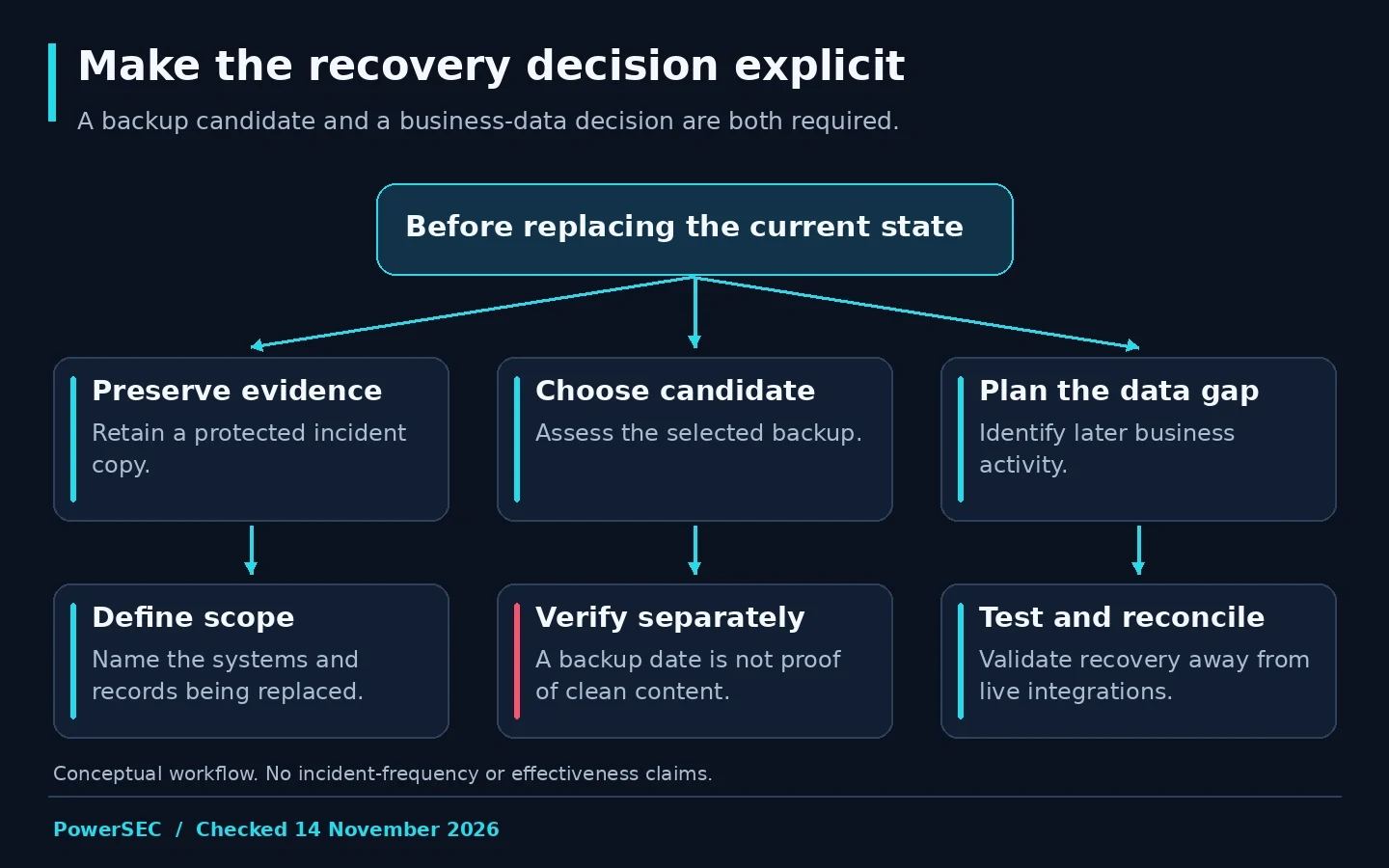
A recovery candidate needs both technical checks and a plan for the data it would replace.
Account for orders and other changing data
For a transactional site, define the gap between the backup and the intended recovery moment. Ask the business team which systems hold independent records that can help reconcile activity. Do not assume that an export of visible orders captures every relationship an extension needs.
WooCommerce's Subscriptions recovery documentation explicitly warns that a rollback can lose orders, customer information, payment tokens and subscription records created during that gap. It also describes the risk of previously processed renewals returning to a pending state. These are reasons to involve someone who understands the store's payment and scheduling behavior.
Our suggested reconciliation worksheet separates record type, authoritative source, responsible person and completion evidence. For example, the payments lead can reconcile gateway records while the store operator verifies order status. Those are assigned tasks, not instructions to copy sensitive payment data into a shared spreadsheet.
Record group | Question for the recovery team |
|---|---|
Orders and customers | Which legitimate records would the restore remove? |
Payments and renewals | Which actions have already occurred outside WordPress? |
Inventory and fulfillment | Which external systems need reconciliation? |
Content and configuration | Which approved changes should be reapplied? |
Integrations | Which connections must remain paused during testing? |
Do not improvise direct database changes from a generic article. Ask for a store-specific reconciliation procedure and a record of its outcome.
Test recovery away from live business activity
Use an isolated recovery environment when feasible. Agree how access, outbound email, payment actions and integrations will be controlled before bringing a restored copy online. A test should not silently become another production system.
Ask the team to verify more than the homepage. The acceptance list should reflect the site's purpose: administrator access, content and media, customer-facing forms, search, checkout where applicable and the integrations that matter to the business. Use approved test accounts and payment test facilities rather than live customer credentials.
Record observed outcomes, not a general "looks fine." If a form submits, establish where its test message went. If a protected page opens, establish which role accessed it. If a recovery test fails, retain the error and the attempted scope so the next change addresses the failure rather than hiding it.
This test demonstrates the behavior examined in that environment. It does not by itself establish that the original entry point has been removed. Keep recovery validation and incident remediation as separate work items with separate evidence.
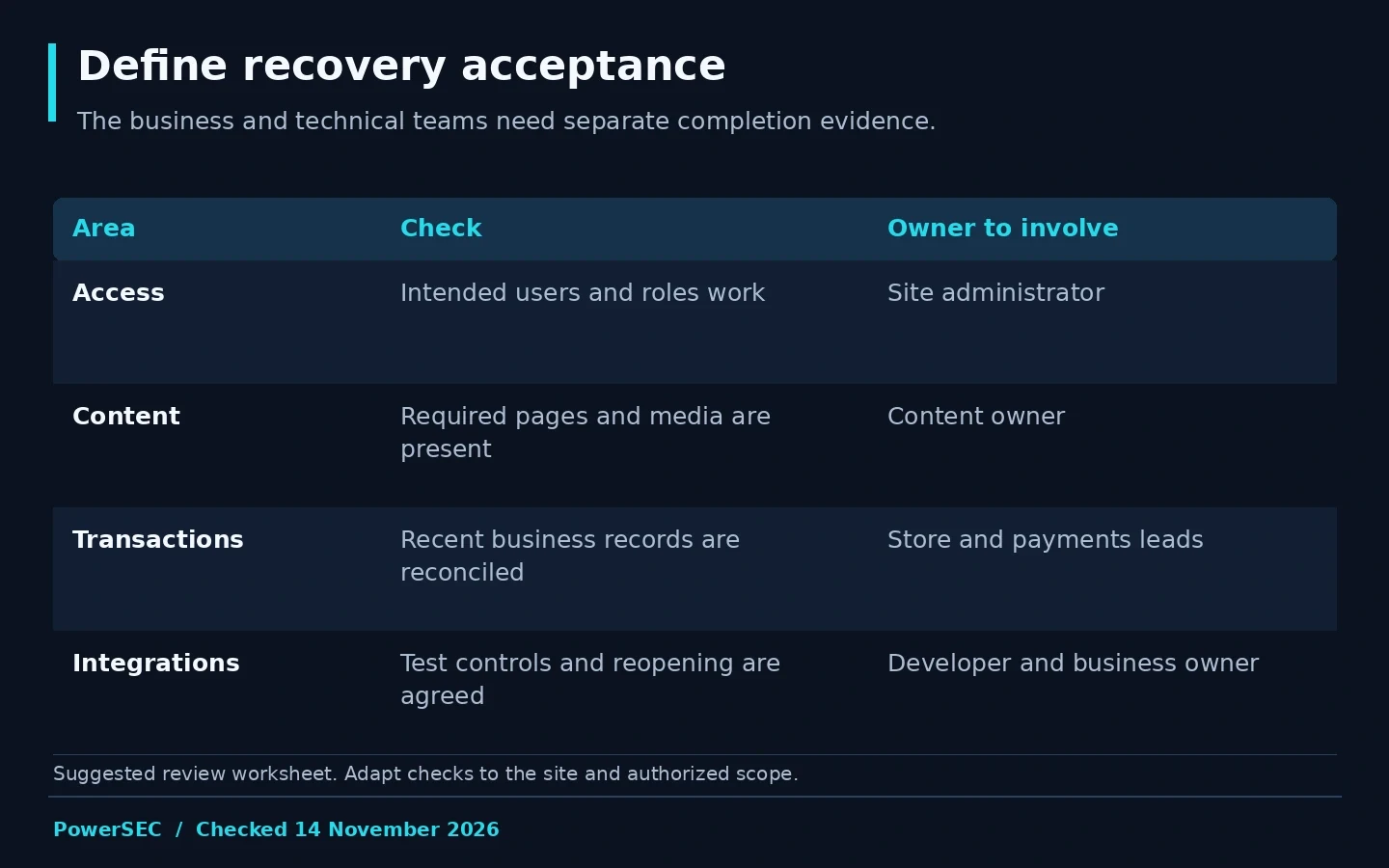
Technical restoration and business reconciliation need their own acceptance evidence.
What needs to happen before reopening?
Apply the vendor updates and access corrections identified by the incident investigation. The vendor update is the fix for the vulnerability it addresses. Restoring an older installation without addressing the identified cause does not complete that remediation.
Agree on the transition from recovery to production. Name the person who authorizes reopening and the person who monitors the result. Document any customer-facing limitations that remain, rather than assuming a restored homepage means every service is available.
Keep the rollback decision explicit. If the restored environment fails acceptance checks, the team needs a controlled next step and preserved current evidence. Do not repeatedly overwrite live data while trying different backups without a record of what each attempt changes.
Where PowerSEC fits
If you are unsure which backup to trust or what a restore would overwrite, request PowerSEC recovery help before proceeding. Share the backup inventory, incident timeline and the business records that must be preserved. Scope and timing depend on the site and available access.
PowerSEC's restore safety checks include required artifact availability, checksum checks and a current-state checkpoint before destructive steps. Its readiness view is metadata-based, not a completed restore test. Backup Only, Pro Protection, Pro + Backup Plus and Agency provide cloud backup capabilities with different limits. None of those labels makes a compromised backup clean.
Bottom line
The right recovery question is not simply whether a backup can be restored. Ask whether it is a credible candidate, what legitimate data the operation replaces, and how the result will be verified. A documented recovery decision gives the business a safer path back than a rushed overwrite.
Sources
Primary sources checked on 14 November 2026: