WordPress malware removal cost is difficult to compare because the quoted products often buy different things. A one-time cleanup, a malware review and a year of managed incident response are separate services. The cheapest displayed number may not include the work your site needs, while a larger annual price may include continuing protection you already purchase elsewhere.
This guide compares documented offers and gives you a practical way to request a useful quote. Prices and scope were checked on 14 November 2026. Figures below are displayed USD prices, not a market average, a negotiated quote or a benchmark of cleanup quality.

Compare the work, billing period and acceptance criteria before comparing the total.
The short version
What you are buying | What to clarify |
|---|---|
Assessment or review | Does it identify problems, or include remediation? |
One-time cleanup | Which site components and incident tasks are included? |
Annual managed service | What is the commitment, renewal price and response coverage? |
Emergency assistance | Is the promised time an initial reply or completed recovery? |
Recovery help | Is a usable backup required, and who reconciles recent data? |
Ask for the scope in writing. A service name alone does not establish whether the provider will investigate unauthorized access, repair business functions or help address search-engine warnings.
WordPress malware removal cost: What do current offers show?
The table compares selected public offers rather than pretending they are equivalent. Follow the linked vendor page for eligibility and terms before purchasing. Taxes, options and the actual incident scope can change the checkout or quoted amount.
Provider and offer | Displayed price | Billing and documented scope |
|---|---|---|
From $199 | One-time service; request the incident-specific scope | |
From $399 | One-time service; initial response within 4 business hours, US Eastern Time | |
$229/year | One site; manual cleanup and ongoing platform features | |
$299/year | One site; cleanup and a post-cleanup report, with continuing protection | |
$590/year | One site; managed security and incident response | |
$1,250/year | One site; premium incident-response coverage |
PowerSEC also lists a basic malware review from $99. That is a review and written report, not the malware cleanup offer. Keep that distinction when budgeting. Similarly, MalCare's Protect plan explicitly excludes cleanup, so it is not a substitute for Repair when removal is the immediate requirement.
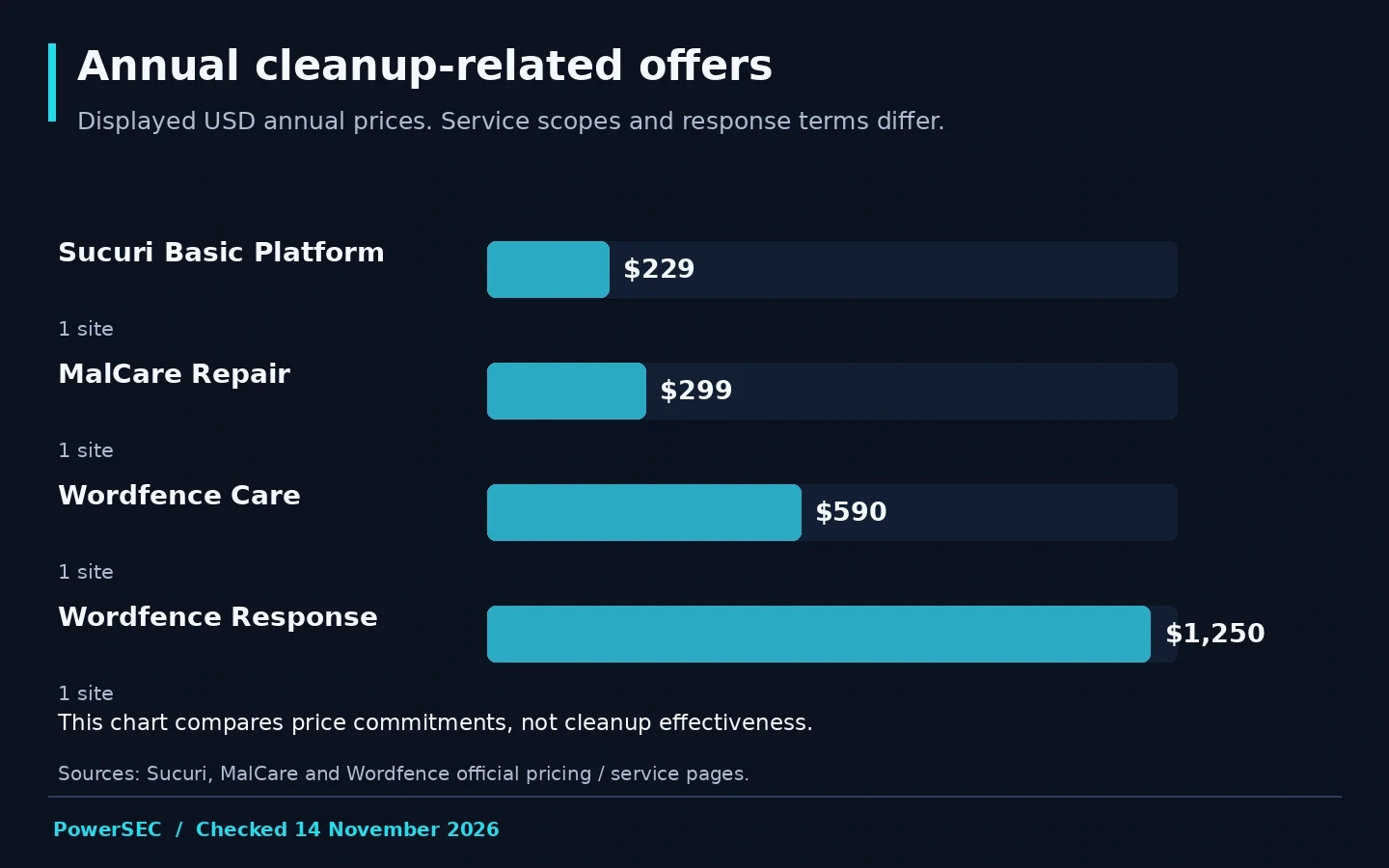
Annual list prices checked on 14 November 2026: Sucuri $229, MalCare $299, Wordfence Care $590 and Response $1,250. Different service scopes; this is not an effectiveness ranking. Sources: the linked vendor pages above.
What belongs in a useful cleanup scope?
Our recommended quote request separates investigation, remediation and verification. Ask what each includes rather than assuming the word "cleanup" covers them all.
For investigation, ask which parts of the installation will be reviewed and which access paths are in scope. For remediation, ask how suspicious files, database changes and unauthorized accounts will be handled if found. For verification, ask what the provider will retest and what evidence you will receive.
Include the business symptom in the request. A shop with broken checkout needs a different acceptance conversation from a brochure site displaying unwanted links. Tell the provider about failed earlier cleanups, unavailable admin access, hosting suspension and custom code. These are scope questions, not reasons to guess a price multiplier.
Ask what is excluded. Hosting-account investigation, neighboring websites, bespoke application repair and search-review assistance may require separate work. A clear exclusion is more useful than a vague promise that everything is covered.
The deliverable should describe actions taken and remaining uncertainty. You are buying a documented intervention, not just the disappearance of a scanner alert.
Does a faster response mean faster resolution?
No. Read the exact service wording. Sucuri's pricing page describes ticket response timing as an estimate and notes that resolution varies with complexity and queue volume. Do not turn the response figure into a guaranteed time for a repaired site.
Wordfence Response advertises a one-hour response around the clock and a separate remediation commitment. Those are vendor terms for that service, not a general promise that every incident can be resolved in the same way. Review access requirements and the current terms with the provider.
PowerSEC's incident-help page states that response and cleanup depend on access, site size and severity. Its emergency offer's business-hour wording should not be represented as round-the-clock coverage.
For your quote, ask when the response clock starts, how business hours are defined, and what happens while access is missing. Also ask who communicates during the incident. A technically strong service can still be a poor fit if its availability does not match your store's operating needs.
Which costs should your team budget separately?
Separate the provider's fee from internal recovery work. We recommend listing staff coordination, customer communication, restoration testing and data reconciliation as tasks with owners. Do not assign invented average costs to them; use your own workload and contracts.
Ask whether replacing a paid extension requires an active vendor license. Ask who can obtain the trusted package and whether custom changes need developer review. If the provider discovers a hosting or integration problem outside the agreed scope, establish how additional work is approved.
Be explicit about recurring fees. An annual plan may be attractive if you want ongoing response and monitoring. A one-time service may fit when you already have a maintenance arrangement and need a defined incident intervention. Compare the renewal commitment, not an annual price divided into a misleading monthly checkout figure.
For agencies, identify who pays the service provider and who explains the work to the client. A cleanup fee and an agency's own coordination time should not appear as unexplained additions after the incident closes.
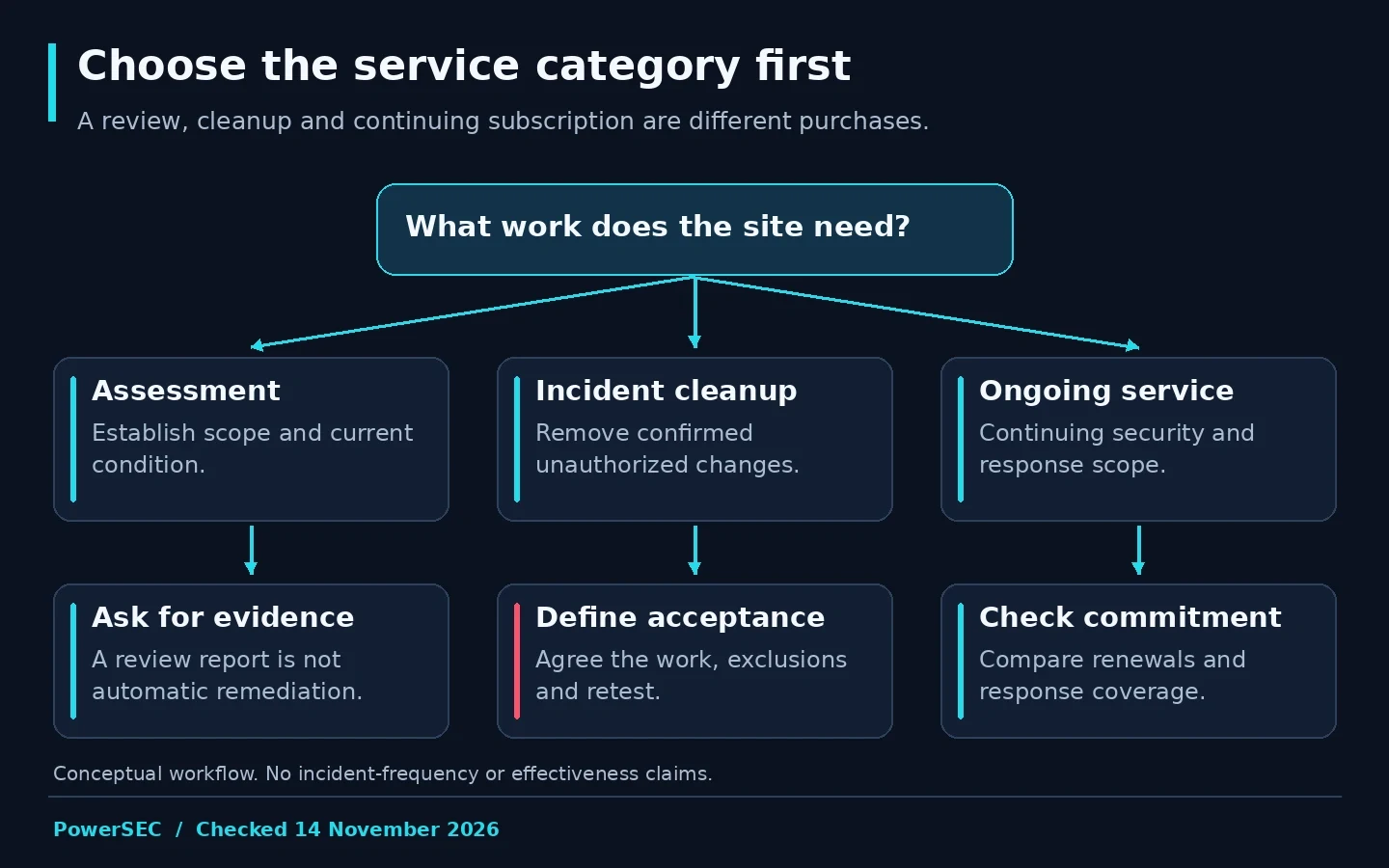
Choose the service category first, then compare providers within the scope you need.
What questions should you send before paying?
Use the following procurement checklist as a starting point. It is our recommended request, not a claim that a particular vendor omits these items.
Topic | Question to ask |
|---|---|
Current compromise | Does the offer cover a site already infected? |
Access | Which access is required, and how is it shared securely? |
Scope | Are files, database changes and unauthorized accounts reviewed? |
Root cause | Will suspected entry points and unresolved gaps be documented? |
Business recovery | Who checks forms, checkout and integrations? |
Deliverable | Will we receive a written action record and limitations? |
Recurrence | What follow-up is included, and under which conditions? |
Billing | What is one-time, recurring, optional or subject to a new quote? |
Include a redacted timeline and the visible symptom. Do not send passwords or customer data in the initial contact form. Ask the provider for its approved access process after the scope is understood.
How should you evaluate the finished work?
Agree on acceptance evidence before the work begins. The provider should explain what was examined, what was changed and which checks were performed. Your team should verify the business workflows it owns. A clean scanner result and a successful checkout test answer different questions.
Ask how identified vulnerable components will be updated. The vendor update is the fix for the affected flaw; a cleanup service's removal of unwanted code does not make an outdated component current. Establish who performs follow-up maintenance after the incident engagement ends.
Keep unresolved items visible. If a log was unavailable or an external account could not be reviewed, the final report should say so. This is useful information for your next decision, not a reason to demand an unsupported guarantee that the site can never be compromised again.
Where PowerSEC fits
Request a free PowerSEC assessment when you need to establish whether the next step is review, cleanup or recovery. The one-time service model can fit a site that needs a defined intervention without committing to an annual managed-cleanup subscription.
Use the current service and plan page to distinguish that work from ongoing software protection. Buying scanning or backups is not the same as commissioning incident cleanup. Confirm the scope, access needs and final price before authorizing the service that matches your situation.
Bottom line
Compare WordPress cleanup services by the work they promise and the evidence they return. Keep initial response separate from resolution, one-time fees separate from annual commitments, and cleanup separate from ongoing maintenance. A clear scope is a better buying signal than the smallest number on a pricing card.
Sources
Primary pricing and service pages checked on 14 November 2026: