WordPress Japanese keyword hack symptoms often reach the owner through search results: unfamiliar Japanese titles, shopping-related snippets or pages the business never created. The immediate goal is to establish what exists on the site and who still controls it. Hiding a search result is not the same operation as removing the compromise.
This guide separates site cleanup, Search Console ownership, URL handling and Google's review process. Google documentation and PowerSEC product information were checked on 14 November 2026. The language of the spam does not identify the attacker's nationality, and the symptom alone does not identify an entry-point vulnerability.

Investigate the site and its search ownership before treating the problem as an indexing task.
The short version
Workstream | Desired result |
|---|---|
Site investigation | Understand and remove confirmed unauthorized changes |
Access review | Confirm the people and integrations allowed to administer the site |
Search ownership | Remove unauthorized owners and their verification methods |
URL handling | Serve legitimate content or an appropriate removed-page response |
Google review | Follow the relevant report's review process after fixing the issue |
Follow-up | Monitor new observations and unresolved findings |
These tasks can overlap, but none should be marked complete merely because another one is finished. Keep an owner and evidence record for each.
What is a WordPress Japanese keyword hack?
Google's Japanese keyword hack guide describes unauthorized Japanese-language pages commonly associated with counterfeit-product spam. The guide also discusses cloaking and unauthorized Search Console ownership. Those are documented characteristics of this hack type, not proof that every affected WordPress site has the same implementation.
Start by preserving the actual URLs and snippets reported for your domain. Record the discovery time and whether the page exists when inspected in a controlled environment. Do not visit the advertised products or interact with suspicious destinations to prove the spam is real.
If the site's own administrator sees an error page while search results show content, keep both observations. Do not conclude that nothing exists solely from the administrator's view. Conversely, an old snippet is not enough to establish that the current origin still serves that content. Establish which observation is current and what it actually measures.
This is an incident to investigate, not a reason to add arbitrary Japanese-language blocking. Legitimate multilingual visitors and content should not be treated as indicators of compromise.
Separate site state from search state
Maintain distinct records for the page currently served by the site, Google's stored view and any security or manual-action report. URL Inspection provides indexing information and a live-test option; those views answer different questions and can reflect different moments.
Google's Security Issues report explains that its example URLs are samples. Use them to begin the investigation, not as the complete cleanup boundary. Ask the responder how the rest of the installation will be reviewed.
Create a private URL worksheet with the path, source of discovery, current observation and planned disposition. Separate confirmed spam from legitimate pages that have been altered. That distinction helps prevent a hurried cleanup from removing valuable original content.
Do not publish a clickable directory of malicious destinations as evidence. Redacted examples and a restricted internal record are sufficient for coordination. Keep customer identifiers and sensitive query parameters out of public incident notes.
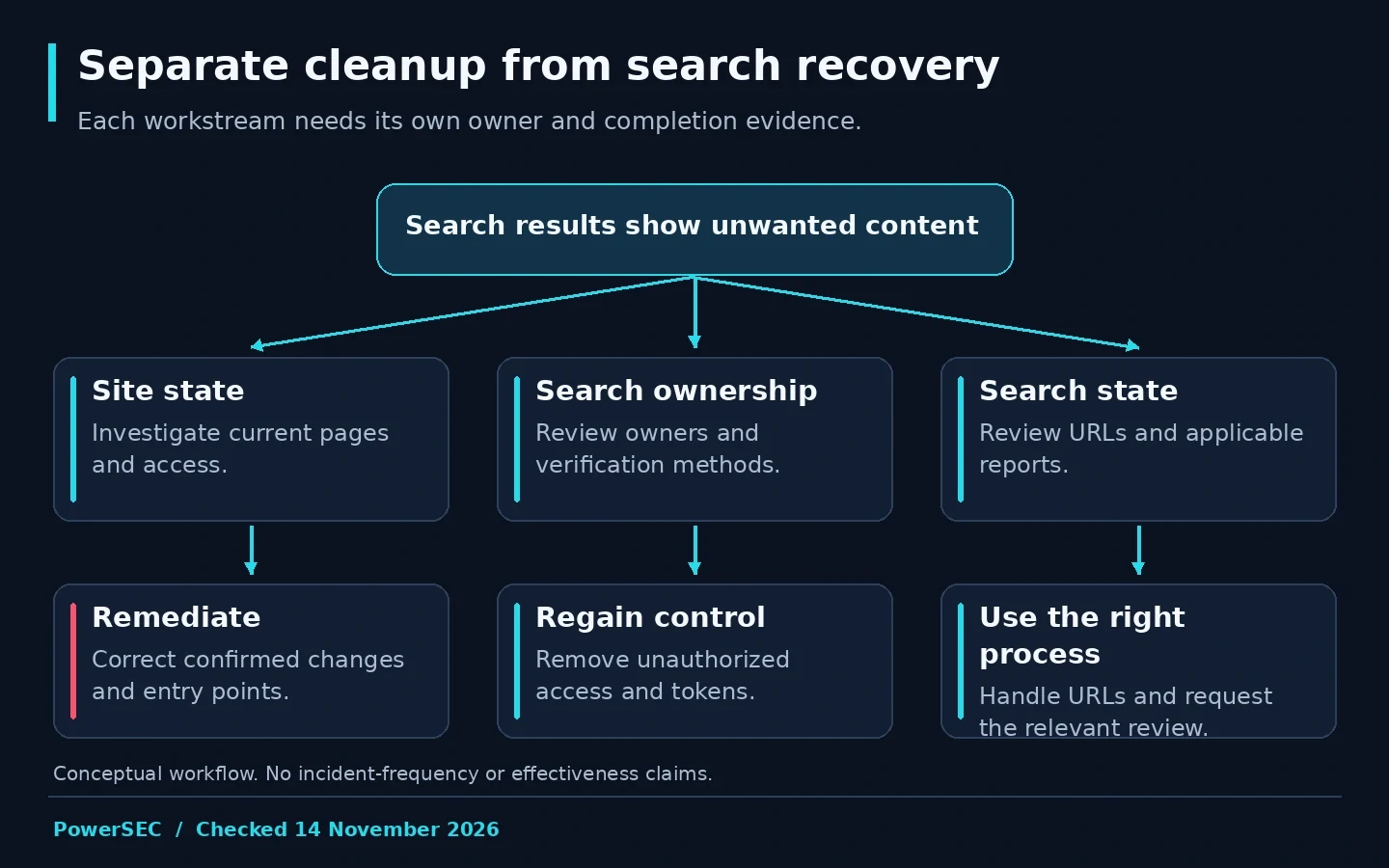
Site remediation, access control and search recovery require different evidence.
Who controls your Search Console property?
Review Search Console's Users and permissions settings. Google's ownership documentation distinguishes verified owners from delegated access and explains the importance of verification tokens. Removing a visible user entry may not settle ownership if an unauthorized verification method remains available.
Ask the person responsible for the domain, hosting and Search Console to review the relevant verification methods. Record legitimate owners before making changes. A shared agency account or hosting integration may need investigation rather than immediate removal.
Coordinate this with the site's broader access review. A search-property permission change does not review WordPress administrators, hosting credentials or integrations. Assign those checks to the appropriate owners instead of treating Search Console as the entire access boundary.
Keep a short completion record: who reviewed the property, which access was confirmed, which unwanted method was removed and what could not be checked. Do not put the verification token itself in a public report. The record should demonstrate the review without distributing the mechanism used to control the property.
Clean the site before requesting search recovery
Ask an authorized responder to assess the underlying installation and remove confirmed unauthorized changes. Preserve evidence and document the action taken on each affected component. A list of unwanted URLs is helpful, but it does not explain how those pages were created or whether access remains.
Use trusted vendor updates for identified vulnerable components and correct confirmed access or configuration problems. Do not describe updating a plugin as proof that the earlier incident has been cleaned. Those are related but separate tasks.
If a scanner reports suspicious files, review the findings in context. PowerSEC's malware scanning documentation explicitly treats detections as review signals and does not automatically delete files. The same caution should guide the human workflow: an unfamiliar filename alone is not enough to justify destructive changes.
Before moving to the search-review stage, retest the reported symptom and examine the responder's scope and limitations. Ask what remains unresolved. A clean homepage screenshot is weak evidence for an incident involving generated pages elsewhere on the site.
Should you remove the URLs from Google?
Google's Removals tool can temporarily hide eligible results, but it does not delete the source content from the website or remove it from other search engines. Use it for the specific purpose it serves, alongside the underlying remediation.
For a spam URL that should no longer exist, ask the developer to return an appropriate response. Google's HTTP status documentation explains how responses such as 404 and 410 affect indexing. For a legitimate page that was altered, restore the intended content rather than treating it as disposable spam.
Avoid a blanket action that hides the whole site when the problem is a set of unwanted paths. Check the scope of a removal request before submission. Keep the chosen URL treatment in the incident worksheet so search recovery and engineering work remain aligned.
Do not redirect every unwanted path to the homepage merely to make an error disappear. Choose behavior based on what the URL represents and the site's legitimate content. If the correct treatment is unclear, ask the SEO and development owners to agree before applying a broad rule.
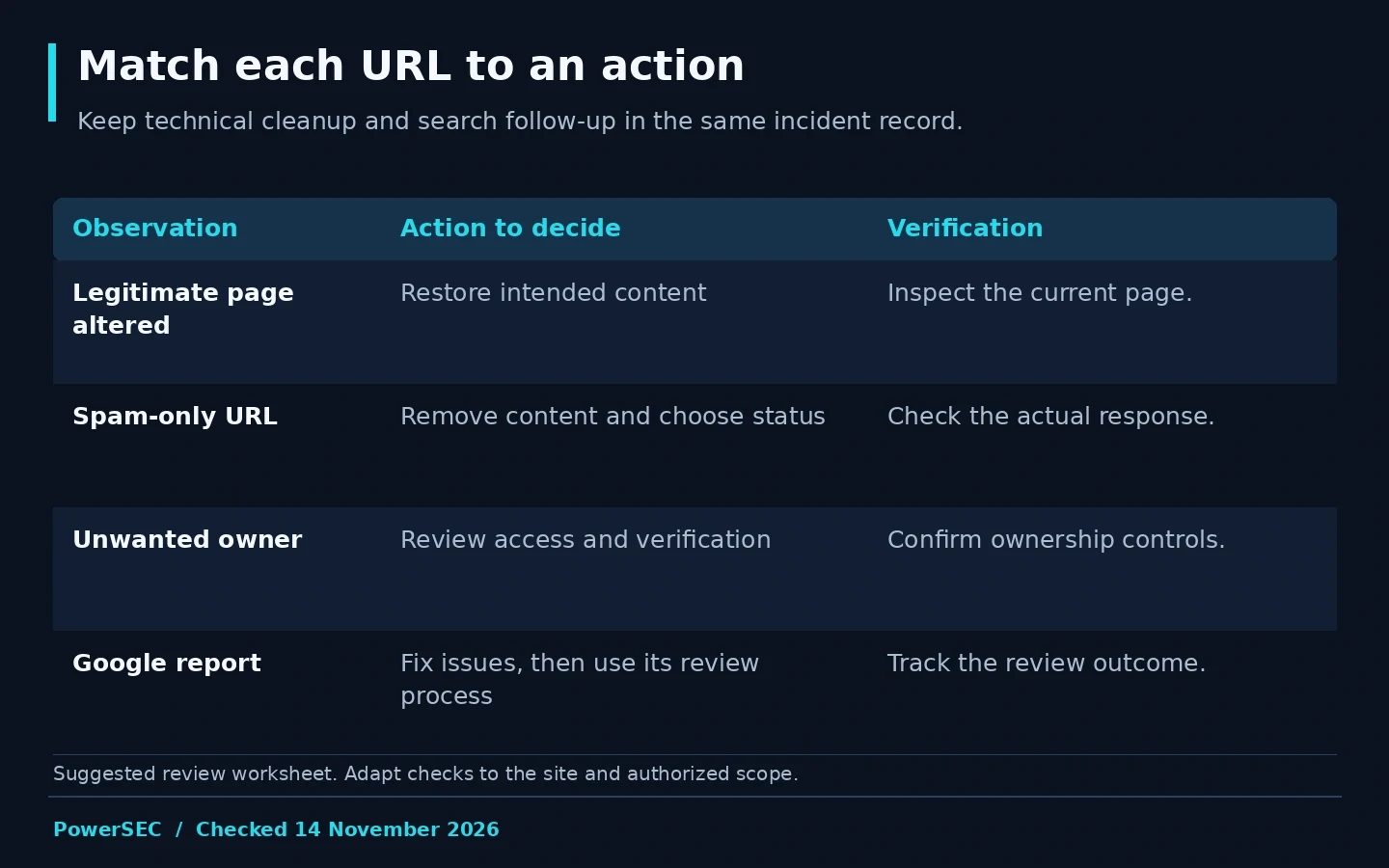
Match each affected URL to a documented action, then use the appropriate review process.
Which review should you request?
Use the report that actually describes the problem. Google's Security Issues guidance describes requesting a review after addressing the listed security problems. Explain the work performed and how you checked it. A submitted request is not the same as a completed review.
The Manual Actions report has its own reconsideration process. Do not assume a security warning, a manual action and an indexing issue are interchangeable. Read the property reports and document which process applies.
Avoid promising the client a fixed date for rankings or snippets to return. This guide has no basis for an exact recovery timeline or traffic guarantee. Track the actual review outcome and subsequent observations instead of measuring success by the moment a request was submitted.
Keep a follow-up owner after the immediate incident. That person should check for new examples, investigate recurring symptoms and retain a concise record of changes. Search recovery is easier to assess when the technical remediation and review dates are documented clearly.
Where PowerSEC fits
Request a PowerSEC assessment if you need help connecting search spam to a site-level investigation. Include affected URLs, current Search Console findings and previous cleanup attempts. The useful engagement is one that establishes scope and evidence, not merely removes a visible snippet.
The free security scan can add an external observation. It cannot inspect every server-side file or replace Search Console ownership review. PowerSEC's site scanning can support the broader investigation, while the vendor update remains the fix for an identified vulnerable component.
Bottom line
Treat Japanese keyword spam as connected site, access and search work. Establish what is currently served, review ownership, correct the compromise and apply the appropriate URL and review process. The goal is a documented recovery that preserves legitimate content and leaves fewer unanswered questions.
Sources
Primary sources checked on 14 November 2026: